Introduction
Picture this: your production schedule looks perfect at 8 AM. By 10 AM, a CNC mill throws an alarm, a rush order lands on your desk, and your material supplier calls with a delay. Suddenly, that carefully planned spreadsheet is worthless. This scenario plays out daily in manufacturing shops across North America, and it's costing the industry dearly. Fortune Global 500 manufacturers lose approximately 11% of their annual turnover to unplanned downtime—nearly $1.5 trillion annually. In automotive alone, a single lost hour now costs over $2 million.
The root problem? 82% of manufacturers still rely on spreadsheets or manual methods for production scheduling. These static tools can't respond when reality diverges from the plan.
This article covers the shift to dynamic, data-driven production scheduling software: the top five tools, critical features to evaluate, and how to select the right fit for your shop. We'll also explain why real-time machine data — the layer that keeps any scheduling tool grounded in what's actually happening on the floor — determines whether your schedule holds or falls apart.
Key Takeaways
- Production scheduling software replaces static spreadsheets with dynamic plans that adapt in real time
- The best tools integrate with ERP systems and pull live machine availability, material status, and capacity data
- Top solutions range from enterprise platforms (Siemens Opcenter, PlanetTogether) to SMB-focused tools (Katana MRP, Epicor Kinetic)
- Choose based on shop size, ERP compatibility, and whether you need finite capacity scheduling or scenario simulation
- Real-time machine data is the foundation—without it, schedules stay disconnected from shop floor reality
What Is Production Scheduling and Why Does It Matter in Manufacturing
Production scheduling is the process of sequencing and timing manufacturing jobs across available machines, labor, and materials to meet delivery commitments. Accuracy here directly impacts on-time delivery, throughput, and cost. When schedules align with reality, shops ship on time, maximize machine utilization, and avoid costly rush fees or overtime.
The core challenge? Most shops still rely on spreadsheets or basic ERP modules that cannot dynamically respond to disruptions. Common failure points include:
- Unplanned machine downtime that invalidates the entire schedule
- Material shortages discovered only after a job has started
- Urgent orders inserted without recalculating downstream impact
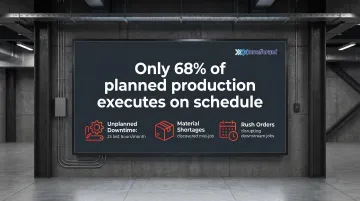
Industry data shows that only 68% of planned production is actually executed on schedule, highlighting the gap between plan and reality. This disconnect costs manufacturers an average of 25 hours of production every month due to unplanned downtime alone.
Modern scheduling tools work best when connected to a real-time machine data layer. IIoT-enabled machine monitoring platforms (such as Excellerant's IIoT Platform) feed live availability, utilization, and job status data into scheduling systems. Schedules can then update automatically when a machine goes down or a job runs long — rather than waiting for a planner to manually intervene.
Without this data layer, even the most sophisticated scheduling software is working from yesterday's numbers.
Top Production Scheduling Tools for Manufacturing Efficiency
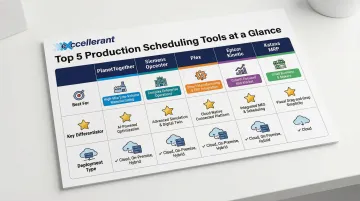
The five tools below cover the full manufacturing spectrum—from enterprise-grade APS platforms built for multi-site complexity, down to lean cloud tools for growing job shops. Each was evaluated on scheduling capability, ERP and machine integration depth, and real-world fit for manufacturing environments.
PlanetTogether
PlanetTogether is a dedicated Advanced Planning and Scheduling (APS) platform with deep ERP integration across SAP, Oracle, Microsoft Dynamics, and Infor. Mid-to-large discrete and process manufacturers turn to it when spreadsheet-based scheduling breaks down under production complexity.
What sets it apart is constraint-based scheduling combined with "what-if" scenario simulation. Planners can model the impact of prioritizing one customer order over another—or simulate a machine going offline—before committing to a plan. That capability directly reduces risk in high-mix, high-complexity environments.
| Category | Details |
|---|---|
| Best For | Mid-to-large manufacturers needing multi-constraint optimization and ERP-connected scheduling |
| Key Features | Finite capacity scheduling, drag-and-drop Gantt, ERP bi-directional sync, scenario modeling |
| Deployment | Cloud and on-premise; integrates with major ERP platforms |
Proven outcomes:
- A medical device manufacturer achieved a 15% reduction in inventory overhead and 20% reduction in overtime labor costs within 60 days
- A truck equipment manufacturer reduced scheduling time from hours to 15 minutes, with ROI in six months
- A snack manufacturer realized a 25% increase in production output and 30% reduction in changeover times
Siemens Opcenter (formerly Preactor)
Siemens Opcenter is an enterprise-grade APS and MES scheduling platform, formerly known as Preactor. Aerospace, automotive, and defense manufacturers rely on it where regulatory compliance and multi-resource constraints are non-negotiable.
Opcenter stands out for its deep configurability across complex constraint environments—tooling constraints, labor skill requirements, energy limits, and multi-site scheduling—all backed by the Siemens industrial technology ecosystem. It integrates tightly with Siemens MES for closed-loop execution feedback.
| Category | Details |
|---|---|
| Best For | Large enterprises and regulated industries (aerospace, defense, medical) with complex multi-resource constraints |
| Key Features | Advanced constraint-based sequencing, multi-site scheduling, MES integration, simulation and KPI dashboards |
| Deployment | On-premise and cloud; part of the broader Siemens Xcelerator portfolio |
Proven outcomes:
- Sumida Lehesten improved on-time delivery reliability to 96-98% by integrating Opcenter APS with their ERP
- Applied Composites reduced scheduling time from hours to minutes and nearly doubled scheduled operations
- Natural One reduced production planning from three days to two hours
Plex (Rockwell Automation)
Plex is a cloud-native Smart Manufacturing Platform by Rockwell Automation that includes built-in production scheduling tightly integrated with its ERP, quality, and supply chain modules. It's a strong choice for manufacturers replacing legacy ERPs or seeking a unified platform.
Because Plex manages inventory, shipping, and quality natively alongside scheduling, the production plan stays continuously synchronized with real supply chain conditions—no manual data reconciliation needed. That "single version of the truth" eliminates the data silos that plague multi-system environments.
| Category | Details |
|---|---|
| Best For | Manufacturers seeking a fully integrated cloud ERP and scheduling platform with native shop floor connectivity |
| Key Features | Native ERP-scheduling integration, real-time inventory sync, quality and traceability, supply chain visibility |
| Deployment | Cloud-native SaaS; scalable for mid-to-large manufacturers |
Proven outcomes:
- Eurotranciatura Mexico improved on-time delivery to nearly 100% and inventory accuracy from 85% to 99%
- Accuride Corporation improved supply chain productivity by 10% and reduced hardware requisition time from days to 30 minutes
- G&W Products increased on-time delivery from mid-80% to 98% and achieved a 25% reduction in inventory
Epicor Kinetic
Epicor Kinetic is a manufacturing ERP with robust built-in scheduling capabilities, particularly well-suited for job shops, contract manufacturers, and high-mix low-volume (HMLV) environments common in aerospace and defense supply chains.
Unlike platforms that bolt scheduling onto a separate APS tool, Epicor's scheduling module is purpose-built for make-to-order manufacturers. It covers finite and infinite capacity scheduling, job costing integration, and custom workflow configurability—keeping integration complexity and total cost of ownership lower.
| Category | Details |
|---|---|
| Best For | Job shops and HMLV contract manufacturers needing integrated ERP and scheduling without a separate APS tool |
| Key Features | Finite/infinite capacity scheduling, job costing, BOM and routing management, shop floor data collection |
| Deployment | Cloud and on-premise; widely used across North American job shops and contract manufacturers |
Proven outcomes:
- Rochdale Spears reduced lead times from 120 days to 90 days using Epicor's advanced scheduling, with a target to reach 60 days
- OnOff Electric Co. cited increased business efficiency and productivity as a direct result of implementing Kinetic
Katana MRP
Katana MRP is a modern, cloud-based manufacturing resource planning and scheduling tool designed for small-to-mid-sized manufacturers—particularly those in custom, batch, or make-to-order production environments looking for a lightweight alternative to full-scale ERP.
For growing shops that don't yet need the complexity or cost of an enterprise platform, Katana's visual scheduling board with live inventory tracking hits a practical sweet spot. E-commerce and ERP integrations (QuickBooks, Shopify, Xero) come standard, and subscription pricing includes unlimited users—no per-seat licensing to manage.
| Category | Details |
|---|---|
| Best For | Small-to-mid manufacturers and job shops needing affordable, visual scheduling with inventory and ERP integrations |
| Key Features | Visual production scheduling board, real-time inventory management, multi-channel integrations, batch and custom order tracking |
| Deployment | Cloud-based SaaS; subscription pricing starting at $179/month with no per-user licensing complexity |
Proven outcomes:
- Peace Collective increased order capacity by over 50% by strategically managing capacity through Katana
- Sylmasta reported increased revenue due to the ability to handle much larger orders without adding management overhead
Key Features to Look for in Production Scheduling Software
Real-Time Data Connectivity
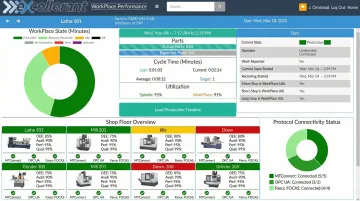
Real-time data connectivity is the most critical feature. A scheduling tool is only as accurate as the machine availability and job status data feeding it. Without live data, your schedule is a guess. This is why pairing scheduling software with an IIoT machine monitoring layer—like Excellerant's platform, which collects real-time CNC data including machine status, cycle time, OEE, and downtime events—directly improves schedule adherence.
The platform supports a broad range of protocols — MTConnect, OPC UA, Fanuc FOCAS, HAAS MNET, and Mazak Mazatrol — so it connects to any machine brand, age, or control type. Bi-directional sync with ERP and MES systems ensures scheduling tools always reflect current shop floor reality.
Finite Capacity vs. Infinite Capacity Scheduling
Infinite capacity scheduling assumes resources are limitless, producing schedules that ignore machine availability and routinely miss delivery dates. Finite capacity scheduling — the APICS-standard approach — accounts for actual machine uptime and labor availability by assigning no more work than a resource can realistically execute.
For high-mix environments, finite capacity logic is the only way to make credible delivery promises.
ERP Integration Depth
A scheduling tool that cannot bi-directionally sync with the ERP forces manual data entry, reintroducing the manual errors you're trying to eliminate. Look for native connectors or robust APIs, and confirm compatibility with your existing ERP before evaluating other features.
Key ERP integration criteria to verify before committing to a platform:
- Native connectors or published APIs for your specific ERP
- Bi-directional sync (not just read-only data pulls)
- Real-time or near-real-time update frequency
- Audit trail for data changes between systems
Manual data reconciliation between disconnected systems is a significant cost center — labor and error-correction expenses add up quickly across a single plant.
How We Chose These Tools
Each tool was evaluated across five criteria:
- Scheduling methodology (APS vs. ERP-native)
- ERP and machine data integration capability
- Scalability across shop sizes
- Deployment flexibility (cloud vs. on-premise)
- Demonstrated use in aerospace, defense, CNC machining, and contract manufacturing
The most common mistake buyers make: selecting a tool based on brand recognition or lowest price rather than evaluating whether it integrates with their specific ERP and machine types. Without real-time shop floor data, even a well-configured scheduler is making decisions blind. Research indicates that 73% of ERP implementations in discrete manufacturing fail to meet their original business objectives, most often because the scheduling layer never gets accurate machine-level inputs.
Total cost of ownership goes beyond licensing. That integration gap also drives hidden costs. For smaller shops without dedicated IT teams, the following factors often determine whether a tool succeeds or stalls:
- Implementation complexity and timeline
- Training requirements for schedulers and floor staff
- Ongoing configuration as jobs and machines change
- Whether vendor support is US-based and reachable during production hours
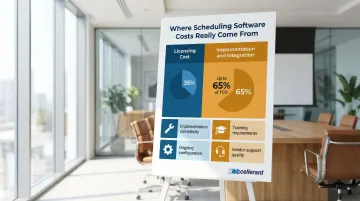
Up to 65% of TCO can come from implementation and integration alone — which is why proven ERP connectors and accessible vendor support matter as much as the software itself.
Conclusion
Production scheduling software reduces chaos, improves on-time delivery, and maximizes resource utilization—but the right tool depends on your shop's size, order mix, ERP environment, and the quality of machine data available to feed the schedule. Pilot programs integrating real-time machine data with scheduling systems have demonstrated on-time delivery rates rising to 96-98%, proving the value of this approach.
The best scheduling platform is only as powerful as the real-time data behind it. Manufacturers looking to close the gap between their plan and shop floor reality should consider combining scheduling software with a dedicated machine monitoring and connectivity solution.
Excellerant's IIoT Platform connects any machine—legacy or modern CNC—to provide the live data layer that makes scheduling accurate. With 30+ years of machine tool networking experience rooted in Macdac Engineering's 1991 founding, Excellerant has spent three decades integrating machine tools across manufacturing facilities of all sizes.
Contact Excellerant to see how their machine connectivity expertise can feed live data into the scheduling tools already running on your shop floor, or schedule a demo to see the platform in action.
Frequently Asked Questions
How do you optimize production scheduling in manufacturing?
Map capacity constraints, apply finite capacity scheduling logic, integrate real-time machine availability data, and sync plans to actual shop floor conditions — not static weekly snapshots. Real-time data from IIoT platforms eliminates guesswork and keeps schedules aligned with what's actually happening on the floor.
What are the best tools for optimizing production schedules in manufacturing?
The best fit depends on shop size, ERP system, and complexity. APS platforms like PlanetTogether and Siemens Opcenter offer advanced constraint modeling and simulation. Integrated ERP-schedulers like Epicor Kinetic work well for job shops. Cloud platforms like Plex and Katana MRP serve manufacturers seeking unified systems or affordable SMB solutions.
What is the difference between APS software and ERP-based scheduling?
APS software uses constraint-based algorithms to optimize job sequencing across tooling, labor, and machine availability. ERP-based scheduling integrates with business workflows but offers less sophisticated sequencing logic — which is why many manufacturers run both in tandem.
Can production scheduling software connect with legacy CNC machines?
Most scheduling platforms rely on a separate IIoT connectivity layer to pull live data from legacy CNCs. Protocols like MTConnect, Fanuc FOCAS, and serial communications make this possible — the MTConnect standard alone connects over 250,000 devices across manufacturing environments worldwide.
What features should a machine shop prioritize when selecting scheduling software?
Look for these capabilities when evaluating scheduling tools:
- Finite capacity scheduling with constraint-based logic
- Real-time machine data integration
- ERP connectivity
- Visual Gantt-based scheduling boards
- Ease of use for shop floor operators
Scalability and vendor support quality are equally important as your order volumes and machine counts grow.