Introduction
CMMC compliance is no longer a future concern for aerospace and defense contractors — it's a present contractual reality. With the 48 CFR/DFARS final rule effective November 10, 2025, DoD solicitations are actively incorporating CMMC clauses, and contractors handling Controlled Unclassified Information (CUI) need to be ready.
Your ERP system sits at the center of this challenge. It stores production data, financial records, contract details, and billing information — most of which overlaps with CUI. Choose the wrong platform, or configure the right one incorrectly, and you risk disqualification from DoD contracts.
What follows covers the five ERP systems best aligned with CMMC requirements, what assessors actually look for in your ERP configuration, and the shop floor data integrity factors that can make or break a compliance audit.
Key Takeaways
- CMMC Level 2 requires 110 NIST SP 800-171 Rev. 2 controls covering access, authentication, audit logging, and communications protection — all ERP-relevant domains
- Cloud ERP systems storing or processing CUI must operate in a FedRAMP Moderate or higher authorized environment
- On-premise ERP avoids FedRAMP scoping but must still implement all applicable NIST 800-171 controls
- Top CMMC-aligned ERPs: Deltek Costpoint, Microsoft Dynamics 365 GCC High, SAP S/4HANA (NS2 GovCloud), Acumatica, and Infor CloudSuite Industrial
- Shop floor data integrity: Automated machine monitoring (such as Excellerant) eliminates manual entry errors that can compromise the ERP records auditors review
What CMMC Compliance Actually Requires from Your ERP
The Three-Level Framework
CMMC 2.0 uses three levels:
- Level 1 (Foundational): 17 basic safeguarding practices
- Level 2 (Advanced): 110 controls aligned with NIST SP 800-171 Rev. 2 across 14 domains
- Level 3 (Expert): Additional controls based on NIST SP 800-172
Most A&D contractors handling CUI fall under Level 2, which requires a third-party C3PAO assessment. Note that while NIST SP 800-171 Rev. 3 was published in May 2024, the current CMMC rule still references Rev. 2. Use that for compliance planning until DoD formally amends the rule.
Why Your ERP Is Almost Never Out of Scope
ERP systems typically touch CUI through production orders, contract billing, material traceability, and subcontractor data. That makes them a primary focus during CMMC assessments, not a background system assessors can skip over.
According to a 2024 National Defense survey, only 4% of companies reported being completely ready for CMMC certification. Misconfigured access controls, missing audit logs, and unencrypted data paths within ERP systems are among the most frequently cited deficiencies.
The Four ERP-Critical CMMC Domains
These NIST 800-171 families directly govern how your ERP must behave:
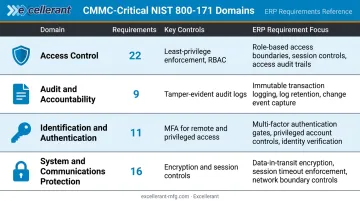
| Domain | Requirements | What It Demands from Your ERP |
|---|---|---|
| Access Control | 22 | Least-privilege permissions, role-based access |
| Audit & Accountability | 9 | Tamper-evident logs of who accessed what and when |
| Identification & Authentication | 11 | MFA for all remote and privileged access |
| System & Communications Protection | 16 | Encryption in transit/at rest, session controls |
Best ERP Systems for CMMC Compliance in Aerospace & Defense
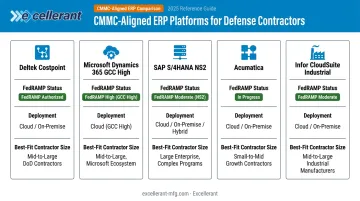
The following five platforms are recognized in the defense industrial base (DIB) for their alignment with CMMC requirements, FedRAMP availability, and defense-specific functionality. Let your deployment environment, contract volume, and existing IT infrastructure drive selection — not brand recognition alone.
Deltek Costpoint
Deltek Costpoint is the most widely deployed ERP among U.S. defense contractors, purpose-built for the DIB with modules covering project accounting, DCAA compliance, contracts management, and government billing. Its long track record in federal contracting makes it the default starting point for most mid-to-large prime contractors.
Key differentiators:
- Native CUI data segregation and DCAA audit trail support
- Built-in DFARS 252.204-7012 compliance workflows
- Costpoint GCCM achieved FedRAMP Moderate Ready status in February 2024
- Purpose-configured for CMMC Level 2 environments
Important caveat: The FedRAMP Marketplace currently lists Costpoint GCCM as FedRAMP Ready (Class C Moderate), not FedRAMP Authorized. Verify current status at fedramp.gov/marketplace before contract commitments.
| Deployment Options | Cloud (FedRAMP Moderate Ready GovCloud), On-Premise |
| CMMC/FedRAMP Status | FedRAMP Moderate Ready (cloud); CMMC-ready configuration support available |
| Best For | Mid-to-large defense contractors with complex project accounting and government billing needs |
Microsoft Dynamics 365 GCC High
Dynamics 365 GCC High is Microsoft's government-cloud ERP offering, designed for organizations operating within the M365 GCC High environment. Microsoft achieved FedRAMP High JAB authorization for Dynamics 365 Government in March 2018, and the M365 GCC High environment carries FedRAMP High Certified status (Class D High, certified December 2024).
For contractors already standardized on Microsoft 365 GCC High for email and collaboration, Dynamics 365 extends that same security boundary into ERP — simplifying compliance scoping.
Key differentiators:
- Shared security boundary with M365 GCC High
- Native MFA and role-based access controls
- Three-tier offering (Commercial → GCC → GCC High) lets contractors match compliance level to data sensitivity
- Supports CMMC Level 2 and Level 3 scoping environments
| Deployment Options | Cloud only (GCC or GCC High tenant) |
| CMMC/FedRAMP Status | FedRAMP High Authorized (GCC High); supports CMMC Level 2 and Level 3 environments |
| Best For | Contractors already using Microsoft 365 GCC/GCC High who want a unified compliance environment |
SAP S/4HANA (with CMMC-Compliant Cloud Hosting)
SAP S/4HANA is the enterprise-grade successor to SAP ECC, with deep manufacturing, supply chain, and procurement capabilities. For CMMC compliance, it must be deployed on a FedRAMP-authorized environment — the primary option being SAP NS2.
The SAP NS2 Cloud Intelligent Enterprise holds FedRAMP Certified status (Class C Moderate) with 25 ATO/ATU letters and 24 reuses, including SAP S/4HANA Private Cloud Edition within its authorized boundary.
Key differentiators:
- SAP GRC module for centralized compliance management and access governance
- Firefighter role (Emergency Access Management) with full audit log capture
- Data classification features for flagging military contract materials
- Deployable on NS2, AWS GovCloud, or Azure Government
Critical note: FedRAMP-authorized infrastructure does not automatically make your SAP deployment CMMC compliant. The authorized cloud boundary and your specific SAP workload configuration must both be assessed.
| Deployment Options | On-Premise, Cloud (NS2, AWS GovCloud, Azure Gov) |
| CMMC/FedRAMP Status | FedRAMP Certified via NS2 hosting (Class C Moderate); NIST 800-171 control documentation supported through SAP GRC |
| Best For | Large A&D enterprises with complex supply chains and existing SAP investments migrating from ECC |
Acumatica Cloud ERP
Acumatica is a flexible, SMB-oriented cloud ERP that has found adoption in the defense supply chain among smaller contractors drawn to its open architecture and consumption-based pricing. Acumatica itself does not hold a FedRAMP Marketplace entry — CMMC-compliant deployments rely on certified hosting partners such as WM Synergy, which provides a FedRAMP-compliant private hosting environment.
Key differentiators:
- Consumption-based pricing with no per-user licensing fees
- Configurable access controls and manufacturing workflows (MRP, BOM, production scheduling)
- Open API supports integration with DNC and machine monitoring systems
- FedRAMP Moderate-compliant private hosting available via certified partner
Critical note: Do not assume Acumatica is FedRAMP authorized out of the box. CUI scoping and hosting evidence must be documented separately.
| Deployment Options | Cloud (FedRAMP-compliant private hosting via certified partner) |
| CMMC/FedRAMP Status | FedRAMP Moderate compliance via certified hosting partner; CMMC-ready with proper configuration |
| Best For | Small to mid-sized A&D job shops and subcontractors seeking flexible, cost-effective CMMC-ready ERP |
Infor CloudSuite Industrial (SyteLine) GovCloud
Infor CloudSuite Industrial, powered by SyteLine, is a manufacturing-focused ERP with a dedicated GovCloud deployment option. The Infor Government Solutions SaaS platform holds FedRAMP Certified status (Class C Moderate) since July 2018, covering integrated cloud application suites for aerospace and defense and public sector industries.
Key differentiators:
- FedRAMP Moderate Certified GovCloud environment specifically positioned for defense contractors
- Built-in support for ITAR, DFARS, and FAR compliance workflows
- Advanced production scheduling with MES integration capabilities
- Strong Tier 1/Tier 2 supplier adoption in the DIB
Important note: Research did not verify a separate CMMC 2.0 product certification for CloudSuite Industrial/SyteLine specifically. Use the exact FedRAMP Marketplace listing (Infor Government Solutions SaaS) and verify the authorized boundary with Infor before deployment.
| Deployment Options | Cloud (GovCloud), On-Premise |
| CMMC/FedRAMP Status | FedRAMP Certified, Class C Moderate (Infor IGS SaaS); defense-sector configured |
| Best For | Mid-market A&D manufacturers and Tier 1/Tier 2 suppliers needing a manufacturing-focused ERP with proven FedRAMP credentials |
Key Features to Look for in a CMMC-Ready ERP
Access Control and Role-Based Permissions
CMMC requires the principle of least privilege — users should only access the CUI they need for their specific role. Your ERP must support granular role-based access controls (RBAC) that restrict who can view, modify, or export sensitive production and contract data.
This is one of the most commonly failed controls in CMMC Level 2 assessments. Generic "admin/user" permission models do not pass.
Multi-Factor Authentication and Identity Management
NIST 800-171 requires MFA for all remote access and privileged account access. Your ERP must natively support MFA — not depend on a third-party bolt-on — and integrate with your identity management infrastructure, whether that's Active Directory, Azure AD, or similar.
Automated Audit Trails and Activity Logging
CMMC auditors require documented evidence of who accessed what data, when, and what changes were made. ERPs must auto-generate and retain tamper-evident logs that hold up to both self-assessments and C3PAO scrutiny. Manual log maintenance is not acceptable.
FedRAMP-Authorized Cloud Hosting (or Verified On-Premise Controls)
Cloud ERP systems storing CUI must operate in a FedRAMP Moderate or higher environment. The practical check: verify the ERP's listing at fedramp.gov/marketplace before signing any contract. A FedRAMP-authorized IaaS host (like AWS GovCloud) does not automatically cover an ERP SaaS application running on top of it.
Shop Floor Data Accuracy and Traceability
CMMC compliance depends on the integrity of the data inside your ERP, and that data originates on the shop floor. When production records are entered manually, errors accumulate, timestamps drift, and audit trails become unreliable.
Excellerant's machine monitoring and DNC integration eliminates manual entry errors and timestamp drift by capturing data automatically, in real time, directly from CNC machines. The platform pushes job status, part counts, cycle times, and quality outcomes into ERP records. Its DNC software also maintains per-machine event logs of every NC program transfer, including which revision was sent, to which machine, and when.
Excellerant's platform supports CMMC 2.0 and NIST 800-171 controls for CUI protection within CNC program files. Several features align directly with CMMC's access control and configuration management requirements:
- Customizable user permissions that enforce least-privilege access at the machine level
- Active Directory integration for centralized identity management across the shop floor
- Rev-Lock-Load (optional), which restricts each CNC machine to one approved program at a time
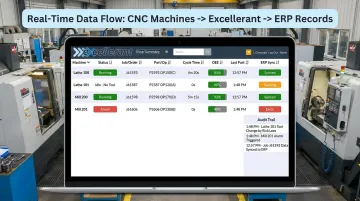
One manufacturer noted that "the accuracy of information coming into our ERP system is exponentially better than what it was before" after deploying Excellerant.
On-Premise vs. Cloud ERP for CMMC
On-Premise Advantage
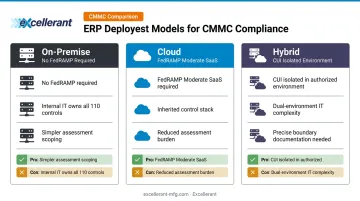
On-premise ERP systems are treated as internal infrastructure under CMMC, which means they don't trigger FedRAMP requirements. For organizations with strong internal technical controls — MFA, RBAC, encryption, audit logging — on-premise can be a more straightforward compliance path with less third-party dependency.
The trade-off is real: your internal IT team owns the full burden of implementing and documenting all 110 NIST 800-171 controls.
Cloud Requirement
Any cloud ERP that processes or stores CUI must be FedRAMP Moderate authorized at the SaaS level — not just hosted on a FedRAMP-authorized infrastructure platform. This distinction matters:
- FedRAMP-authorized IaaS/PaaS (AWS GovCloud, Azure Government) secures the infrastructure layer only
- FedRAMP-authorized ERP SaaS inherits controls across the full stack, reducing your compliance burden and C3PAO assessment scope
Running a non-authorized ERP on AWS GovCloud does not satisfy DFARS 252.204-7012 or CMMC cloud requirements.
Hybrid Approach
For organizations caught between the cost of full migration and the constraints of a purely on-premise setup, a hybrid approach offers a middle path. CUI stays within an on-premise or FedRAMP-authorized ERP module, while non-sensitive commercial data routes to a standard cloud environment.
The tradeoffs are worth understanding before committing:
- Reduces migration scope for legacy systems already in production
- Adds IT complexity from managing two separate environments
- Requires precise CUI boundary documentation to satisfy CMMC scoping requirements
How We Chose These ERP Systems
The five platforms on this list were evaluated against four criteria:
- FedRAMP authorization status — verified against fedramp.gov/marketplace, not vendor marketing claims
- Native CMMC-aligned controls — MFA, RBAC, audit logging, and encryption built into the platform, not reliant on workarounds
- Demonstrated use in A&D/DIB — track record with defense contractors and government suppliers
- Compliance support availability — vendor or implementation partner resources for CMMC configuration
Passing those criteria is necessary but not sufficient. Contractors frequently disqualify otherwise capable platforms by making avoidable purchasing errors.
Common selection mistakes to avoid:
- Choosing based on manufacturing features alone without verifying FedRAMP status
- Assuming a "Government Edition" label equals CMMC compliance
- Underestimating the configuration work required to activate CMMC controls after deployment
- Treating a FedRAMP-authorized hosting provider as equivalent to a FedRAMP-authorized ERP SaaS
Even with the right ERP in place, CMMC readiness depends on more than the software. Documentation, governance, and operational consistency are what auditors scrutinize most — a point National Defense highlighted in 2025.
Conclusion
Choosing a CMMC-capable ERP gets you to the starting line. What happens next — configuration, documented policies, staff training, and continuous monitoring — is what actually determines whether you pass a C3PAO assessment.
Before committing to a platform:
- Complete a CMMC readiness assessment to understand your current gap baseline
- Verify FedRAMP status independently at fedramp.gov/marketplace — never rely solely on vendor claims
- Evaluate whether your deployment model (cloud vs. on-premise vs. hybrid) aligns with your IT resources and contract timeline
- Ensure the data flowing into your ERP from the shop floor is accurate and traceable enough to withstand audit scrutiny
That fourth point is where many defense manufacturers run into trouble. When CNC machines feed manual or delayed data into your ERP, the records your assessors review won't match what actually happened on the shop floor — and that discrepancy can sink an otherwise solid compliance posture.
Excellerant's real-time machine data integration connects CNC equipment of any brand or age directly to your ERP, replacing manual entry with automated, timestamped records. If traceable shop-floor data is a gap in your current setup, reach out to Excellerant to see how the integration works.
Frequently Asked Questions
Are major ERP vendors like SAP and Oracle CMMC compliant out of the box?
No. SAP and Oracle are not inherently CMMC compliant — compliance depends on the deployment environment (such as SAP NS2 GovCloud or Oracle Fusion Cloud in a government tenant) and how the system is configured. Contractors must verify FedRAMP status independently and document configuration controls before claiming compliance.
Does my ERP system need to be FedRAMP authorized for CMMC compliance?
FedRAMP Moderate authorization is required only for cloud-based ERP systems that store, process, or transmit CUI. On-premise ERP systems are not subject to FedRAMP requirements but must still implement all applicable NIST 800-171 Rev. 2 technical controls within the assessed boundary.
Can an on-premise ERP system meet CMMC Level 2 requirements?
Yes. On-premise ERP systems can achieve CMMC Level 2 compliance by implementing the required 110 controls — including MFA, access control, encryption, and audit logging. The advantage is avoiding FedRAMP scoping complexity; the trade-off is that your internal IT team must own and document all control implementation.
What is the difference between a FedRAMP-authorized platform and a FedRAMP-authorized ERP?
A FedRAMP-authorized platform like AWS GovCloud or Azure Government secures the infrastructure layer only — the contractor remains responsible for securing the ERP application running on top of it. A fully FedRAMP-authorized ERP SaaS inherits security controls across the entire stack, reducing both compliance effort and C3PAO assessment scope.
How long does it take to achieve CMMC compliance with an ERP system?
Third-party assessors estimate up to 12 months for preparation alone — before scheduling a formal assessment. For Level 2 manufacturers, accounting for gap remediation, documentation, and C3PAO scheduling, a 12–24 month total timeline is realistic.
What happens if my ERP vendor cannot support CMMC requirements?
If your ERP cannot meet required controls — particularly FedRAMP hosting for cloud deployments — you face contract disqualification risk. Options include migrating to a compliant ERP, implementing compensating controls (which require formal documentation and assessor approval), or adopting a hybrid architecture that isolates CUI from the non-compliant system.