Introduction
Production planners shouldn't be calling the shop floor to find out if a job is on schedule. Yet in many machine shops, that's still the reality — the ERP shows a job as "in progress" while the actual machine finished hours ago, or worse, went down and nobody updated the system.
This disconnect between ERP data and shop floor reality is one of the most persistent operational problems in discrete manufacturing. Rockwell Automation's 2023 State of Smart Manufacturing report found that 50% of manufacturers were still relying on manual tools like spreadsheets for supply chain planning — and that one-third of manufacturing data goes entirely unused.
ERP API integration fixes this by creating automated, real-time data pipelines between your ERP and the systems actually running production. This article covers:
- What ERP API integration means and how it works
- Why it matters specifically for discrete manufacturers
- Real-world examples from machine shop environments
- The tools available and common pitfalls to avoid
- Practical best practices to get it right
Key Takeaways
- ERP API integration automates bi-directional data exchange between your ERP and shop floor systems — no manual entry
- Real-time sync gives planners accurate job status, actual hours, and OEE data without calling the floor
- Legacy CNC machines connect via hardware adapters and IIoT platforms, so machine age is no barrier to integration
- Start with one high-pain integration, prove ROI, then expand
- Purpose-built IIoT tools handle machine protocol complexity that generic integration platforms (iPaaS) can't match
What Is ERP API Integration?
ERP API integration is the process of connecting an ERP system to other software applications — machine monitoring platforms, MES, DNC systems, CRM, or inventory tools — via application programming interfaces (APIs). The result is automated, bi-directional data exchange that eliminates manual re-entry.
According to SAP, an API defines the rules and protocols for communication between systems, while API integration is the functioning implementation of those connections — the live data pipelines that keep systems synchronized.
How It Differs from Other Integration Methods
Most shops have encountered older integration approaches that fall short:
- Flat-file transfers / CSV imports — manual, error-prone, and always delayed
- Vendor connectors — often one-directional and limited to specific system versions
- API integration — automated, near-real-time or real-time, bi-directional, and expandable as your machine count grows
In fast-moving production environments, that gap has real consequences. When a machine goes down or a job falls behind, you need that information in your ERP within minutes — not the next morning when someone submits a paper traveler.
ERP Integration vs. ERP API Integration
Not all ERP integrations are equal. "ERP integration" is a broad term covering any connection method, including scheduled file transfers. "ERP API integration" specifically refers to connections built on API protocols that enable synchronous or near-synchronous data exchange.
Common API protocols used in manufacturing include:
- REST — lightweight, widely supported, ideal for cloud-based ERP platforms
- SOAP — structured, contract-based, common in older enterprise environments
- OData — Microsoft-native, used heavily with SAP and Dynamics integrations
- Proprietary interfaces — vendor-specific APIs for platforms like Epicor or JobBOSS²
For shop floor connectivity, APIs are the practical standard because they support real-time triggers, structured data validation, and two-way communication — none of which scheduled file transfers can reliably deliver.
Why ERP API Integration Matters for Manufacturers
Without integration, shop floor data stays trapped. Machine status, cycle times, scrap counts, and job progress sit in the heads of operators and supervisors — or on whiteboards — while ERP production orders, job costs, and scheduling reflect yesterday's reality.
The downstream effects are predictable:
- Schedulers make decisions based on stale data, creating cascading delays
- Job costing relies on estimated hours rather than actuals, distorting margins
- Procurement can't respond to real material consumption because inventory isn't updated until end-of-shift
- Downtime events go untracked until a supervisor notices a machine is cold
The Business Case for Integration
Aberdeen's ERP in manufacturing research found that best-in-class ERP users achieved 96% manufacturing schedule compliance and 98% complete and on-time shipments, compared to 87% and 89% respectively for non-ERP users. Those numbers hold only when the ERP is working from accurate, current data — and that requires shop floor systems feeding it automatically.
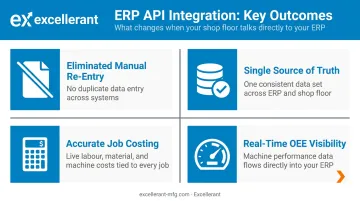
Bridging that shop floor-to-ERP data gap delivers measurable results across the operation:
- Eliminated manual re-entry — operators stop filling out paper travelers or duplicate forms
- Single source of truth — planners and supervisors see the same job status
- Accurate job costing — actual hours replace estimates, tightening margins
- Real-time OEE visibility — downtime, utilization, and throughput data flows directly into reporting
ERP API Integration Examples in Manufacturing
Syncing Machine Data with ERP Job Orders
Real-time machine monitoring captures cycle completions, run status, and downtime events as they happen. When that data feeds into the ERP via API, job order progress updates automatically — no manual status reports, no end-of-day reconciliation.
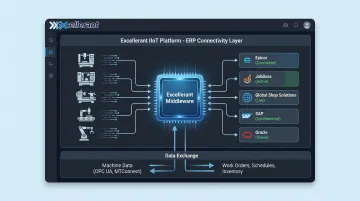
Excellerant's IIoT machine connectivity platform does exactly this. The system captures data from any CNC machine — including legacy equipment running RS-232 serial connections — and pushes it to ERP platforms including Epicor, JobBoss, Global Shop Solutions, SAP, and Oracle in real time.
Operators signal job completion, assign good-versus-scrap part quantities, and log downtime reasons through a tablet interface. All of it flows to the ERP automatically.
Dan Villemaire from C&M Machine Products summarized the impact directly: "The accuracy of information that's coming into our ERP system is exponentially better than what it was before. We have been able to improve the accuracy of our costs and increase our value to our customers."
The data flowing in both directions includes:
- Cycle times and run/idle time by job, shift, or machine
- Good and scrap part counts (pushed to ERP in real time)
- Downtime events with operator-assigned reason codes
- Actual hours versus planned standards for job costing
- Job and work-order data pulled back from the ERP to the shop floor interface
Connecting DNC Systems to ERP Production Scheduling
When a DNC system is integrated with the ERP, production orders can trigger the correct CNC program to be sent to the right machine — automatically. This prevents a costly failure mode: operators running outdated program revisions because the DNC file wasn't updated when engineering changed the part.
Modern Machine Shop reported a 23% spindle-uptime increase for manufacturers using integrated NC-code verification tools connected to ERP workflows. The same publication noted that CNC program errors — missing restart commands, incorrect modes, outdated safety codes — can cause scrap, crashes, and downtime when revision control isn't enforced.
Excellerant's DNC software addresses this through several revision-control mechanisms:
- NC file revision control that meets AS9100 and CMMC documentation standards
- In-browser G-code editor with one-click revision compare
- Rev-Lock-Load that limits each machine to one active program — the file must be returned to the server before a new one loads, a requirement in AS9100 and CMMC-regulated shops
Inventory, Quality, and Compliance Data
Machine status is the most visible integration point, but two others carry equal operational weight:
Inventory and material tracking: Scrap quantities and part completions flow to the ERP automatically as jobs progress. Procurement and operations work from current stock levels — not counts that are hours or shifts old. Excellerant's platform pushes good-versus-scrap quantities in real time through the shop floor operator interface.
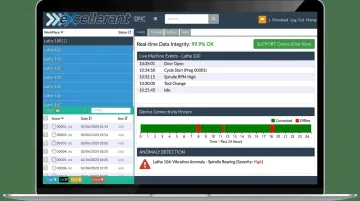
Quality and compliance records: In aerospace, defense, and medical device manufacturing, inspection results and non-conformance records must trace back to specific jobs, program revisions, operators, and timestamps. Excellerant's per-machine event logging and device connectivity history creates the documented audit trail that AS9100, ISO 9000, FDA QMSR, and CMMC requirements demand — flowing directly into the ERP job record instead of a separate paper system.
ERP API Integration Tools and Methods
Three main approaches exist, and the right choice depends on your shop's technical resources and machine mix:
| Approach | Best For | Trade-offs |
|---|---|---|
| Custom API builds | Maximum control, unique workflows | Requires developers; ongoing maintenance burden |
| iPaaS platforms | Cloud-to-cloud integrations, reusable connectors | Needs technical configuration; may lack machine-level context |
| IIoT/MES middleware | Shop floor to ERP, mixed machine environments | Purpose-built for manufacturing; handles protocol complexity |
Which Approach Fits Your Shop
Custom builds make sense when an integration is truly unique to your workflow and your team has dedicated developer capacity. The downside is that every ERP update or software version change can break the connection, creating ongoing maintenance work.
iPaaS tools (Gartner defines these as vendor-managed cloud services with pre-built connectors and low-code workflows) accelerate time-to-integration for business system connections. They're well-suited for CRM-to-ERP or e-commerce-to-ERP scenarios but tend to fall short when the data source is a Fanuc CNC running a proprietary protocol.
IIoT/MES platforms like Excellerant handle the layer that the other approaches skip: translating raw machine signals — across MTConnect, OPC-UA, Fanuc FOCAS, HAAS MNET, Mazak Mazatrol, and RS-232 serial protocols — into structured, normalized data that an ERP can consume.
The platform then connects to the ERP via its Open API, with pre-built connectors for Epicor, JobBoss, Global Shop Solutions, SAP, and Oracle. For shops with a mixed floor of modern and legacy equipment, this is the fastest path to a working integration without custom development.
Key Factors to Evaluate
When selecting any integration tool, check for:
- Pre-built connectors for your specific ERP
- Support for real-time (not just batch) data sync
- Ability to connect legacy machines without full network interfaces
- Security and compliance standards (especially for CMMC and ISO 9000 shops)
- Ongoing technical support from people who understand manufacturing
Common Challenges of ERP API Integration
Data Mapping Complexity
ERP systems and shop floor tools rarely use the same identifiers for the same thing. A job number in Epicor may not match the work order ID in a machine monitoring platform. Part numbers, machine IDs, and shift codes all require careful upfront mapping before data can flow accurately.
That mapping isn't a one-time exercise. Every ERP update, software version change, or production workflow shift can change field names or data formats and silently break an integration. Ongoing governance — someone verifying that data still matches correctly — matters as much as the initial build.
Legacy Machine Compatibility
Most job shops have CNC machines that are 15, 20, or 30 years old. These machines don't have Ethernet ports or native API support. Connecting them requires hardware adapters, serial communications, or PLC intermediary devices that translate their output into something the ERP integration can use.
This is where many integrations stall. Excellerant addresses it by connecting RS-232 serial-controlled CNCs, behind-the-tape-reader machines, and other legacy controls through serial communications or PLC gateways, placing them on the same data platform as modern networked machines. A shop doesn't need to replace older equipment to get accurate ERP data from it.
Keeping Integrations Accurate Over Time
An integration that works on day one may drift over months as systems change. ERP patches, machine firmware updates, and new production workflows can all introduce mismatches that don't throw obvious errors — they just cause the data to be wrong in ways that are hard to catch without active monitoring.
Excellerant's platform addresses this through:
- Per-machine event logging that creates a traceable record of every data transaction
- Device connectivity history to pinpoint when and where a mismatch started
- 24/7 monitoring with a predictive rule engine that flags anomalies before they compound
- USA-based technical support available by phone and email to trace discrepancies back to specific machine events or software changes
Best Practices for ERP API Integration
Audit Your Data Flows Before You Build
Before selecting a tool or writing a line of code, map which data needs to move, in which direction, and how often. Identify the specific ERP fields (job order status, actual hours, scrap quantities) that need to sync with specific shop floor outputs. This prevents scope creep and ensures the integration actually supports the decisions planners and managers make every day.
Prioritize Real-Time Where It Matters
Not every data point needs to sync instantly. A tiered approach reduces API load and complexity:
- Real-time: Machine status, job progress, downtime alerts, scrap counts
- Near-real-time (minutes): Cycle time actuals, operator time entries
- Batch/scheduled: Historical reporting, monthly cost roll-ups, archival records
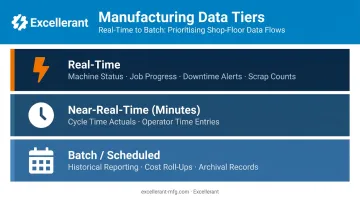
Production-critical data — anything that affects a scheduling or quality decision made during the shift — should sync in real time. Everything else can wait.
Start With One High-Impact Integration, Then Expand
Attempting to connect every system at once is how integration projects stall. Identify the single data flow causing the most operational pain — manual job status reporting, inaccurate job costing, or blind spots in downtime tracking — and integrate that first. The ROI from that first integration funds and informs what comes next.
Involve Both IT and Shop Floor Stakeholders
Integration projects fail when IT designs the data flows without input from the people using them. Build requirements with all three groups at the table:
- Production supervisors — know which machine states actually matter for scheduling decisions
- Operators — know which downtime categories are distinct enough to track separately
- Planners — know which ERP fields drive their daily decisions
Plan for Legacy Machine Connectivity From Day One
Many manufacturers assume ERP integration only applies to machines with modern network interfaces. That assumption leaves a significant portion of production capacity off the data map.
Choose a connectivity platform that supports the full range of protocols — MTConnect, OPC-UA, Fanuc FOCAS, HAAS MNET, Mazak Mazatrol, and RS-232 serial — from the start. Retrofitting legacy connectivity after an integration is live costs far more than planning for it upfront.
Frequently Asked Questions
What are ERP integrations?
ERP integrations are connections between an ERP system and other business or operational applications — such as CRM, MES, machine monitoring platforms, or inventory tools — that allow data to flow automatically between systems, keeping information consistent and current across the organization without manual re-entry.
What is real-time ERP?
Real-time ERP refers to an ERP system that receives and displays data as it's generated — for example, updating job order status the moment a machine completes a cycle or flags a downtime event. This contrasts with batch imports or manual updates, enabling faster and more accurate production decisions.
What is the difference between ERP integration and ERP implementation?
ERP implementation is the process of deploying and configuring the ERP system itself. ERP integration is the subsequent, ongoing process of connecting that ERP to other systems — such as machines, MES, or CRM — to enable automated data exchange.
What systems does an ERP typically integrate with in manufacturing?
Common integration targets include machine monitoring/IIoT platforms, MES, DNC systems, inventory and WMS tools, quality management systems, and CRM.
Can legacy CNC machines be connected to modern ERP systems?
IIoT hardware adapters and connectivity platforms — like Excellerant's — translate older machine protocols (RS-232 serial, Fanuc FOCAS, Mazak Mazatrol, and others) into data streams compatible with modern ERP systems. A mixed floor of new and 30-year-old machines can feed the same ERP integration.
What are the biggest risks of not integrating ERP with shop floor systems?
The main risks are inaccurate job costing from manual data entry errors, poor scheduling from stale production status, inability to detect and respond to downtime in real time, and difficulty meeting traceability requirements for aerospace, defense, and medical device customers.