Introduction
Most manufacturers running Epicor know the frustration: the ERP holds the schedule, the work orders, and the cost data — but the shop floor operates on paper travelers, manual labor tickets, and end-of-shift data entry. By the time production data reaches Epicor, it's already hours old.
Seventy percent of manufacturers still collect data manually, according to the Manufacturing Leadership Council. That gap between what's happening on the floor and what the ERP actually shows is where scheduling errors, inaccurate job costs, and missed delivery dates are born.
Epicor ERP integration closes that gap by connecting Epicor to shop floor machines, machine monitoring systems, and business tools like CRM platforms and BI dashboards: data moves automatically, replacing manual entry entirely.
This guide covers the main integration methods, the most common integration types manufacturers rely on, a real-world example, and a framework for choosing the right approach for your environment.
Key Takeaways
- Epicor integrates with shop floor machines, CRM, eCommerce, supply chain, and BI tools
- Five main integration methods: P2P, ESB, API-based, iPaaS, and purpose-built shop floor connectors
- Purpose-built connectors are the lowest-friction path for manufacturers running mixed-age CNC fleets
- Work orders push to the floor; real machine data flows back into Epicor — no manual entry
- Choose your method based on Epicor deployment type (cloud Kinetic vs. on-premises) and top operational pain point
What Is Epicor ERP Integration?
Epicor ERP integration connects Epicor — whether Epicor Kinetic for manufacturers or Prophet 21 for distributors — to other business systems so data flows automatically and bidirectionally without manual re-entry.
Epicor handles financials, inventory, purchasing, and work order management well. What it doesn't do natively is reach down to the shop floor and pull real-time machine data — and that's exactly where integration earns its place.
What Epicor Does Well vs. Where Integration Fills the Gaps
| Epicor's Strengths | Where Integration Adds Value |
|---|---|
| Work order management | Real-time machine cycle data |
| Inventory and purchasing | Automated labor ticket capture |
| Financial reporting | Shop floor operator inputs |
| Production scheduling | Live job progress vs. schedule |
| Customer order management | CRM data sync for sales teams |
Epicor's Integration Architecture
Bridging those gaps starts with understanding your deployment. The integration method you choose depends on how Epicor is deployed:
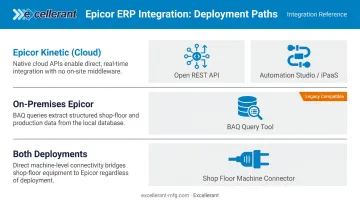
- Epicor Kinetic (cloud): Offers a full Open REST API — everything accessible through the Kinetic UI is also available via REST. Epicor also offers Automation Studio, an embedded iPaaS powered by Workato with over 1,000 pre-built connectors.
- On-premises Epicor: Typically relies on Business Activity Queries (BAQs) — Epicor's no-code custom query tool — to expose data for external systems.
- Both deployments: Support third-party industrial connectors for shop floor machine data, which the native API alone doesn't handle.
Epicor ERP Integration Methods
No single method fits every shop. The right choice depends on your Epicor deployment, the number of systems you need to connect, and how much developer resources you have available.
Point-to-Point (P2P) Integration
P2P connects two specific systems directly through custom code. It's workable if you have one or two connections to make and a developer to maintain them.
The problem is scale. As MuleSoft notes, three systems require three connections — but ten systems require 45 or more. Each new system demands a new custom build, and when one system updates, the custom code breaks. P2P is fragile by design.
Best for: Small shops with a single integration need and in-house developer support.
Enterprise Service Bus (ESB)
ESB introduces a centralized middleware layer that routes data between multiple systems — handling protocol conversion and data transformation in one place. It's more structured than P2P and suits businesses coordinating several systems.
The tradeoff: ESB typically requires significant IT infrastructure and specialized expertise to configure. Changes aren't fast, and it doesn't lend itself to the kind of rapid adjustments a growing shop floor operation needs.
Best for: Mid-to-large enterprises with dedicated integration teams.
API-Based Integration
Modern Epicor Kinetic exposes REST APIs that let other systems push and pull data directly. API integration is faster to implement than custom P2P code and follows standardized protocols (OpenAPI, Swagger, OData).
That said, it still requires developer expertise — someone needs to write and maintain the API calls, handle authentication, and manage error responses. For on-premises users, BAQs help expose data not available through standard endpoints.
Best for: Cloud Kinetic users with developer resources who need flexible, direct data access.
iPaaS (Integration Platform as a Service)
iPaaS platforms are cloud-native, come with pre-built connectors, and support low-code or no-code configuration. Epicor's own Automation Studio (powered by Workato) fits here, as do third-party platforms.
Key advantages for manufacturers:
- Pre-built connectors for CRM, eCommerce, and BI tools
- Built-in monitoring and error logging
- Real-time data sync without heavy developer involvement
- Scalable as you add more systems
Best for: Manufacturers integrating Epicor with multiple platforms simultaneously (CRM + eCommerce + BI).
Purpose-Built Shop Floor Connectors
For manufacturers, purpose-built shop floor connectors are a distinct category — not a variant of generic iPaaS. Specialized industrial connectors pull real-time data from CNC machines regardless of brand, age, or protocol, then synchronize it directly with Epicor work orders and labor records.
Generic iPaaS platforms move data between applications. They weren't built to interpret machine-level signals: cycle times, spindle utilization, part counts, and operator inputs require connectors that understand industrial protocols — MTConnect, FANUC FOCAS, OPC-UA, HAAS MNET, and Mazak Mazatrol — and can translate raw signals into ERP-readable fields.
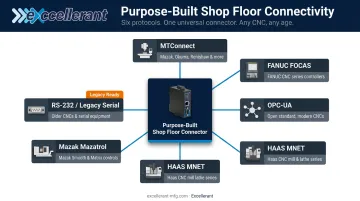
Excellerant's platform extends this to legacy equipment, supporting RS-232 serial machines alongside modern networked CNCs. Shops running 20-, 30-, and 40-year-old equipment can connect everything to the same platform as new machining centers, with no machine replacement required.
Best for: Manufacturers who need accurate, real-time shop floor data in Epicor and run any mix of CNC equipment.
Types of Epicor ERP Integration
The right integration types depend on where your data gaps are causing the most operational pain. For most manufacturers, shop floor connectivity is the highest-priority gap — but CRM, supply chain, eCommerce, and BI integrations are also common needs.
Shop Floor and MES Integration
This is where Epicor integration delivers the most direct operational value for manufacturers.
Connecting Epicor to shop floor machines or an MES creates a genuine bidirectional data flow:
- Epicor → Shop Floor: Work orders, job numbers, and scheduling data flow to operator dashboards
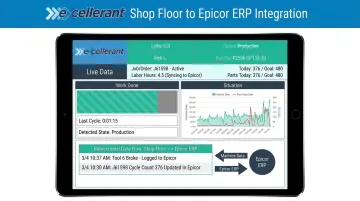
- Shop Floor → Epicor: Actual cycle times, labor hours, part counts, scrap quantities, and job completion status sync back automatically
The downstream impact is substantial. Job costing becomes accurate because actual hours replace estimated hours. Paper travelers disappear. Supervisors can see real job progress against the schedule without walking the floor or waiting for end-of-shift entries.
Excellerant's bidirectional integration with Epicor pushes real-time machine and operator data into the ERP while pulling work order data back to the shop floor, replacing manual labor tickets with automated actual-hours capture. Dan Villemaire from C&M Machine Products put it plainly: "The accuracy of information that's coming into our ERP system is exponentially better than what it was before."
Legacy machine connectivity matters here too. Most shops run mixed-age fleets, and a shop floor connector that only works with newer equipment leaves older machines — often the highest-utilization assets — in a data blind spot.
CRM Integration
Connecting Epicor to a CRM (Salesforce, HubSpot, Dynamics) gives sales teams real-time ERP data — customer purchase history, open quotes, order status — without requiring them to log into Epicor directly.
The gap is real: only 32% of companies have a single view of customer information, while 90% say that view would be valuable. CRM-ERP integration creates that unified view, improving response times and sales forecasting accuracy.
eCommerce and Supply Chain Integration
For manufacturers and distributors with online storefronts or supplier networks:
- eCommerce integration connects Epicor to platforms like Shopify or BigCommerce for automated inventory updates, order ingestion, and shipment status sync — eliminating manual order entry
- Supply chain integration enables automated purchase order generation, real-time inventory replenishment signals, and procurement workflow automation
A 2023 survey of 530 B2B organizations found that companies delivering a consistent digital experience through ERP-eCommerce integration reported a 62% increase in product and service sales, while 71% described their current processes as moderately to extremely manual.
Business Intelligence and Reporting Integration
Once your transactional data is flowing cleanly, the next step is making it visible. Connecting Epicor to Power BI, Tableau, or built-in dashboards transforms raw ERP data into decision-ready KPIs. Manufacturers can track OEE (Overall Equipment Effectiveness), job completion rates, and cost-per-part without manual exports, using live data for scheduling decisions.
Key Benefits of Epicor ERP Integration
Operational Efficiency
Automated data flow eliminates duplicate data entry and the errors that come with it. IBM reports that over one-quarter of organizations lose more than $5M annually due to poor data quality, with 43% of COOs identifying data quality as their most significant operational concern.
On the shop floor, this translates directly: when actual labor hours and cycle times enter Epicor automatically, job costing is accurate, payroll validation is faster, and production planning starts from a reliable baseline.
Real-Time Visibility and Confident Production Forecasting
When Epicor is connected to shop floor systems, managers can see actual production progress versus scheduled progress at any moment. Managers catch scheduling gaps early — before they become missed deadlines.
Rory Miller from McMellon Bros. described it plainly: "ERP has become a more powerful tool. I can pull it up at any time and find out what's happening with a customer's parts. If we're not on pace, we can fix it."
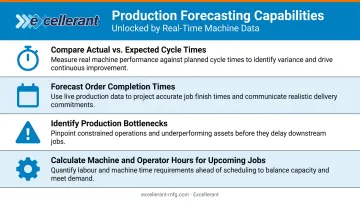
Real-time machine data enables forecasting capabilities that manual data entry simply can't support:
- Compare actual-to-expected cycle times and output
- Forecast order completion times based on current machine performance
- Identify production bottlenecks before they become missed deadlines
- Calculate actual machine and operator hours required for upcoming jobs
Scalability Without Workarounds
An integrated Epicor environment grows with the business. Adding a new machine, production line, or customer doesn't mean recreating manual data entry processes — the integration handles new data sources as they're added.
For manufacturers running Excellerant's platform, this means any machine — regardless of brand, age, or protocol — connects to the same unified system and feeds data into Epicor without additional custom development.
Epicor ERP Integration in Practice: A Manufacturing Case Study
The Situation
A mid-size precision machining facility running Epicor had a familiar problem. Operators recorded job completion times on paper travelers, supervisors had no real-time job status visibility, and ERP data was always hours behind actual production. Job costing was based on estimated hours rather than actuals, leading to consistent quoting inaccuracies.
The Challenge
The shop ran a mixed fleet — newer CNC machining centers alongside legacy equipment from multiple vendors, each using different communication protocols. A standard connector that only worked with modern machines would leave older, high-utilization equipment out of the data loop entirely.
The Solution
A purpose-built shop floor connector was deployed to collect real-time machine data from every CNC on the floor — regardless of brand or age — using ethernet connections for modern machines and serial/RS-232 adaptors for legacy equipment. Work orders flowed from Epicor to operator dashboards on the shop floor. Actual cycle data, labor hours, part counts, and job completion status synced back to Epicor automatically.
This is the type of deployment Excellerant specializes in: universal connectivity across any machine mix, with pre-built bidirectional integration for Epicor that replaces paper-based labor tickets with automated actual-hours capture.
The Results
C&M Machine Products described the shift in ERP data accuracy as "exponentially better." The broader operational impact included:
- Eliminated paper travelers and end-of-day manual data entry
- Improved job costing accuracy through actual-hours capture instead of estimates
- Gave supervisors real-time job status visibility against the schedule
- Transformed the ERP from a lagging record into a live production tool
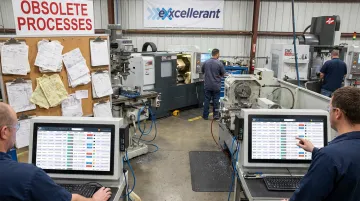
The facility went from perpetually working off yesterday's data to having an accurate, current picture of the shop floor — which made both quoting and scheduling more reliable.
How to Choose the Right Epicor Integration Approach
Start by mapping your biggest data gap. Where does inaccurate or delayed data cause the most operational pain? Shop floor visibility, customer order accuracy, inventory sync, and financial reporting are the most common answers for manufacturers. Address the highest-cost problem first.
Match the method to your Epicor deployment:
- Cloud Kinetic users have access to native REST APIs and are well-suited for iPaaS platforms or purpose-built connectors with API connectivity
- On-premises users may need BAQ-based connectors or purpose-built middleware that works around standard API limitations
- Manufacturers with legacy machines should look specifically for industrial connectivity solutions that handle multi-protocol, multi-vendor environments — generic iPaaS won't address machine-level data
Custom P2P integrations may appear cheaper upfront but require ongoing developer maintenance every time a connected system updates. Purpose-built platforms and iPaaS solutions typically include monitoring, error handling, and support — reducing long-term IT burden. The full ROI calculation needs to account for what bad data is already costing:
- Mis-scheduled jobs that idle machines or delay shipments
- Inaccurate labor costing that distorts job profitability
- Missed delivery commitments that damage customer relationships
- Manual re-entry overhead that pulls staff away from higher-value work
Once the cost picture is clear, the final question is disruption. The best integrations layer on top of existing systems — no machine replacement, no Epicor reconfiguration. Excellerant's platform works this way: it connects any machine the shop already runs and feeds data into the existing Epicor environment without changing how Epicor is configured.
Frequently Asked Questions
What are three approaches to ERP integration?
The three most common approaches are Point-to-Point (P2P) custom coding, API-based integration using the ERP's native endpoints, and iPaaS platforms with pre-built connectors and low-code configuration. Manufacturers often add a fourth: purpose-built industrial connectors for shop floor machine data, which generic integration platforms aren't designed to handle.
Does Epicor have an API?
Yes. Epicor Kinetic provides a full Open REST API — everything accessible through the Kinetic UI is also available via REST, with OpenAPI and Swagger support. On-premises users can also expose additional data through Business Activity Queries (BAQs), and purpose-built connectors fill gaps for shop floor machine data that the native API doesn't cover.
Is Epicor a CRM or ERP?
Epicor is an ERP (Enterprise Resource Planning) system. It manages operations, inventory, financials, and production — not customer relationship management. Most Epicor users add a CRM connector — Salesforce, HubSpot, or Dynamics 365 — to link sales data with operational data.
What companies use Epicor ERP?
Epicor serves more than 23,000 customers across 150 countries, with 2.3 million daily users — primarily mid-market manufacturers, distributors, and wholesalers in automotive, aerospace, medical devices, and industrial machinery. Epicor Kinetic targets manufacturers specifically; Prophet 21 targets wholesale and industrial distributors.
How does Epicor ERP integrate with shop floor machines?
Purpose-built industrial connectors collect machine data via protocols like MTConnect, FANUC FOCAS, OPC-UA, HAAS MNET, and Mazak Mazatrol, then sync it bidirectionally with Epicor work orders and labor records in real time. Legacy machines connect through RS-232 serial adaptors or PLC intermediary devices, so older equipment feeds the same data flow as modern networked CNCs.