Introduction
Manufacturing ERP integration is the process of connecting an ERP system with the machines, software, and workflows that drive production — from shop floor equipment to supply chain and finance tools.
For manufacturers, machine shop managers, and operations leads, the ERP is only as useful as the data feeding it. In most facilities, that data still comes from manual entry.
According to the Manufacturing Leadership Council, 70% of manufacturers still collect data manually — meaning the scheduling decisions, inventory forecasts, and cost reports their ERP generates are based on information that's already hours or shifts behind reality.
The gap between what's happening on the floor and what the ERP reports is one of the most common — and most underestimated — sources of inaccuracy in manufacturing operations.
Closing that gap starts with understanding what ERP integration actually involves. This guide covers what it is, why it matters, how it works, which systems connect to an ERP, and what challenges to plan for before you start.
Key Takeaways
- Manufacturing ERP integration connects an ERP to machines, MES platforms, CRM tools, and supply chain systems for automated, real-time data flow.
- Without integration, ERP accuracy depends entirely on manual entry — leading to scheduling errors and delayed decisions.
- The shop floor is the biggest integration gap: legacy CNC equipment needs specialized connectivity (MTConnect, DNC, or serial adapters) to feed live data into the ERP.
- Common integration methods include APIs, iPaaS platforms, ESB architecture, and middleware — each suited to different shop environments.
- Successful integration requires data mapping, phased rollout, and a connectivity strategy spanning both software systems and shop floor equipment.
What Is Manufacturing ERP Integration?
Manufacturing ERP integration is the technical process of linking an ERP system with the other platforms and equipment a manufacturer depends on — so that data moves automatically between them rather than being entered manually.
Implementation is deploying and configuring the ERP itself. Integration is the separate, ongoing work of connecting that ERP to everything else: machines, MES platforms, CRM tools, WMS systems, and financial software. It's typically more complex than implementation — and as systems are added, replaced, or upgraded, integration continues to evolve with them.
What Integration Is Designed to Achieve
When integration works, job status, machine utilization, inventory counts, and financial performance all reflect the same reality — updated automatically as work moves through the shop, without anyone re-entering data between systems.
That matters because these systems are often confused with one another. Three distinctions worth keeping clear:
- ERP integration ≠ ERP customization — customization modifies the ERP itself; integration connects it to external systems
- ERP ≠ MES — a Manufacturing Execution System manages real-time shop floor execution; it's one of the systems integrated with the ERP, not a substitute for it
- Integration is bidirectional — data doesn't just flow into the ERP; job orders, schedules, and work instructions flow back out to the shop floor
Why Manufacturing ERP Integration Matters on the Shop Floor
The ERP's core value — accurate scheduling, inventory forecasting, cost reporting — depends entirely on the quality of data feeding it. In manufacturing, the primary source of that data is the shop floor. If machines aren't reporting their actual status, cycle times, and output in real time, every downstream ERP calculation is working from incomplete information.
What Goes Wrong Without It
When shop floor integration is absent or incomplete, the problems compound quickly:
- Production orders get scheduled against capacity that doesn't reflect actual machine availability
- Downtime goes unrecorded until it surfaces as a cost variance — often days later
- Scrap and rework are tracked on paper and entered in batches, not in real time
- Front-office teams make decisions based on data that's a shift behind reality
ABB's 2023 Value of Reliability survey found that unplanned downtime costs the typical industrial business $125,000 per hour — and that over two-thirds of industrial businesses experience unplanned outages at least once a month. When that downtime isn't captured in real time, the ERP keeps scheduling against capacity that no longer exists.
Closing the Gap with Real-Time Machine Data
Connecting live machine data to the ERP (through machine monitoring platforms, MTConnect-compatible adapters, or IIoT connectivity solutions) replaces lagging manual entries with accurate, real-time inputs the ERP can actually act on.
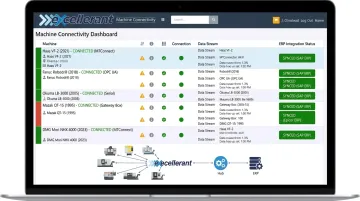
Excellerant's machine monitoring platform captures data from any CNC machine regardless of brand or age and feeds it directly into the ERP or MES layer through a bi-directional Open API. Data collected includes:
- Cycle times and part counts
- Machine status and downtime events
- OEE metrics and fault codes
- Operator-reported job data
This replaces manual labor tickets with automated actual-hours capture — no batch entry, no lag.
Customers have seen the difference directly. Dan Villemaire at C&M Machine Products noted: "The accuracy of information that's coming into our ERP system is exponentially better than what it was before. We have been able to improve the accuracy of our costs and increase our value to our customers."
For manufacturers in aerospace, defense, and medical devices, real-time data accuracy isn't a preference — it's a compliance requirement. Traceability obligations under CMMC, ITAR, and FDA Part 11 make automated data capture essential, not optional.
How Manufacturing ERP Integration Works
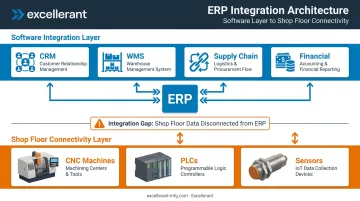
Integration follows this flow: data originates from machines, operators, or external systems → a connectivity layer translates and routes it → the ERP receives and updates the relevant records without manual re-entry.
Most integration guides focus on the software layer. For manufacturers, there are actually two distinct layers that must both work:
- Shop floor connectivity layer — connecting machines and equipment to the data pipeline
- Software integration layer — connecting business systems (CRM, WMS, supply chain) to the ERP
Skipping the first layer is the most common integration mistake in manufacturing.
API-Based Integration
APIs allow two systems to communicate directly through defined interfaces, enabling real-time data exchange. This works well for cloud-based ERP systems integrating with modern software tools — CRM platforms, e-commerce systems, procurement tools.
- Best for: Cloud ERP connecting to modern, API-enabled business software
- Limitation: Legacy CNC machines and older industrial equipment typically lack accessible interfaces
iPaaS (Integration Platform as a Service)
iPaaS platforms provide cloud-based middleware with pre-built connectors, workflow tools, and data mapping capabilities — linking multiple systems without custom coding. Gartner reported the worldwide iPaaS market grew 23.4% to $8.5 billion in 2024, reflecting how widely this approach has been adopted.
- Best for: Connecting ERP to CRM, WMS, financial, and procurement systems
- Limitation: Requires a separate strategy for machine-level data — iPaaS alone can't pull data from a 1990s CNC lathe
ESB and Middleware Integration
An Enterprise Service Bus (ESB) acts as a central routing hub for data between all connected systems. General middleware provides translation and routing between specific system pairs.
- ESB: Better suited to large manufacturers with many integrated systems; requires dedicated IT expertise
- Middleware: More practical for targeted, point-to-point integrations
Both approaches require ongoing IT maintenance and are generally being replaced by iPaaS for new implementations — though legacy ESB architectures remain common in larger facilities.
All three software-layer methods share the same blind spot: none of them reach the machines themselves. That's where the second layer comes in.
Shop Floor Connectivity: MTConnect, DNC, and Machine Adapters
This is the layer most integration guides overlook.
Connecting actual CNC machines to the ERP requires protocols and adapters that speak the machine's language:
- MTConnect — an open, royalty-free standard (ANSI/MTC1.4-2018) used on more than 250,000 devices across 50+ countries for standardized machine data publishing
- OPC-UA — a platform-independent standard released in 2008 supporting machine-to-enterprise interoperability
- FANUC FOCAS — proprietary interface for collecting data from FANUC CNCs
- DNC (Direct Numerical Control) — networks CNC machines to transfer NC programs from a central computer
- RS-232/Serial adapters — hardware bridges that bring legacy machines lacking network ports into the data pipeline
Without this layer, the ERP has no real-time visibility into what the machines that actually run the work are doing.
Key Systems That Connect to a Manufacturing ERP
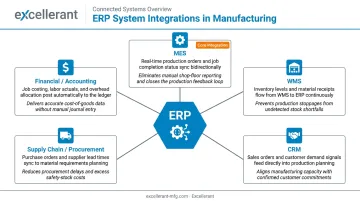
The most common software integrations in a manufacturing environment:
| System | Primary Data Flow | Why It Matters |
|---|---|---|
| MES | Shop floor execution data ↔ ERP | Bridges real-time machine data and production status to business-level records |
| WMS | Inventory, receiving, picking ↔ ERP | Eliminates inventory discrepancies between warehouse and ERP records |
| CRM | Customer orders, quoting ↔ ERP | Connects sales activity to production scheduling and job costing |
| Supply Chain / Procurement | POs, supplier data ↔ ERP | Keeps material availability aligned with production demand |
| Financial / Accounting | Job costing, labor, variance ↔ ERP | Enables accurate cost reporting without manual time entry |
Where Machine Monitoring Fits
Machine monitoring platforms sit at the base of this stack. They collect OEE, downtime, cycle time, and utilization data from individual machines and pass it upward to the MES and ERP. Without this layer, the ERP has no real-time visibility into actual production performance — it only knows what operators have entered.
That gap matters because automation systems can generate sensor readings every second, while an ERP typically needs summarized data — hourly or daily production counts, for instance. MESA describes this translation challenge explicitly: the machine monitoring and MES layers are what bridge raw machine output into ERP-ready records.
Excellerant fits within this stack at multiple points — feeding data directly into the ERP, into an MES that then feeds the ERP, or both, depending on the shop's existing infrastructure. Pre-built integrations cover Epicor, JobBoss, Global Shop Solutions, SAP, and Oracle.
Common Manufacturing ERP Integration Challenges
Legacy Machine Connectivity
This is the most common and most underestimated challenge in job shops and machine shops. Many facilities run CNC equipment that is 20, 30, or even 40 years old — machines that predate modern APIs and cannot connect to any software system without a hardware adapter or protocol translation layer.
Excellerant's universal machine connectivity approach addresses this directly. Modern CNCs connect via Ethernet or WiFi; legacy equipment connects via serial communications, RS-232 adapters, or PLC intermediary devices. The platform acts as a protocol converter — supporting:
- FANUC FOCAS
- HAAS MNET
- Mazak Mazatrol
- MTConnect
- OPC-UA
- Heidenhain TNCremo
This brings any machine, regardless of age or brand, into a connected system without replacing the equipment.
Data Quality and Mapping
When integrating multiple systems, the same data point — a job number, a part number, a machine ID — may be formatted differently in each system. Without careful data mapping before integration begins, records fail to sync, duplicate, or overwrite each other.
Manufacturers should audit and standardize their master data before starting any integration project. Fixing data quality problems after go-live costs far more than resolving them upfront.
Organizational Resistance
ERP integration changes how operators, supervisors, and planners interact with data every day. Employees accustomed to paper-based processes or informal tracking often resist because they haven't been trained on why it matters or how to use it.
Integration projects that skip end-user training frequently achieve technical connectivity but low adoption. The data flows, but people route around it.
Security and Access Control
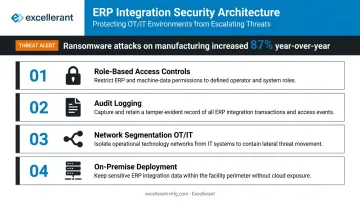
Connecting more systems to the ERP expands the attack surface. Dragos documented 1,693 ransomware attacks targeting industrial organizations in 2024 — an 87% increase over the prior year — with manufacturing accounting for 70% of all ransomware activity tracked in Q4 2024.
Manufacturers handling defense contract data, proprietary part programs, or regulated medical device records need to build security into the integration architecture from the start:
- Role-based access controls limiting who can view or modify data
- Audit logging for all file access and machine data transfers
- Network segmentation separating OT and IT environments
- On-premise deployment options for CUI-bearing data
Excellerant's platform includes Active Directory integration, customizable user permissions, per-machine event logging, and CMMC 2.0/3.0 and NIST 800-171 compliance support — specifically for defense-sector and regulated manufacturers where connected ERP data flows must remain auditable and secure.
Frequently Asked Questions
What is the difference between ERP integration and ERP implementation in manufacturing?
Implementation is the process of deploying and configuring the ERP system itself. Integration is the ongoing work of connecting that ERP to the other systems and equipment it needs to exchange data with. Integration is more technically complex and never fully complete. It evolves as systems, machines, and business processes change.
How do legacy CNC machines connect to a modern ERP system?
Older CNCs without network ports require a hardware adapter, protocol translator (such as an MTConnect agent, RS-232-to-Ethernet bridge, or DNC solution), or wireless connectivity tool to extract machine data and route it to an MES or ERP. This is a distinct step from software-to-software integration and often requires hands-on hardware installation.
What is the most common ERP integration method used by manufacturers?
iPaaS (Integration Platform as a Service) is the most widely adopted method for software integrations — CRM, WMS, supply chain — due to pre-built connectors and lower IT overhead. Machine-level connectivity relies on industrial protocols like MTConnect, OPC-UA, FANUC FOCAS, or DNC adapters, which iPaaS platforms alone cannot provide.
What data flows from the shop floor into an ERP system?
Key data types include:
- Machine utilization and downtime
- Cycle times
- Actual vs. planned production counts
- Job completion status
- Scrap and rework events
- Operator labor time
These feed ERP modules for production scheduling, job costing, and inventory management.
What is the difference between ERP and MES in manufacturing?
An ERP manages business-level data — orders, inventory, finance, scheduling. An MES manages real-time shop floor execution — work instructions, machine status, quality checks. In most integration stacks, the MES sits between the machines and the ERP, passing summarized production data upward.
How long does manufacturing ERP integration typically take?
Timelines vary by complexity. A focused software integration (ERP to CRM, for example) can be completed in weeks. A full shop floor integration — involving legacy machine connectivity, data mapping, and multi-system synchronization — often takes several months to a year, with discovery, hardware installation, testing, and operator training all contributing to that window.