Introduction
Walk through any manufacturing floor at shift change and you'll see the same scene: a supervisor hunting down a machine operator for a status update, a scheduler making delivery promises based on yesterday's numbers, and a maintenance tech who missed a downtime alert posted on a whiteboard.
When communication breaks down in manufacturing, the consequences aren't abstract. Production stalls. Safety protocols don't reach the right people. Customers get inaccurate lead times.
According to Zebra's 2024 Manufacturing Vision Study, only 16% of manufacturing leaders have real-time work-in-progress visibility across their entire production process. That's the core problem this article addresses.
Internal communication software for manufacturers spans two layers: people-facing tools (messaging platforms, employee apps, digital signage) and operational data tools (machine monitoring, production visibility, job tracking). Ignoring either layer leaves gaps that cost time and money. This article breaks down both, explains what to look for in each, and helps you identify where your shop's communication is falling short.
Key Takeaways
- Most manufacturing communication fails because it's built for office workers, not the shop floor
- Four tool categories cover the field: messaging platforms, mobile employee apps, digital signage, and machine monitoring software
- Must-have features: mobile access, push notifications, shift handover support, and ERP/machine data integration
- The right choice depends on shop size, workforce structure, and whether your gap is team communication or shop floor-to-front office visibility
Why Internal Communication Breaks Down on the Manufacturing Floor
The Deskless Worker Problem
Most manufacturing employees don't sit at desks. They work at machines, on assembly lines, in loud environments — without regular access to email or desktop tools. A 2021 Parsable survey of 1,168 U.S. frontline manufacturing workers found that fewer than half had mobile app technology available on the factory floor, and 16% had never used any digital tools to perform their duties.
Traditional communication channels — email, intranet, desktop alerts — don't reach these workers.
The Shift Handover Gap
Shift-based operations create a structural communication failure point. Critical information about machine conditions, job status, or safety incidents communicated during one shift often doesn't transfer to the next. Verbal handoffs get compressed. Paper logs get skipped or misread.
The UK's Health and Safety Executive notes directly that many industrial accidents have occurred due to communication failures at shift handover — most involving planned maintenance work. The 2005 BP Texas City refinery explosion, which killed 15 and injured 180, cited shift turnover communication breakdown as a causal factor.
The Shop Floor-to-Front Office Lag
Production managers making decisions about job scheduling, resource allocation, and delivery commitments are often working from data that's hours or days old. The Manufacturing Leadership Council reported in 2024 that 70% of manufacturers still enter production data manually.
That means by the time numbers reach the front office, conditions on the shop floor have already shifted.
The Workforce Transition
25.2% of U.S. manufacturing workers are now aged 55 or older, according to BLS 2025 data — bringing significant institutional knowledge that needs to be captured and transferred. At the same time, younger workers expect modern digital tools. The same Parsable survey found that more than half of frontline manufacturing workers said a modern digital environment would influence their decision to leave.
Siloed Departments
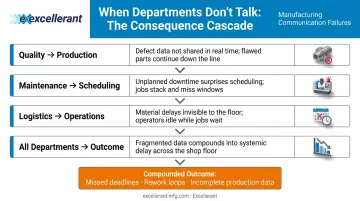
Production, quality, maintenance, and logistics all hold information critical to each other — but most operations lack a shared channel to move it quickly. When that information stays siloed, the consequences stack up fast:
- Quality holds a defect finding that production doesn't see until the next run
- Maintenance flags an at-risk machine that scheduling ignores until it goes down
- Logistics commits to a delivery date based on job status that's already changed
Each gap is a communication failure. Together, they compound into missed deadlines, rework, and decisions made on incomplete data.
Types of Internal Communication Software for Manufacturing Teams
Messaging and Collaboration Tools
Platforms like Slack and Microsoft Teams give supervisors, engineers, and managers fast back-and-forth communication. They work well for office-adjacent roles. But they have real limitations for workers who are machine-side or don't carry smartphones during their shift.
A Microsoft Work Trend Index survey of 9,600 frontline workers found 63% say messages from leadership don't reach them — and 41% of non-management workers say they lack the digital tools to do their jobs effectively. Even where collaboration tools exist, coverage isn't complete.
Employee Apps and Mobile Platforms
Mobile-first employee apps address the deskless worker challenge directly by pushing information to a worker's smartphone. Common use cases include:
- Shift schedules and last-minute changes
- Safety alerts and protocol updates
- Urgent announcements and policy notices
The key differentiator is push notifications: when equipment goes down or a safety protocol changes, workers get an alert in seconds rather than waiting for their next check-in.
Given that 72% of frontline manufacturing workers in the Parsable survey had no concerns about using mobile apps to improve their work, the demand exists. The gap is adoption by employers.
Digital Signage and Shop Floor Displays
Digital signage — mounted screens in high-traffic areas — displays real-time production targets, safety reminders, quality alerts, and schedule updates. This is particularly valuable where workers can't check personal devices during their shift.
NIST MEP documented a case at Lynn Welding, an aerospace and defense manufacturer, where visual management tools drove measurable quality and production improvements. Digital signage builds on what shops already know: the production board — just automated, real-time, and without the whiteboard marker.
Intranet and Document Management Platforms
A centralized intranet provides a single searchable source for safety documentation, SOPs, training materials, and HR information. Binder-based approaches require physical access and manual updates — two things that don't scale. Cloud-accessible platforms ensure every worker sees the current version of every document.
Machine Monitoring and Production Data Platforms
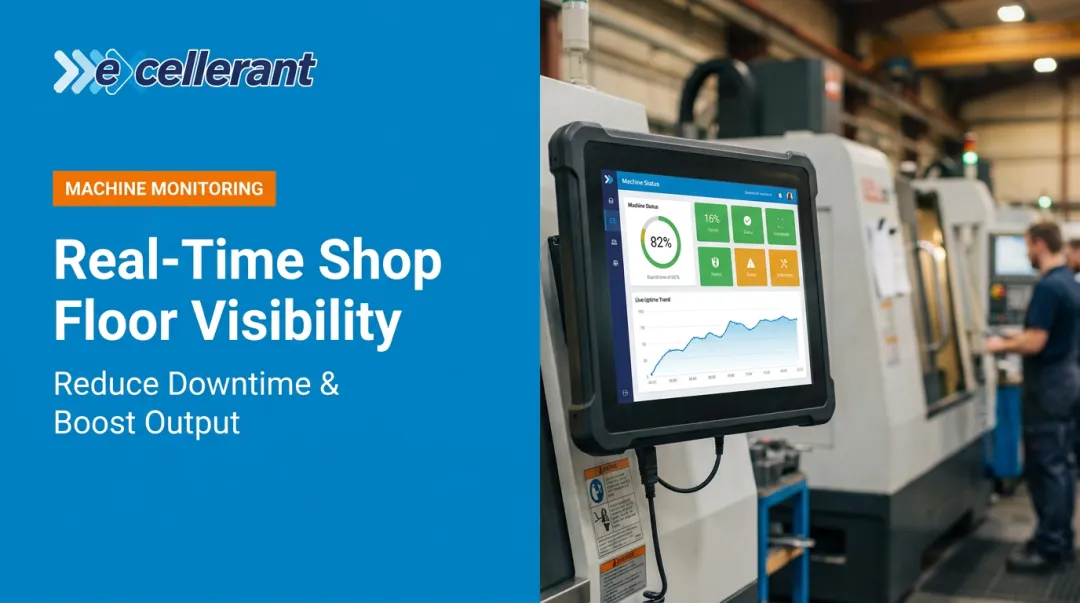
This is the category most internal communication strategies overlook — and it's often where the largest gap exists. Machine monitoring software communicates machine status, job progress, downtime events, cycle times, and OEE data to operators, supervisors, and management in real time. It replaces the manual check-ins and paper-based job tracking that create the shop floor-to-front office lag. That gap — and how to close it — is covered in the next section.
Must-Have Features in Manufacturing Communication Software
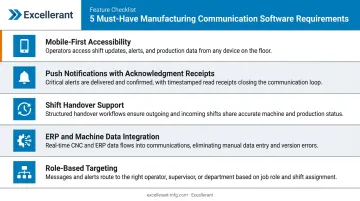
Most communication platforms are built for office environments. On a shop floor — with shift rotations, legacy equipment, and loud, fast-moving conditions — the requirements are different. These are the features that matter:
- Mobile-first accessibility — Designed for touch and small screens from the ground up, not just resized desktop interfaces
- Push notifications with acknowledgment receipts — Delivers time-sensitive alerts (machine outages, safety incidents, schedule changes) instantly, with read confirmation
- Shift handover support — Carries job status and machine condition data across shift boundaries automatically, replacing verbal handoffs
- ERP and machine data integration — Connects to existing ERP, MES, or machine data systems so operators see real numbers, not manually entered guesses
- Role-based targeting — Segments alerts by role, department, or shift so a CNC operator and a plant manager each see only what's relevant to them
The Missing Communication Layer: Real-Time Machine Data and Shop Floor Visibility
Most internal communication strategies focus on people-to-people messaging. They miss the other half: machine-to-human communication — the automated flow of data from CNC machines, production equipment, and shop floor sensors to the people who need to act on it.
Job status, cycle times, downtime codes, and utilization rates are themselves a form of operational communication. When that data flows automatically, supervisors stop chasing status updates. When it doesn't, they spend their shifts doing manual reconnaissance instead of solving problems.
What Real-Time Visibility Actually Changes
This is the gap Excellerant's machine monitoring and IIoT platform is built to address. The platform connects any mix of machines — modern CNCs via ethernet or WiFi, legacy equipment via RS-232 serial connections, BTR machines, PLC-controlled equipment — to a unified real-time dashboard accessible from any device, with no per-seat licensing fees.
Supported machine protocols include:
- Fanuc FOCAS
- HAAS MNET
- Mazak Mazatrol
- MTConnect
- OPC-UA
- Heidenhain TNCremo
For machines that predate network connectivity, serial adapters and PLC intermediary devices bring them onto the same platform as newer equipment. Shops running 20-, 30-, and 40-year-old machines alongside modern CNCs can see all of them in a single view.
The practical result for the front office: instead of calling the floor for job status, a scheduler can pull up the Shop Summary Dashboard and see exactly where every job stands — part counts, cycle times, current machine states, and intelligent schedule forecasts that update in real time as conditions change.
McMellon Bros., a 36-employee CNC shop, put it directly: "ERP has become a more powerful tool. I can pull it up at any time and find out what's happening with a customer's parts. If we're not on pace, we can fix it." Dan Villemaire from C&M Machine Products reported that ERP data accuracy improved "exponentially" after deployment, enabling better cost accuracy and increased customer value.
From Reactive to Proactive
That same visibility feeds directly into scheduling. When Excellerant's finite dynamic scheduling system connects to real-time machine data, schedule changes triggered by unplanned downtime or performance variation propagate automatically — production plans update against actual shop-floor conditions rather than static assumptions. Supervisors get alerts about threats to planned production levels before they become missed deadlines.
The result: production teams spend less time reacting to surprises and more time preventing them.
How to Choose the Right Communication Software for Your Manufacturing Team
Start with Your Actual Gap
Before evaluating platforms, audit where information is currently lost. Common failure points:
- Shift-to-shift handoffs (verbal, paper-based, or skipped entirely)
- Shop floor-to-management visibility (manual data entry, delayed reporting)
- Safety protocol distribution (outdated binders, no confirmation of receipt)
- Cross-department coordination (maintenance, quality, and production operating in separate silos)
Pick a tool that fixes your specific failure point. If a process is already working, the software shouldn't touch it.
Match the Tool to Your Workforce Structure
A 20-person job shop and a 500-person multi-shift plant have different needs:
| Shop Profile | Primary Need | Recommended Starting Point |
|---|---|---|
| Small job shop (under 50 employees) | Real-time job and machine visibility | Machine monitoring platform + shared dashboard |
| Mid-size manufacturer (50-250) | Both visibility and workforce communication | Machine monitoring + mobile employee app |
| Large multi-shift plant (250+) | Layered approach | Employee app + digital signage + operational data platform |
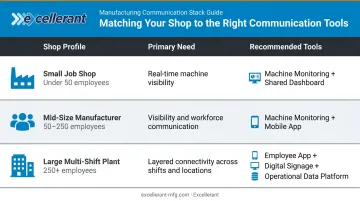
For smaller operations, a machine monitoring platform that feeds real-time data to a shared dashboard often delivers the most immediate ROI, eliminating the manual status checks that consume supervisor time every day.
Evaluate Integration and Legacy Equipment Compatibility
Once you've matched a tool to your workforce size, the next filter is technical fit. More than 70% of North American manufacturing equipment is over 20 years old, according to IndustryWeek. Any platform that requires modern, network-ready machines excludes a large portion of most shops' floors.
Key questions to ask any vendor:
- Does this integrate with our ERP (SAP, Epicor, JobBoss, Global Shop Solutions)?
- Can it connect to our older machines — RS-232, serial, legacy controls?
- What protocols does it support natively versus through workarounds?
- What are the ongoing licensing costs as we add users and machines?
Vendors who can't answer these directly — or who require workarounds for legacy connectivity — are likely to create integration headaches down the line.
Frequently Asked Questions
What is internal communication software for manufacturing?
It's the category of digital tools — messaging platforms, employee apps, digital signage, and machine monitoring systems — that keep information flowing reliably across workers, supervisors, and management. In manufacturing, that includes both people-facing communication and the automated flow of operational data from equipment to decision-makers.
How does poor internal communication affect manufacturing operations?
Poor communication causes missed shift handoffs, delayed responses to machine downtime, inaccurate production forecasts, safety risks from outdated protocols, and higher employee turnover driven by disengagement. Each failure point has a direct cost in rework, missed deliveries, or safety incidents.
What features should I look for in manufacturing communication software?
Prioritize: mobile-first accessibility, push notifications with acknowledgment receipts, shift handover support, ERP and machine data integration, and role-based message targeting. Every one of these addresses a failure mode specific to manufacturing environments.
How is manufacturing communication software different from general employee communication tools?
Manufacturing-specific tools must account for deskless workers, noisy shop floor environments, shift-based schedules, safety-critical alerting, and machine data integration. General office platforms like Slack or Teams aren't designed for any of these requirements, which is why 63% of frontline workers report that leadership messages don't reach them even when those tools are deployed.
Can communication software integrate with CNC machines and legacy equipment?
Yes. Platforms like Excellerant's connect any mix of machines regardless of brand, age, or protocol — RS-232 serial machines, BTR equipment, and modern CNCs with ethernet connectivity all feed into a single unified platform. That makes machine-generated data a core part of your shop's communication and visibility system.
How do I measure whether my manufacturing communication software is working?
Track downtime response time, shift handover accuracy, ERP data accuracy, and employee engagement scores. Excellerant's built-in analytics benchmark OEE, downtime, and scheduling performance run-to-run, week-to-week, and year-to-year, giving you concrete before-and-after data on what's actually improving.