Choosing the wrong DNC drip feed unit makes the problem worse — data transmission errors, speed mismatches, and communication failures can stall production as reliably as the memory problem itself. The right unit streams programs block-by-block directly to the control during execution, eliminating memory limits entirely.
This guide covers what DNC drip feed units are, how they work, the three main types available, and the six factors that should drive every selection decision.
Key Takeaways
- A DNC drip feed unit streams G-code line-by-line from a host computer to a CNC machine, bypassing memory limits entirely
- Essential for older controls, large CAM programs, or multi-axis toolpaths that exceed machine buffer capacity
- Key selection factors: communication protocol, transfer speed, machine count, version control, and environment ruggedization
- Units range from standalone RS-232 hardware adapters to full software platforms with wireless connectivity
- Matching the unit to your machine mix and communication protocols matters more than chasing maximum features
What Is a DNC Drip Feed Unit?
A DNC (Direct Numerical Control) drip feed unit is a hardware device, software system, or combined solution that transmits CNC program data incrementally from a computer to a machine control in real time. The machine executes each block of G-code as it arrives rather than storing the full program in memory first.
Haas Automation's operator documentation defines DNC mode as allowing large CNC programs to be "drip fed" into the control for execution via RS-232, with no limit to program size in that mode. Modern Machine Shop describes it as a receiving control downloading one section while machining from another as memory becomes available — a practical description of the buffer-and-execute cycle that makes drip feeding work.
The terminology varies by control manufacturer:
- Haas — "DNC" for RS-232 drip feed, "FNC" for USB drip feed
- Siemens SINUMERIK 840D sl / 828D — "Execution from external"
- Mitsubishi MELDAS 60/60S — "Tape mode"
- Fanuc — supports large program management and drip feeding via RS-232 remote mode
The underlying mechanism is the same regardless of what a control manufacturer calls it. Setup parameters vary by machine, so the machine manual is always the first place to confirm support and locate required communication settings.
How a DNC Drip Feed Unit Works
The data flow follows a consistent cycle:
- Host PC holds the full program — the NC file stays on the computer, not in machine memory
- DNC unit establishes a connection — via RS-232 serial, Ethernet, USB-to-serial, or wireless
- Control buffers a small segment — the control's internal buffer holds a few blocks at most
- Control signals readiness — handshaking (XMODEM, XON/XOFF) tells the DNC unit the control can accept more data
- Next block transmits — the unit sends the next segment
- Cycle repeats until the program ends — the machine never needs to store more than a few lines at a time
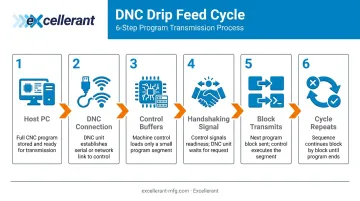
Haas documentation notes that DNC mode operates "one block at a time without look-ahead" — with an exception for cutter compensation, which requires three motion-command blocks buffered in advance. Siemens uses a FIFO-style "reloading memory" in dynamic NC memory with a buffer size set by machine parameter MD18360.
Benefits of DNC Drip Feeding
The core operational benefits:
- Eliminates program size limits — the machine runs any file regardless of control memory
- Reduces manual data entry errors — programs transmit directly from the programmer's PC
- Enables complex toolpaths — multi-axis and high-density surfacing programs run without memory upgrades
- Keeps the program source at the PC level — one edit on the host file takes effect on the next run, no re-loading required
Types of DNC Drip Feed Units
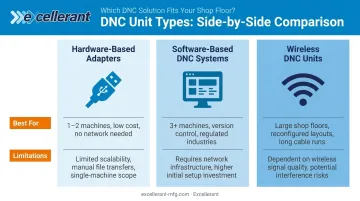
Three categories cover the market. Each solves a different version of the same problem.
Hardware-Based Adapters
Standalone devices — USB-to-RS-232 adapters or dedicated DNC controllers — that connect directly between a PC or USB storage device and the machine's serial port. Common for single-machine setups or shops without a network.
Best for: One or two machines, minimal IT infrastructure, tight budget.
Limitations: One-to-one machine connections, cable-length constraints tied to baud rate, no centralized file management.
Software-Based DNC Systems
PC applications that manage file transfer, drip feeding, and communications across multiple machines simultaneously. These provide centralized program management, version control, and logging from a single interface.
Platforms like CIMCO DNC-Max support parallel, RS-232, RS-422, Ethernet, and wireless Ethernet connections. FactoryWiz DNC manages CNC part programs across the shop floor and ensures each machine runs the correct revision whether connected via RS-232 or Ethernet.
Best for: Three or more machines, shops with revision-tracking requirements, regulated industries (aerospace, defense, medical).
Limitations: Requires server infrastructure and initial configuration.
Wireless DNC Units
Systems that replace RS-232 cabling entirely by transmitting program data over Wi-Fi or RF to a receiver at the machine. Excellerant's founder John Carpenter developed the world's first wireless DNC connection to a machine tool in 2001, and Modern Machine Shop documented the technology in production use by 2002. Today, wireless DNC supports standard Wi-Fi infrastructure, making it far easier to deploy than early RF-dependent systems.
Best for: Large shop floors, frequently reconfigured layouts, shops with long cable runs.
Limitations: Requires RF environment planning, compatible receiver at each machine, and potentially a site survey in metal-dense or shielded environments before deployment.
Six Factors That Drive DNC Selection
No single unit is universally optimal. The right choice depends on machine age, control type, shop layout, program complexity, and how DNC fits into your broader workflow. Each factor below connects directly to measurable shop outcomes: uptime, throughput, error rates, and scalability.
1. Communication Protocol Compatibility
The machine control's native communication interface must match what the DNC unit supports. A mismatch means no connection at all.
Many shops run a mixed fleet — some machines RS-232-only, newer ones with Ethernet support. The DNC unit or software platform must handle both without requiring separate infrastructure for each.
Key metrics this affects:
- Connection success rate across machine types
- Time-to-setup per machine when onboarding new equipment
- Whether the shop can consolidate DNC management under one system
Verify the control's supported interface in the machine manual under "Serial Communications," "RS-232," or "DNC" before evaluating any unit.
2. Machine Memory and Maximum Program Size
The primary driver for drip feeding is insufficient machine memory. FANUC's current controls offer up to 8 MB internal nonvolatile storage, up to 2 GB via ATA or Compact Flash, and a Fast Data Server option with up to 4 GB. Haas includes 1 GB standard program memory on current machines. Older controls have far less.
This factor also determines whether you need true drip feed (real-time streaming during execution) versus simple file transfer (sending the full program before execution begins). Confusing the two can lead to purchasing a unit that doesn't solve the actual problem:
| Approach | When to Use |
|---|---|
| File Transfer | Program fits within machine memory; machine runs independently |
| Drip Feed | Program exceeds available memory; machine needs real-time streaming |
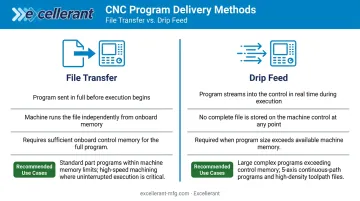
Check your control's memory spec before selecting an approach — the table above tells you which purchase you actually need to make.
3. Transfer Speed and Baud Rate
RS-232 baud rate determines how quickly G-code blocks reach the control. If the machine's feed rate demands faster block processing than the baud rate allows, the control's look-ahead buffer empties and the machine decelerates or stops. Haas warns directly that "the data rate must keep up with block execution or the tool may stop in a cut."
Common settings for RS-232 DNC:
- Haas (verified): 19,200 baud, no parity, 8 data bits, XMODEM
- Fanuc (parameter-dependent): 4,800, 9,600, or 19,200 baud — confirm in your specific control manual
Cable capacitance also constrains baud rate. Analog Devices notes that RS-232 specifications evolved from a 15-meter cable-length limit to a 2,500 pF maximum load capacitance specification — meaning cable quality, shielding, and routing all affect the practical limit, not just physical length.
Ethernet and wireless DNC largely eliminate this constraint, making them preferable for shops where programs are dense or cycle times are time-critical.
4. Number of Machines and Scalability
A shop running one or two machines can use a hardware adapter cost-effectively. As machine count grows, managing individual adapters — separate cables, separate file copies, separate configurations — costs hours of operator time weekly.
A software-based DNC platform with multi-port or network architecture lets one operator manage all machines from a single interface, drip-feed multiple machines simultaneously, and push program updates across the floor at once.
Operational metrics at stake:
- Operator touchpoints required per program change
- Time lost moving files manually between machines
- Version mismatch risk when different machines run different revisions
5. Software Integration and Version Control
DNC units or systems that integrate with CAM software, ERP platforms, or MES systems tie program transmission directly to job orders — ensuring the right revision runs at the right time. For aerospace, defense, and medical device manufacturers, this closes an audit and quality gap that can't be left open.
Version control within the DNC system — logging which program version ran on which machine at what time — reduces rework by catching mismatches before they produce out-of-tolerance parts. ISO 9001, AS9100, and ISO 13485 all impose configuration and change-control requirements that a DNC platform with audit logging directly supports.
Look for these capabilities when evaluating platforms:
- One-click revision compare
- Per-machine event logging
- Rev-Lock-Load option that prevents a machine from loading a new program before returning the current one
6. Wired vs. Wireless Configuration
RS-232 cable runs over approximately 50 feet at high baud rates are susceptible to signal degradation from cable capacitance. Shops with long runs or frequently reconfigured floor layouts face chronic communication errors with wired setups.
Wireless DNC eliminates cable routing entirely. However, it requires:
- A stable RF environment
- Proper wireless access point placement
- A site survey in metal-dense or heavily shielded environments before deployment — per NIST's Guide to Industrial Wireless Systems Deployments and Rockwell Automation guidance on wireless equipment placement
This factor is where shop floor layout and machine density drive the decision more than any specification sheet.
How Excellerant Can Help
Excellerant's roots in DNC go back to 1991, when the company (then Macdac Engineering) began as a reseller and installer of Easytalk, an MS-DOS-based DNC protocol for machine tools. Founder John Carpenter, trained in electronics by the US Navy, joined in 1997.
Under Carpenter's leadership, the team developed the world's first wireless DNC connection to a machine tool — demonstrated in 2001 with Comtrol Corporation and Enterasys Networks. That milestone led to the establishment of WireFreeCNC in 2002 and a cover feature in Modern Machine Shop in 2006.
Excellerant's current DNC software platform covers all six selection factors under one system:
- Universal machine connectivity — RS-232 serial, wired Ethernet, and wireless WiFi, including wireless adaptors for legacy machines, all managed within a single software instance
- Simultaneous drip-feed to multiple machines — no more one-at-a-time file loading that stalls production
- ISO 9001 and CMMC-compliant version control — one-click G-code revision compare, per-machine event logging, and the optional Rev-Lock-Load feature for one-program-per-machine compliance
- No per-machine or per-seat licensing — unlimited machine connections and unlimited browser-based client access, with no added fees as the shop grows
- ERP/MES integration — bi-directional data sync with SAP, Oracle, Epicor, JobBoss, Global Shop Solutions, and others via open API
- USA-based technical support from a team with three decades of hands-on machine tool networking experience
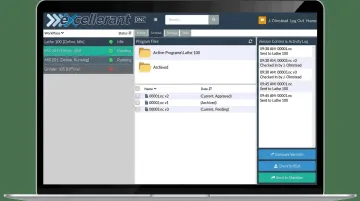
The DNC software licenses as a standalone solution. Shops can add machine monitoring, OEE analytics, and finite scheduling later, all running on the same IIoT hardware infrastructure already in place.
Conclusion
The right DNC drip feed unit is the one that matches your communication protocol, transfer speed, scalability, and integration requirements to what your shop floor actually demands. A hardware adapter handles one machine's memory limitation. A software-based or wireless DNC system addresses how programs flow across your entire operation.
That match doesn't stay fixed. As machine fleets grow, CAM programs get larger, and quality standards tighten, your DNC infrastructure needs to keep pace. What works for a three-machine shop today can become a bottleneck at ten machines. Audit your current setup against the six factors in this guide — and if gaps exist, connect with a DNC specialist like Excellerant before the next program-transfer failure holds up a critical job.
Frequently Asked Questions
What is CNC drip feed?
CNC drip feed transmits a G-code program from a computer to a CNC control one block at a time during execution, so the machine runs each instruction as it arrives rather than loading the full file into memory first. It's used when the program is too large for the control's onboard storage capacity.
What is the difference between CNC and DNC?
CNC refers to the machine tool and its onboard control system. DNC refers to the method by which programs are transferred from an external computer to one or more CNC machines. DNC is a communication and program management layer that sits above the CNC control, not a separate machine type.
Can you drip feed a CNC machine wirelessly?
Yes. A wireless DNC system replaces the RS-232 cable with a Wi-Fi or RF connection between the host PC and a receiver unit at the machine. The control still uses its standard RS-232 interface, but the signal travels wirelessly for most of the distance — eliminating cable-length and interference constraints.
What baud rate should I use for DNC drip feeding?
Haas officially recommends 19,200 baud, no parity, 8 data bits, and XMODEM for DNC. Fanuc baud rates are parameter-dependent — verify in your specific control manual. If the machine pauses during drip feed, the baud rate is likely too low; a line delay adjustment or a serial device server (such as a Moxa NPort) typically resolves it.
Does drip feeding work with all CNC controls?
Most modern and legacy controls support drip feed mode, often labeled DNC mode, TAPE mode, or buffered input. Setup procedures vary by manufacturer — check your machine manual under "DNC," "Serial Communications," or "RS-232" to confirm support and locate the required parameters.
What is the difference between DNC file transfer and DNC drip feeding?
File transfer sends the complete NC program into machine memory before execution begins — the machine then runs independently. Drip feeding streams the program in real time during execution so the machine never stores the full file. Drip feeding is required when the program exceeds available machine memory; file transfer is sufficient when it fits within the control's storage capacity.