Here's the challenge: connecting legacy machines to IoT isn't one thing. A 2005 CNC with an RS-232 port has completely different options than a 1980s hydraulic press with purely mechanical controls. Pick the wrong method, buy the wrong hardware, and you've wasted budget on incompatible equipment.
This guide covers how to assess your machines, choose the right connection method, execute the installation, and avoid the mistakes that derail most projects — including the cybersecurity ones that manufacturers consistently underestimate.
Key Takeaways
- Legacy machines fall into two categories: primitive (no built-in communications) and intelligent (RS-232, RS-485, Modbus, or proprietary CNC protocols) — each requires a different connection approach
- You don't need to replace machines; external sensors, industrial gateways, and serial adapters can all achieve real-time data collection
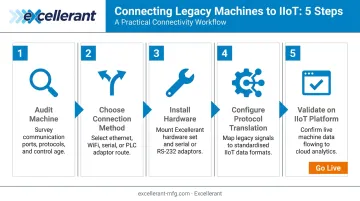
- The five steps: audit your machine → choose a connection method → install hardware → configure protocol translation → validate on your IIoT platform
- Start narrow: McKinsey found 70% of Industry 4.0 pilots fail to capture value when scope is too broad — one machine, a focused metric set
- Each machine added to a network expands your attack surface; treat cybersecurity as a day-one requirement, not an afterthought
Understanding Your Legacy Machine Type Before You Begin
Before buying anything, you need to know what you're working with. Misidentifying machine type is the fastest way to purchase incompatible hardware.
Most legacy machines fall into one of two categories: those with no built-in communications at all, and those that already have serial or protocol-based ports waiting to be used.
Primitive Machines (No Built-In Communications)
These machines have no integrated sensors, no serial ports, no PLCs, and no communications protocols. Common examples include older hydraulic presses, compressors, pumps, and manual machine tools from the 1980s or earlier.
The machines themselves produce no data output — but they can still be connected. Externally attached sensors measure physical behavior (vibration, current draw, temperature) and infer operating state. The sensors report what the machine cannot.
Intelligent Machines (With Existing Communication Ports)
These machines have RS-232, RS-485, Modbus RTU/TCP, or proprietary CNC protocols built in. Many CNC machine tools already have RS-232 ports that were used for DNC (Direct Numerical Control) file transfer — downloading part programs from a PC to the machine controller.
According to Modern Machine Shop, many older CNC controls run at 4,800 baud or slower through those same RS-232 ports. That same port, with the right software, can stream real-time machine data without any hardware modification to the machine.
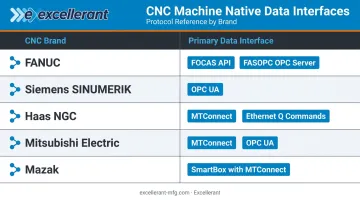
Common CNC brands and their native protocols:
| CNC Brand | Primary Data Interface |
|---|---|
| FANUC | FOCAS API / FASOPC OPC Server |
| Siemens SINUMERIK | OPC UA (Access MyMachine) |
| Haas NGC | MTConnect (port 8082) / Ethernet Q Commands |
| Mitsubishi Electric | NC Machine Tool Connector (MTConnect / OPC UA) |
| Mazak | SmartBox with MTConnect |
Step-by-Step Guide: How to Connect Legacy Machines to IoT
Step 1: Audit Your Machine's Communication Capabilities
Physically open the control cabinet and inspect for existing ports:
- RS-232 (DB-9 or DB-25 connector)
- RS-485 (terminal block or DB-9)
- Ethernet (RJ-45)
- USB or 4–20mA analog outputs
Document the CNC control brand and model number — FANUC, Siemens, Haas, Mazak, Mitsubishi, Heidenhain. This determines which protocols and adapters are compatible. If no communication ports exist at all, note available physical attachment points: motor housings, drive shafts, power lines.
Step 2: Choose Your Connection Method
Based on your audit, select one of three approaches:
- External sensor retrofit — for primitive machines with no serial ports or PLCs
- Industrial gateway / protocol translation — for machines with serial ports or PLCs
- Direct DNC / serial-to-IIoT integration — for CNC machines with existing RS-232 output
See the "Choosing the Right Connection Method" section below for full detail on each.
Step 3: Procure and Install Hardware
For sensor-based retrofits:
- Vibration sensors for motors and bearings
- Current transformers for power consumption monitoring
- Temperature sensors for thermal monitoring
- Verify all sensors are rated for your facility's environmental conditions
For gateway-based approaches:
- Select an industrial IoT gateway that supports your machine's native protocol on the input side (Modbus RTU, RS-232, RS-485) and a modern protocol on the output side (MQTT, OPC-UA, or HTTPS). Examples include the Moxa AIG-301 (Modbus RTU/TCP in, MQTT out) and the HMS Anybus X-gateway IIoT (Modbus TCP server to OPC UA/MQTT)
For CNC machines with serial ports: A DNC networking solution or IIoT adapter connects to the existing RS-232 port to capture machine status, part counts, cycle data, alarm codes, and program execution data in real time. Excellerant's machine connectivity platform supports this across any CNC brand — FANUC FOCAS, Haas MNET, Mazak Mazatrol, MTConnect, OPC-UA, and Heidenhain TNCremo — without requiring machine modification.
Step 4: Configure Protocol Translation and Data Flow
Set up the gateway or edge device to translate the machine's native format into something your IIoT platform can ingest. For example, Modbus RTU register values are converted into MQTT JSON messages for cloud processing.
Critical rule: don't collect everything. Focus on the metrics most relevant to your goal — for OEE tracking, that might be spindle state, cycle time, and alarm codes. For predictive maintenance, current draw and vibration. Capturing every available variable creates data overload that makes analysis impossible.
Configure any applicable preprocessing:
- Filtering — remove noise and spurious readings
- Aggregation — average temperature over 30-second windows
- Transformation — convert raw sensor values into engineering units
Step 5: Connect to Your IIoT Platform and Validate
Route the processed data stream to your chosen platform — MES, ERP connector, cloud dashboard, or standalone monitoring software — and confirm data arrives at the expected interval and format.
Run the machine through a known production cycle and verify the platform captures expected state transitions accurately: idle → running → alarm → cycle complete.
Establish baselines during this phase. Use these baselines as reference points for anomaly detection, predictive maintenance alerts, and OEE calculation going forward.
Choosing the Right Connection Method
No single method works for all legacy machines. Here's when each approach applies.
Sensor-Based Retrofit (Primitive Machines)
Best for: Machines with no serial ports or PLCs.
Attach external IoT sensors to the machine's physical components to infer operating state from vibration, current draw, or temperature.
- Non-invasive and low upfront cost — no machine modification required
- Data is inferred, not direct; detecting subtle state differences (cutting vs. idle vs. fault) may require additional signal processing
Industrial Gateway / Protocol Translation (PLC and Serial Machines)
Best for: Machines with RS-232, RS-485, Modbus, or proprietary PLC outputs.
An industrial gateway sits between the machine's controller and the network, reading native data and translating it to MQTT, OPC-UA, or REST for cloud ingestion.
RS-485 is particularly common in older industrial machines. Wireless RS-485 transceivers (operating at 900 MHz or 2.4 GHz) can eliminate the need for new cable runs across the shop floor. Keep in mind that wireless performance in environments with large metal structures and dense machinery will differ significantly from line-of-sight vendor specifications.
- Translates proprietary protocols to cloud-ready formats (MQTT, OPC-UA, REST)
- Wireless transceivers reduce installation complexity on large shop floors
- Real-world RF range may fall short of vendor specs in metal-heavy environments
Direct DNC / Serial-to-IIoT Integration (CNC Machine Tools)
Best for: CNC machine tools with existing RS-232 ports already used (or designed) for DNC program file transfer.
Specialized CNC monitoring software reads machine status, alarm codes, part counts, and cycle data through the same serial connection — no machine modification required. This provides controller-native data rather than inferred sensor data.
For shops already running DNC, this approach adds monitoring without adding hardware. Excellerant's platform, for example, runs NC file management and real-time machine data collection through the same connection — so program management and performance monitoring don't require separate systems.
- Controller-native data (no inference required)
- No machine modification needed if RS-232 is already in use
- DNC file transfer and monitoring share the same hardware layer
Key Variables That Affect Connection Success
Machine Communication Protocol Compatibility
Protocol mismatch is the most common cause of failed integrations. A gateway purchased for Modbus TCP cannot communicate with a machine that only outputs RS-232 serial. Verify compatibility at the register or command level — not just at the port type.
For CNC machines specifically, confirm whether the control uses:
- Standard G-code responses
- Proprietary macro outputs (FANUC macro variables, Haas Q codes)
- MTConnect (open standard, increasingly common on machines made after 2008)
Network Infrastructure and Signal Integrity
NIST research identifies factories as challenging wireless environments due to metallic surfaces, obstructions, multipath propagation, and electromagnetic interference from cutting equipment and variable-frequency drives.
Practical guidance:
- Wired Ethernet is the most reliable option where cable routing is feasible
- 900 MHz industrial radio penetrates metal structures better than 2.4 GHz Wi-Fi
- Treat vendor wireless range specifications as line-of-sight datasheet numbers, not shop-floor performance guarantees
- Budget time for signal testing before finalizing gateway placement
Data Security Configuration
Security is where manufacturers most frequently cut corners, and the consequences are measurable. Deloitte's 2025 smart manufacturing survey of 600 executives found 91% of manufacturing organizations experienced at least one cybersecurity breach. Dragos documented 1,693 ransomware attacks targeting industrial organizations in 2024 — an 87% year-over-year increase.
Every machine added to a network becomes a potential entry point.
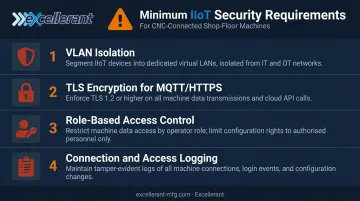
Minimum security requirements:
- Isolate machines on a dedicated VLAN, separated from the corporate network
- Encrypt all data transport using TLS for MQTT or HTTPS
- Restrict IIoT platform access by role, not just by shared password
- Log all machine connections and data access events for audit trails
For defense contractors and shops handling Controlled Unclassified Information in CNC program files, verify that any platform you adopt explicitly supports CMMC 2.0 and NIST 800-171 requirements — not just general "security features." Excellerant's platform is designed around those frameworks specifically.
Common Mistakes When Connecting Legacy Machines to IoT
Most legacy IoT failures trace back to four avoidable mistakes — and catching them early saves both budget and production downtime.
- Buying the wrong gateway before auditing the machine — a Modbus TCP gateway on a machine with RS-232-only output is the single most expensive mismatch in legacy IoT projects
- Capturing every available variable instead of starting with metrics tied to a defined goal, such as OEE, predictive maintenance, or cycle time reduction
- Rolling out shop-wide before running a single-machine pilot that validates hardware compatibility, data quality, and platform integration
- Skipping IT/OT security configuration — a new network-connected gateway on a previously air-gapped machine needs firewall rules, VLANs, or VPN setup to avoid exposing the broader plant network
Conclusion
Connecting legacy machines to IoT is achievable across virtually any machine type — from primitive presses with zero communications capability to fully-featured CNC controllers with proprietary data APIs. The connection method has to match what the machine actually supports, not an idealized version of it.
The most successful integrations share three traits:
- A thorough machine audit before purchasing any hardware
- A focused set of data points tied to a specific business outcome
- A staged rollout that starts with one machine before expanding
If your shop has a mix of machine ages, brands, and protocols — which most do — working with an experienced IIoT integration partner saves significant time and avoids costly compatibility mistakes. Excellerant's team has been networking CNC machine tools since 1991, developed the world's first wireless DNC connection in 2001, and today supports any mix of legacy and modern machines on a single platform. Schedule a demo or call 860-870-5544 to discuss your specific machine inventory.
Frequently Asked Questions
Can legacy machines with no serial ports or PLCs be connected to IoT?
Yes. Externally attached sensors — vibration, current transformers, temperature — capture machine behavior without any built-in communications port. That sensor data feeds through an edge device or IoT gateway to your monitoring platform. The machine never needs to "know" it's connected.
What communication protocols do legacy CNC machines typically use?
The most common are RS-232 serial, RS-485, and Modbus RTU/TCP. Older CNC controls from FANUC, Siemens, Haas, and Mitsubishi each have proprietary data interfaces (FOCAS, OPC UA, MNET, and MTConnect respectively) — with MTConnect serving as the open standard for machines made after roughly 2008.
How much does it cost to connect a legacy machine to IoT?
Cost varies widely by machine type and approach. A simple sensor-and-gateway setup can run a few hundred dollars in hardware, while full CNC serial integration with platform software typically runs into several thousand. Request a scoped quote based on your actual machine inventory and mix of protocols for an accurate figure.
Do I need to stop production to retrofit legacy machines for IoT connectivity?
Most sensor-based and gateway installations complete with minimal or no production downtime, since hardware attaches externally. Serial or DNC connections to CNC controllers may require a brief controlled shutdown to safely access the control cabinet.
What is the difference between DNC connectivity and IIoT connectivity for CNC machines?
DNC transfers CNC program files to the controller; IIoT reads real-time machine status and operational data back from it. Platforms like Excellerant's handle both functions through the same hardware simultaneously.
How long does it typically take to connect a legacy machine to an IoT platform?
A single-machine pilot with sensor or gateway hardware often completes in one to three days. Full integration — including data validation, platform configuration, and baseline establishment — typically takes one to three weeks depending on machine complexity and network readiness.