The challenge is that comparing revisions sounds deceptively simple. In practice, the accuracy of any comparison depends entirely on having the right system, consistent naming conventions, and a tool that can actually parse what changed. A gap in any of those areas can make the comparison meaningless — or worse, give you false confidence that nothing changed when something did.
This guide covers exactly how to compare CNC program revisions step by step, when comparison should be triggered, what you need in place before you start, the variables that affect accuracy, and the mistakes that consistently cause problems on the shop floor.
Key Takeaways
- Comparing CNC program revisions means verifying line-by-line what changed between two versions of a G-code file before it reaches a machine.
- Run a comparison any time a program is edited, re-approved, retrieved from backup, or transferred from an outside source — not only when a change is suspected.
- Reliable comparison requires a centralized program library, consistent naming conventions, and a G-code-aware comparison tool.
- The most common failure: treating revision comparison as an afterthought rather than a defined step in the change workflow.
- DNC software with built-in revision compare cuts manual effort and removes the human error that comes with eyeballing G-code diffs. Excellerant's one-click compare feature handles this automatically.
How to Compare CNC Program Revisions
Each step in the revision comparison process serves a specific control function. Skip one, and an undetected change can reach the machine.
Step 1: Establish Which Revisions to Compare
Before anything else, identify your two files clearly:
- Baseline revision — the last approved, production-validated version
- Candidate revision — the newly modified or incoming version
Verify that file names, revision numbers, or timestamps match your shop's naming convention. Misidentified files invalidate the entire comparison before it begins.
Step 2: Retrieve Both Versions from Your Revision Control System
Pull both files from your centralized program library or DNC system only. Avoid comparing files from local desktops, USB drives, or email attachments — these may not reflect the true production-approved state.
After retrieval, confirm neither file has been modified: check the last-modified date and file size in the metadata before proceeding.
Step 3: Run the Comparison
Use a tool built for the job:
- A dedicated diff utility
- Your CAM system's compare feature
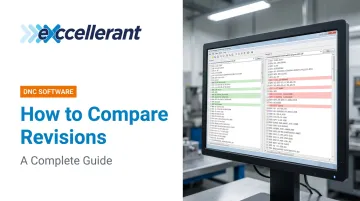
- A DNC platform with built-in revision compare (Excellerant's DNC software offers one-click revision compare that highlights G-code differences in the browser)
Configure the tool to compare functional code, filtering out header comments or machine-specific formatting characters that differ visually but not functionally.
Step 4: Interpret the Results
Review flagged differences by risk category:
| Change Type | Risk Level |
|---|---|
| Tool path or geometry changes | High |
| Feed rate, speed, or offset changes | Medium |
| Comment or formatting changes | Low / None |
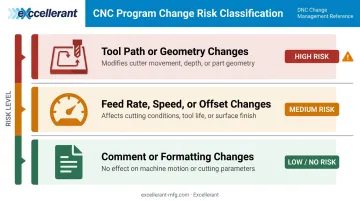
Every change must be intentional and documented in the engineering change order (ECO) or change log. If a change has no documentation, treat it as a discrepancy and escalate it immediately.
Step 5: Approve and Document the Outcome
Record the comparison result with:
- Who performed the comparison
- Which system was used
- Which revisions were compared
- The outcome: approved, rejected, or pending review
This record is required for ISO 9001, AS9100, and CMMC audit trails. Once approved, transmit the correct revision directly from your program library to the machine via your DNC system. Manual file copies that bypass this step defeat the entire process.
When Should You Compare CNC Program Revisions?
Revision comparison should be a defined trigger event in your change management workflow, not a call left to individual operators.
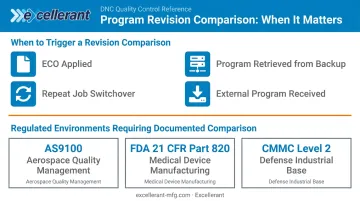
Primary trigger scenarios:
- An engineering change order (ECO) has been applied to a program
- A program is retrieved from backup and reloaded into production
- A machine switches from one job to a repeat job
- A supplier or customer sends an updated program file
Situations where comparison becomes especially critical:
- Regulated environments such as aerospace (AS9100 clause 8.5.1.1), medical device manufacturing (FDA 21 CFR Part 820), and defense contracting (CMMC Level 2 controls CM.L2-3.4.3 and CM.L2-3.4.4) all mandate validation, version control, and documented change approval for production software programs.
- High-value materials like titanium, Inconel, and medical-grade alloys offer no margin for a bad run.
- Complex multi-axis programs, where a single changed line can have disproportionate downstream effects.
What You Need Before Comparing CNC Program Revisions
The best comparison tool produces meaningless results if the files feeding into it aren't properly controlled. Preparation is what makes the comparison trustworthy.
System and Software Requirements
- A centralized DNC or program management system with version history and access controls. Standalone file folders with no version tracking make it impossible to confirm you're comparing the right files.
- A G-code-aware comparison tool. Generic text diff tools flag cosmetic differences (whitespace, line breaks, comment blocks) alongside functional ones, burying real changes in noise.
Excellerant's DNC software stores all programs in a centralized library with per-machine event logging, user permissions, and Active Directory integration, so access stays limited to authorized operators and programmers.
Revision Control Conventions
- Consistent file naming and revision numbering enforced shop-wide (for example:
PART-NUMBER_RevA.nc,PART-NUMBER_RevB.nc). Without this, there's no reliable way to identify which version is which. - A change log or ECO process documenting what changed, why, who authorized it, and when.
Cross-referencing comparison output against intended changes is what gives the results meaning.
Key Factors That Affect Comparison Accuracy
Even with the right tools, these variables directly control whether your comparison surfaces real differences or drowns you in false positives.
File Format and Encoding Consistency
Different machines, CAM systems, and post-processors can output identical toolpaths with different formatting — whitespace, line numbering, character encoding. A generic text diff will flag these as differences even when no functional change exists. The result: hundreds of false flags that obscure the changes that actually matter.
That formatting noise compounds quickly when comparing files across machines from different eras or vendors — which is why format-aware comparison tools matter more than raw text diffing.
Revision Naming and Numbering Discipline
Without an enforced naming convention, an operator can easily compare the wrong pair of files. A comparison between two unrelated revisions produces incorrect change data and can lead to approving a program that diverges from the last validated state.
Completeness of the Change Log
A comparison shows what changed — but the change log explains why it changed and who authorized it. Without that context, every flagged difference requires manual investigation, slowing the review cycle and raising the risk that something gets approved without proper scrutiny.
A complete change log isn't optional for quality- or defense-regulated shops — it's the paper trail that makes a comparison result actionable rather than just informational.
Machine and Controller Compatibility
A revised program may be syntactically correct but incompatible with a specific controller variant. Fanuc 0i and Fanuc 30i dialects, for example, handle certain G-code commands differently — a distinction a straight revision diff won't catch. Always evaluate the comparison outcome against the target machine, not just against the previous revision in the abstract.
Common Mistakes When Comparing CNC Program Revisions
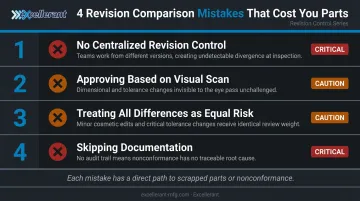
These four mistakes appear repeatedly across job shops and production facilities — and each one has a direct path to a scrapped part or a nonconformance:
No centralized revision control. Files pulled from operator desktops, email threads, or USB drives are the most frequent root cause of running wrong revisions. Enforce a DNC-based program library as the only authorized source. Excellerant's optional Rev-Lock-Load feature goes further: each machine is limited to a single program request, and that program must be returned to the server before a new one can be accessed.
Approving based on a visual scan. Manually scrolling through G-code to spot differences doesn't work reliably, even for experienced programmers. A single character change in a 2,000-line program is easy to miss. Any program going to production requires a tool that flags exact line-level differences.
Treating all differences as equal risk. Flagging a comment change and a feed rate change with the same urgency — or dismissing all flagged items as cosmetic-only changes — both lead to errors. Changes need to be categorized by functional impact before any approval decision is made.
Skipping documentation. Running the comparison but not recording the result leaves no audit trail. In regulated environments, an undocumented comparison is itself a nonconformance. The record needs to capture who reviewed it, what changed, when, and the decision made.
Frequently Asked Questions
What is a CNC program revision, and how is it different from a version?
In manufacturing, a revision typically refers to a formally approved, controlled change tied to an ECO or documented change process. "Version" is sometimes used more loosely for any saved state of a file. The distinction matters because revision implies quality approval status — not just that someone hit Save.
How do you prevent the wrong revision from being run on a machine?
The most reliable method is a DNC system that controls program delivery directly to the machine. Operators request a program by part number and revision, and the system transmits only the approved version — eliminating manual file handling and the errors that come with it.
Can you compare revisions on legacy machines?
Yes. The comparison happens at the software level — in the DNC or program management system, not on the machine itself. Legacy machines connected via RS-232 or serial are not a barrier, as long as their programs are stored in a centralized library alongside modern ethernet-connected machines.
How often should CNC programs be compared against their previous revision?
Every time a program is modified, regardless of how minor the change appears. In regulated industries, this comparison must be documented as part of the change approval record — not just performed and forgotten.
What file formats can be compared?
Most CNC programs are plain-text G-code files (.nc, .cnc, .tap, .txt) and can be compared with any text-level diff tool. Binary or proprietary format files may require specialized software to parse correctly.
What should you do if a comparison reveals an undocumented change?
Quarantine the program immediately by removing it from the active library. Investigate the source of the unauthorized change, then route the program through the full change approval process before returning it to production. Do not approve it provisionally while the investigation is pending.