Introduction
Picture this: your OEE dashboard shows a machine running at 65% effectiveness. Meanwhile, your ERP is scheduling production orders against an assumed 85% capacity. And your maintenance team? They won't know about the degradation until the machine stops completely.
Three systems, three separate realities, one costly disconnect.
According to NIST research on U.S. discrete manufacturing, facilities in the top 25% of reactive maintenance reliance experienced 3.3 times more downtime than those in the bottom 25%. That gap isn't a maintenance problem—it's a data problem. Specifically, it's a problem of systems that don't talk to each other.
Solving that data problem is what this guide is about. You'll see how connecting OEE data to your ERP and CMMS turns isolated metrics into action — production plans built on real capacity, maintenance triggers that fire before failure, and a closed loop between the shop floor and every decision made above it.
Key Takeaways
- OEE measures Availability × Performance × Quality. Without integration, that data stays in a dashboard and drives no action.
- OEE connected to ERP lets production planning adjust in real time based on actual machine capacity
- OEE connected to CMMS enables automatic work order generation when performance degrades, shifting maintenance from reactive to predictive
- Reliable, real-time machine data from every machine on the floor is the non-negotiable foundation of all three integrations
- Integration works best in stages: start with the highest-impact connection, clean source data, and team buy-in from day one
The Three-System Problem: Why OEE, ERP, and CMMS Operate in Silos
What Each System Does
These three systems each do one job well:
- OEE measures how effectively machines produce (Availability × Performance × Quality), surfacing the Six Big Losses at the equipment level
- ERP manages enterprise-wide operations—production scheduling, procurement, finance, capacity planning, and order management
- CMMS tracks maintenance activity, work orders, asset history, spare parts, and PM scheduling
The problem isn't that any one system is broken. The problem is that they were designed to operate independently, and most manufacturing facilities never connected them.
Three Departments, Three Versions of Reality
In a typical plant running disconnected systems:
- OEE reports go to the production team and stop there
- CMMS data lives inside the maintenance department
- ERP plans against historical assumptions that may be months out of date
Each team is making decisions based on different information, often hours or days out of sync with what's actually happening on the floor.
The Cost of That Disconnect
Disconnected systems produce predictable failures across all three departments:
- ERP schedules production against theoretical capacity that doesn't reflect actual line performance
- CMMS reacts to failures rather than anticipating them
- OEE data surfaces problems that no one has a workflow to act on
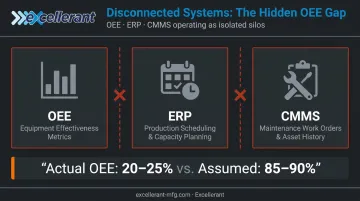
Alexandria Industries found this out firsthand. After implementing automated OEE monitoring, they discovered their actual OEE was 20–25% — against the 85–90% they had assumed. Every production plan built on that assumption was wrong from the start.
How OEE Data Feeds Your ERP for Smarter Production Planning
Closing the Actual vs. Theoretical Capacity Gap
When ERP schedules production orders against an assumed OEE of 85% but the line is actually running at 65%, the results are predictable: delivery commitments slip, lead times become unreliable, and expediting costs start eating into margins.
OEE integration corrects this by feeding actual throughput rates into ERP continuously. Planning shifts from assumptions to what the floor is actually producing, in real time.
Real-Time Scheduling and Procurement
With live OEE data flowing into ERP, two things change immediately:
- Scheduling turns dynamic — planners can reallocate orders, adjust lead times, and alert sales or logistics before a delay reaches the customer
- Material replenishment reflects real consumption rather than static forecasts, cutting both stockouts and excess inventory carrying costs
Financial Accuracy and Bidirectional Flow
Actual scrap rates, rework costs, and true throughput figures replace estimates in ERP financial reporting. Finance and leadership get defensible data instead of approximations built on assumed efficiency.
Integration also runs the other direction. ERP sends production orders, BOMs, and theoretical cycle rates to the shop floor. The OEE system uses these as benchmarks to detect deviations—creating a loop where planning drives execution and execution corrects planning.
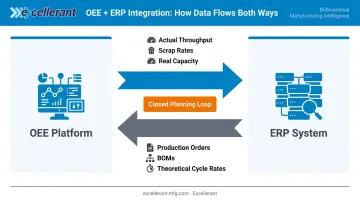
Platforms like Excellerant support this bidirectional architecture with pre-built integrations for SAP, Oracle, Epicor, JobBoss, and Global Shop Solutions, replacing manual labor tickets with automated actual-hours capture. As one C&M Machine Products user noted after deployment: "The accuracy of information that's coming into our ERP system is exponentially better than what it was before."
The Finite Scheduling Advantage
That bidirectional loop sets the stage for finite scheduling. Standard ERP schedulers plan against static capacity assumptions, so even with accurate OEE data flowing in, the schedule itself can lag reality. A finite dynamic scheduling layer closes that gap — using live machine status and OEE feedback to reschedule against actual shop-floor conditions as they change. This doesn't replace ERP; it corrects it in real time, eliminating the disconnect between what ERP believes is possible and what the floor can actually deliver.
How OEE Data Drives Your CMMS for Predictive Maintenance
Reactive Maintenance Is an OEE Problem, Not Just a Maintenance Problem
Every unplanned equipment stoppage is an OEE availability loss that was, in most cases, preventable. A machine running 18% below its planned cycle time for three shifts before it stops is recording a performance loss in OEE long before anyone in maintenance knows there's a problem.
The failure is visible in OEE data. It just isn't connected to anything that acts on it.
According to NIST research, facilities relying primarily on predictive and preventive maintenance had an 87% lower defect rate and 66% less inventory disruption from unplanned maintenance compared to reactive programs. For most shops, the difference shows up directly in throughput, scrap rates, and unplanned downtime hours.
The Automatic Work Order Loop
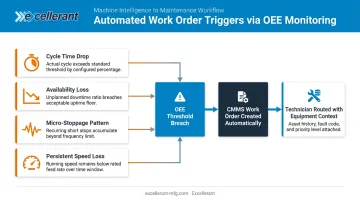
OEE-CMMS integration closes this gap by removing the human handoff from the trigger chain. When OEE detects a defined degradation signal, the CMMS creates a prioritized work order automatically and routes it to the right technician with full equipment context attached.
Triggers that can initiate this automatic loop include:
- Cycle time dropping below planned rate by a defined threshold
- Availability falling outside acceptable operating range
- A pattern of micro-stoppages within a defined time window
- Speed loss that persists across multiple consecutive shifts
Excellerant's platform supports this through configurable threshold alerts and a predictive rule engine that monitors machine control and sensor data 24/7, notifying the right people before a machine goes offline.
Condition-Based Maintenance vs. Calendar-Based PM
Instead of servicing a machine every 30 days regardless of condition, OEE-driven CMMS scheduling triggers maintenance when the machine is actually degrading. This shift from calendar-based to condition-based maintenance means:
- Machines that are running well don't get unnecessarily pulled offline
- Machines showing early degradation signals get attention before they fail
- PM schedules reflect real equipment health, not arbitrary time intervals
Closed-Loop Bidirectional Flow
That condition-based scheduling only works when equipment status stays current — which requires data flowing in both directions. CMMS sends data back to OEE: when a work order closes and a machine returns to service, equipment status in the OEE dashboard updates automatically. Production planning reflects current machine availability in real time—without anyone manually updating a spreadsheet.
The Data Collection Foundation: What Makes OEE Integration Actually Work
Why This Step Gets Skipped—and Why It Shouldn't
OEE-ERP-CMMS integration is only as accurate as the machine data feeding it. If production equipment isn't connected and outputting reliable, real-time performance data, OEE calculations are wrong from the start. Every downstream decision — in ERP scheduling, CMMS maintenance triggers, and production planning — inherits that error.
The data collection layer isn't a feature of integration. It's the prerequisite.
The Legacy Machine Challenge
Most manufacturing facilities run a mix of modern and older CNC machines across different brands, ages, and communication protocols. Newer machines often have native data outputs; older equipment typically doesn't — and that gap is where most integration projects stall.
A 2022 survey by Control Engineering found that 74% of industrial firms were still relying on legacy systems post-pandemic — a challenge equally common in US discrete manufacturing. Connecting older equipment without replacing it is the step most integration guides skip entirely.
Excellerant's machine connectivity platform addresses this directly, connecting any brand of machine — modern CNCs via ethernet or WiFi, legacy equipment via RS-232 serial communications or PLC intermediary devices — without requiring replacement.
Supported protocols include MTConnect, OPC-UA, Fanuc FOCAS, HAAS MNET, and Mazak Mazatrol, covering machines 20, 30, and 40 years old alongside new CNCs on a single unified platform.
Integration Architecture: Three Tiers
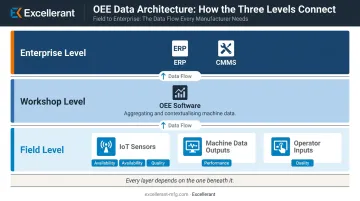
The architecture that makes OEE-ERP-CMMS integration work follows three layers:
| Layer | Function |
|---|---|
| Field level | IoT sensors, machine data outputs, and operator inputs collect Availability, Performance, and Quality signals |
| Workshop level | OEE software aggregates, contextualizes, and calculates the data |
| Enterprise level | ERP and CMMS consume these data flows to drive planning and maintenance workflows |
Every layer depends on the one below it. Enterprise-level integration built on incomplete field-level data collection produces unreliable outputs — regardless of how sophisticated the ERP or CMMS system above it is.
API and Integration Methods
Modern integrations work through several mechanisms:
- Open APIs allow OEE platforms to expose real-time data that ERP and CMMS systems can consume without manual exports
- Native connectors exist for common ERP platforms including SAP, Oracle, and Epicor
- PLC intermediaries handle legacy SCADA environments and older equipment that lacks native digital outputs
- Middleware manages highly customized ERPs where standard API connections aren't sufficient
Getting the integration method right depends entirely on what's already in the shop. The next section covers how to map your current environment before selecting an approach.
Implementing OEE-ERP-CMMS Integration: A Practical Approach
Start With One Critical Data Flow
Don't try to connect everything at once. Identify the single integration that delivers the most immediate, visible ROI.
For most manufacturers, the OEE-to-CMMS connection for automatic maintenance alerts delivers faster measurable results than starting with ERP planning integration. Unplanned downtime improvements are visible within weeks. Deploy on one pilot line or a set of critical machines, measure the improvement in unplanned downtime and MTTR, then expand.
Clean Your Source Data Before Connecting Systems
Integration amplifies data quality problems. Bad machine data automatically fed into ERP or CMMS causes more disruption than approximate manual entries.
Before connecting systems, validate:
- Theoretical cycle times in the OEE system match actual production standards
- Stop reason codes are standardized and consistently applied
- Asset records in the CMMS are accurate, complete, and match physical equipment
Involve the People Who Will Use It
Operators who enter downtime codes and technicians who act on work orders must be involved before go-live—not after. Specifically:
- Walk operators and technicians through workflow changes before they happen — not after
- Show technicians the concrete payoff: automatic work order routing cuts response time and eliminates paperwork
- Create a feedback channel so operators can flag data quality issues during the first weeks of integration
Shop floor interfaces like Excellerant's tablet-optimized operator terminal make this practical. Operators use a one-tap situation picker to record machine status, and that data flows directly into OEE calculations and downstream systems without manual data entry.
Common Integration Pitfalls to Avoid
Three mistakes derail most integration projects before they deliver value:
Connecting everything at once. Linking OEE, ERP, CMMS, MES, and IoT sensors in a single project creates scope complexity that delays results and erodes team confidence. Validate one critical data flow before adding the next — that approach consistently outperforms trying to deploy everything simultaneously.
Skipping baseline measurement. Without defined KPIs before the project begins, it's impossible to demonstrate ROI or spot what's underperforming. Capture your current OEE score, monthly unplanned downtime hours, average MTTR, and inventory carrying costs — then track them weekly for the first three months.
Mistaking data sharing for integration. Exporting OEE reports to email and manually updating ERP scheduling is a workaround, not integration. True integration is bidirectional and automatic: OEE events trigger CMMS work orders, CMMS outcomes update OEE status — no human handoff required between systems.
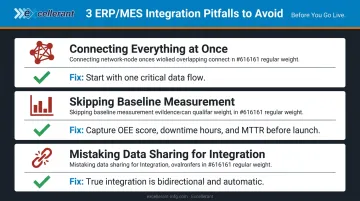
Avoiding these three pitfalls up front keeps the project scoped, measurable, and positioned to show results within the first quarter.
Frequently Asked Questions
Is CMMS an ERP system?
No. A CMMS is purpose-built for maintenance management—work orders, asset history, spare parts, and PM scheduling. An ERP manages enterprise-wide operations including finance, procurement, HR, and production planning. They serve different functions and work best when integrated rather than treated as substitutes for each other.
What is ERP in production planning?
An ERP system translates customer demand into shop floor work orders, managing production schedules, material requirements, and capacity planning across the organization. Its accuracy depends on receiving actual capacity data from the shop floor. OEE integration supplies exactly that data.
What OEE data should flow into an ERP system?
The highest-value OEE data for ERP includes: actual line availability and effective production rates (for capacity planning), rate deviations from theoretical benchmarks (for lead time accuracy), and real material consumption figures (for procurement and inventory replenishment).
How does OEE integration trigger CMMS work orders automatically?
When OEE tracking detects a defined threshold breach—cycle time dropping below planned rate, availability falling outside acceptable range, or a pattern of micro-stoppages—the integration automatically creates a prioritized work order in the CMMS. The system routes it to the appropriate technician with equipment context included, no human initiation required.
Can older or legacy CNC machines be connected to an OEE-ERP-CMMS integration?
Yes. Older CNC machines connect using hardware that interfaces with existing machine controllers regardless of brand, age, or communication protocol: RS-232 serial connections or PLC intermediary devices feed real-time performance data to the platform without requiring equipment replacement.
How long does it typically take to see ROI from OEE-ERP-CMMS integration?
Most manufacturers see measurable improvements in unplanned downtime and maintenance response time within the first 3–6 months of OEE-CMMS integration. Full ROI on a complete OEE-ERP-CMMS deployment typically lands within 12–18 months. Facilities with low OEE scores or highly reactive maintenance programs tend to see the fastest returns.