Shop Floor Interface
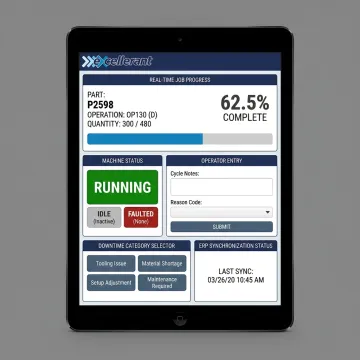
Tablet-optimized operator screens let teams record part completion, good or scrap quantities, nonconformance details, downtime reasons, warnings, and shift progress directly from each workstation.

Give operators a clear, touch-friendly way to capture production status, part counts, downtime reasons, quality notes, and job context directly at the machine. Excellerant’s operator interface solutions connect shop-floor activity with ERP, MES, dashboards, and communication tools, helping manufacturers eliminate paperwork, improve data accuracy, and respond faster when production conditions change.
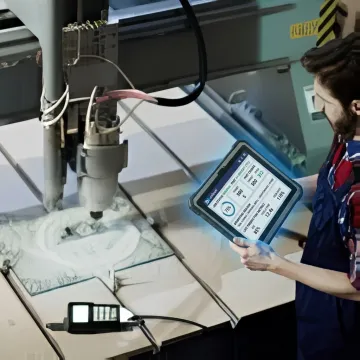
Operator-focused interfaces and connected dashboards that turn machine, job, and ERP data into actionable shop-floor workflows.
Tablet-optimized operator screens let teams record part completion, good or scrap quantities, nonconformance details, downtime reasons, warnings, and shift progress directly from each workstation.
Centralized dashboards display real-time equipment status, job progress, schedule forecasts, bottleneck alerts, and production expectations across PCs, mobile devices, and mounted shop-floor displays.
Context-aware communication connects operators with programmers, schedulers, and office staff while carrying machine, tooling, and job information directly alongside every conversation.
Bi-directional synchronization keeps work orders, actual hours, operator entries, and machine data aligned with ERP and MES platforms including SAP and Oracle.
One-tap downtime categorization and automatic alarm-state tracking help operators document stoppages, identify root causes, and standardize reports by machine, cell, shift, or job.
Detailed part counts, cycle times, utilization timelines, state charts, and comparison tools help managers evaluate production trends and improve performance decisions.
Excellerant’s HMI and operator interface solutions are built around how manufacturing teams actually work. Operators get simple, touch-accessible screens for job status, quantities, downtime, quality notes, and communication, while managers receive accurate live data for scheduling, ERP accuracy, and performance visibility. The result is less manual entry, fewer communication delays, and a stronger connection between machines, people, and business systems.
Excellerant combines deep machine-tool networking experience with practical operator-focused software design.
Built on 30 years of machine tool networking and first-to-market wireless DNC innovation.
Connects new, legacy, CNC, non-CNC, PLC, and protocol-diverse equipment into one platform.
Touch-accessible workflows simplify part counts, downtime reasons, warnings, and job updates at machines.
A USA-based technical team supports integrations, training, and practical shop-floor implementation needs.
Experienced manufacturing technology specialists supporting connected shop floors.
Excellerant’s roots reach back to Macdac Engineering in 1991, when the team began helping manufacturers connect machine tools and DNC systems. Founder John Carpenter, trained in electronics by the US Navy, helped pioneer the world’s first wireless DNC connection to a machine tool in 2001. Today, Excellerant brings that same practical innovation to production job tracking, workflow visibility, machine monitoring, and ERP-connected shop-floor operations for manufacturers across the United States and Canada.
An operator interface is the screen, terminal, tablet, or software panel an operator uses to interact with production equipment and job information. In manufacturing, it often captures part counts, machine status, downtime reasons, quality notes, and job progress. Excellerant’s Shop Floor Interface extends that concept by synchronizing operator entries with live machine data, ERP/MES systems, dashboards, and communication tools.
Talk with Excellerant about your shop-floor workflow and integration needs.

Recognized nationally for wireless DNC innovation.
Connected to national machining industry leadership.
Voting member supporting manufacturing data standards.
Share your machines, workflows, and integration goals, and Excellerant will help identify the right HMI and shop-floor interface approach.
For immediate assistance, feel free to give us a direct call at 860-870-5544. You can also send us a quick email at sales@excellerant-mfg.com.
For immediate assistance, feel free to give us a direct call at 860-870-5544. You can also send us a quick email at sales@excellerant-mfg.com.