Fixing symptoms without understanding causes is how shops waste hours of productive capacity on problems they've already "solved" before. According to Siemens' 2024 analysis, unplanned downtime costs Fortune Global 500 industrial companies $1.4 trillion annually — roughly 11% of revenue. That's not a maintenance problem. That's a problem-solving problem.
This guide explains what Root Cause Analysis (RCA) is in software development, why it matters specifically for manufacturing operations, and how to apply it in a structured way that prevents recurring failures.
Key Takeaways
- RCA is a structured, data-driven process to identify the underlying cause of a problem — not just the symptoms
- The six steps move from defining the problem through data collection to identifying the root cause and verifying the fix
- Core methods include the 5 Whys, Fishbone Diagram, Pareto Chart, and FMEA
- Without RCA, teams fix the same issues repeatedly — draining time, budget, and throughput in the process
- In manufacturing software, real-time machine data — error logs, cycle times, alarm states — is the foundation for accurate RCA
What Is Root Cause Analysis?
Root Cause Analysis (RCA) is a structured, data-driven process that traces a problem back to the underlying condition causing it — not just the visible symptom. The goal is to identify what to fix, so the problem doesn't repeat.
Symptoms vs. Root Causes
The most common mistake in manufacturing troubleshooting is treating a symptom as the cause.
Consider a machine that repeatedly throws a communication error on DNC file transfers. The symptom is the failed transfer. The root cause might be a misconfigured DNC protocol, a network timeout sized for a previous infrastructure, or outdated firmware on the machine controller. Clearing the alert gets the machine running again, but none of those underlying conditions change — so the error returns.
Three Categories of Root Causes
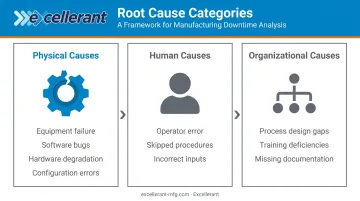
ASQ defines root causes as the core issues that set in motion the cause-and-effect chain leading to a failure. Most fall into one of three categories:
- Physical causes — Equipment failure, software bugs, hardware degradation, or configuration errors
- Human causes — Operator error, skipped procedures, or incorrect inputs
- Organizational causes — Gaps in process design, training deficiencies, or missing documentation
In manufacturing software environments, failures frequently span more than one category. A DNC network outage might involve a physical network switch, a human who changed a subnet configuration without documentation, and an organizational gap in change-control procedures — all at once.
Why RCA Matters in Manufacturing Software Environments
The Cost of Repeat Failures
Unplanned downtime is among the most expensive events on a shop floor. Siemens' 2024 analysis puts automotive downtime at $2.3 million per hour; even mid-market manufacturers can face losses of $150,000 per hour when a line stops unexpectedly.
The financial exposure isn't just from the initial failure — it's from the recurrence. Every time a team patches a symptom without finding the cause, they're borrowing time against the next incident.
Why Software Failures Are Hard to Diagnose
Manufacturing software systems don't operate in isolation. DNC networks, machine monitoring platforms, ERP integrations, and IIoT devices are all interdependent — and when something breaks, failures cascade across multiple layers. Without RCA, teams often misattribute the cause to the wrong one.
A machine that stops receiving DNC files isn't necessarily a DNC software problem. It could be:
- A network latency issue introduced by a scheduled backup running during production hours
- A firmware update that changed a timeout parameter on the machine controller
- An IP address conflict created when IT provisioned new equipment on the same subnet
- A permissions change in the file server that affected automated transfer credentials
Without structured investigation, teams often assume the most visible layer is the guilty one. That assumption is frequently wrong.
RCA and Continuous Improvement
RCA is a discipline already embedded in lean and Six Sigma frameworks. In ASQ's DMAIC structure, it sits squarely in the Analyze phase, where teams use tools like the 5 Whys and Fishbone Diagram to identify root causes before moving to Improve and Control. Manufacturers that practice RCA consistently build institutional knowledge about failure patterns rather than cycling through the same trial-and-error fixes.
For aerospace, defense, and medical device manufacturers, proactive RCA carries additional weight. Quality management frameworks like AS9100D, ISO 13485, and CMMC/NIST 800-171 require documented corrective actions — making RCA a compliance necessity, not just a best practice.
The 6-Step RCA Process in Software Development
Step 1 — Define the Problem
A vague problem statement produces vague conclusions. Before any investigation starts, the team needs a specific, time-bounded, measurable description of what went wrong.
Weak: "Machine #4 keeps having DNC errors."
Strong: "Machine #4 fails to receive DNC files during shift changes, approximately 3 times per week since the network upgrade on [date]. Failures occur between 6:55–7:10 AM and 2:55–3:10 PM."
The second version gives the team a falsifiable target. The first gives them a direction to wander.
Step 2 — Assemble the RCA Team
Effective RCA requires perspectives that span the problem. For manufacturing software issues, that typically means:
- Software or IT engineers who understand the system architecture
- Network administrators familiar with infrastructure changes
- Machine operators who notice patterns before any log catches them
- Floor supervisors who can correlate failures with shift changes, jobs, or machines
- Quality or process engineers if compliance is involved
Keep the team to 5–10 people. Larger groups slow decision-making without improving analysis.
Step 3 — Collect and Analyze Data
Data collection should cover a timeline leading up to the failure, not just the moment it occurred. Relevant inputs for manufacturing software RCA include:
- Machine error codes and alarm-state logs
- DNC transfer records with timestamps
- Network traffic and connectivity history
- Change logs — firmware updates, software patches, configuration edits, IP changes
- OEE and cycle-time records showing performance deviations
- Operator shift notes and downtime categorizations
- ERP/MES work order and scheduling data for the affected period
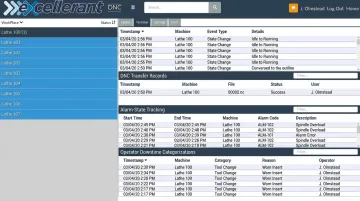
Platforms like Excellerant capture this data automatically — per-machine event logs, device connectivity history, automatic alarm-state tracking, and operator-entered downtime reasons via a one-tap situation picker at the machine. Timestamped, structured records like these give investigators a verifiable sequence of events rather than a reconstruction from memory.
Step 4 — Identify Possible Root Causes
This is the brainstorming phase. The team lists every plausible causal factor before eliminating any. The goal is breadth, not conclusions — jumping to the most obvious cause too early is one of the most common RCA failures.
Distinguish between:
- Causal factors — what triggered the failure
- Contributing factors — what made the impact worse or harder to detect
Step 5 — Determine the Root Cause
The team narrows the list by correlating the failure timeline with data collected in Step 3, then uses RCA methods (covered below) to test each hypothesis. Evidence should drive the conclusion, not intuition.
In complex systems, there may be multiple root causes. All of them should be documented — addressing only one while leaving others in place just changes which symptom surfaces next.
Step 6 — Implement Solutions and Verify
The corrective action plan should:
- Address the root cause directly, not the symptom
- Assign a named owner and deadline for each action
- Define verification criteria — specifically, how the team will confirm the fix worked
- Update documentation, runbooks, and process guidelines so the knowledge outlives the individuals who did the investigation
Without verified corrective action and updated documentation, the same failure will eventually recur — likely handled by someone who wasn't part of the original investigation and has no record of what was found.
Key RCA Methods and Techniques
The 5 Whys
The most accessible RCA technique: iteratively ask "why?" until you reach a cause you can actually act on. ASQ traces the method to Sakichi Toyoda and it remains widely used because it requires no special tools.
Example in manufacturing software:
- Machine data isn't syncing to the monitoring platform → Why?
- The connection is timing out → Why?
- Network latency spikes during certain windows → Why?
- A scheduled backup job runs during production hours and saturates available bandwidth → Why?
- The backup schedule was never adjusted after production shifted to a second shift
Root cause: Backup schedule misaligned with production hours. Fix: reschedule the backup job.
The 5 Whys works well for problems with a clear single cause chain. When multiple factors interact — equipment, software, people, process — Fishbone gives you more structure.
Fishbone (Ishikawa) Diagram
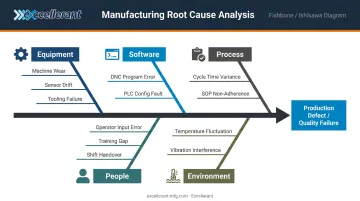
A visual tool for brainstorming problems with multiple potential causes. The problem sits at the "head" of the fish; the "bones" represent categories — equipment, software, people, process, environment, data — with specific factors branching off each.
Fishbone diagrams are particularly useful in manufacturing environments where cross-functional teams need to organize inputs from operators, engineers, IT staff, and supervisors in a single working session. Every discipline can contribute their perspective without the discussion devolving into finger-pointing.
Common categories used in manufacturing RCA sessions:
- Equipment — machine wear, tooling condition, calibration drift
- Software — configuration errors, version mismatches, integration failures
- People — operator error, training gaps, shift handover breakdowns
- Process — scheduling conflicts, undocumented procedures, workarounds
- Environment — temperature, vibration, network interference
Pareto Chart
Applies the 80/20 principle: roughly 80% of failures typically come from 20% of causes. A Pareto chart ranks failure causes by frequency or impact, making it straightforward to decide where to focus first.
In a manufacturing software context, this matters when recurring issues span multiple machines or systems. Running Pareto analysis on downtime categories across a fleet of 20 machines will usually reveal that three or four specific failure types — or three specific machines — account for the majority of lost production time. That tells you where RCA effort delivers the highest return.
Failure Mode and Effects Analysis (FMEA)
The most rigorous technique — and the most proactive. FMEA systematically evaluates every potential failure mode in a system, assesses severity and likelihood, and ranks them by risk score. Unlike the other methods, FMEA is applied before problems occur.
For aerospace, defense, and medical device manufacturers operating under AS9100D, ISO 13485, or similar quality frameworks, FMEA is a recognized method for demonstrating systematic risk management. Whether it is explicitly required depends on the specific standard or customer contract — but manufacturers in these regulated sectors treat it as standard practice, and it's the approach Excellerant's customers in aerospace, defense, and medical device manufacturing rely on to stay ahead of failures rather than react to them.
RCA in Manufacturing: Turning Machine Data Into Answers
RCA is only as good as the data feeding it. In manufacturing software environments, that means having access to real-time and historical machine records that allow teams to correlate a failure timestamp with exactly what changed in the system at that moment.
The Manufacturing Leadership Council reported in 2024 that 70% of manufacturers still collect data manually. When a DNC failure or machine stoppage occurs, teams relying on manual records — handwritten shift notes, verbal accounts, memory — are reconstructing a timeline after the fact. That's a foundation for guesswork, not analysis.
What Useful RCA Data Looks Like
When a software failure occurs on the shop floor, teams need records that were captured automatically at the time of the event:
- Timestamped DNC transfer logs showing exactly which files transferred successfully and which failed
- Machine alarm-state records with fault codes logged by the machine controller
- Per-machine connectivity history showing when devices connected, disconnected, or degraded
- OEE and cycle-time records that reveal performance deviations in the minutes and hours before the failure
- Operator-entered downtime categorizations captured at the machine via the situation picker (an operator-facing interface for logging downtime reasons in real time)
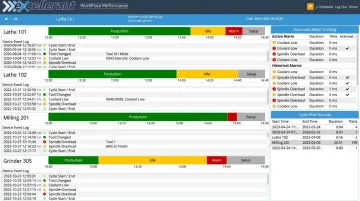
Excellerant's machine monitoring platform captures this data continuously — machine status timelines, device event logs, automatic alarm tracking, operator downtime inputs, and cycle-time records — giving RCA teams a factual timeline to investigate instead of a blank page.
From Reactive to Proactive
Teams with structured machine data can apply Pareto analysis across incidents over time. Over weeks and months, patterns emerge:
- A specific machine accounts for 40% of all DNC failures
- A particular network segment degrades every Monday morning
- One program revision produces disproportionate cycle-time variance
That long-term view shifts teams from reactive troubleshooting to proactive process improvement — addressing root causes before the same failure recurs.
Common Mistakes and Best Practices
Mistakes to Avoid
- Stopping at symptoms — clearing the alarm, restarting the service, or replacing the part without investigating why the alarm triggered in the first place
- Assigning individual blame — blame creates a culture where people hide issues, making data collection harder and problems invisible until they escalate
- Assuming a single root cause — complex systems have interacting failure modes; documenting only one while leaving others in place sets up the next incident
- Skipping verification — implementing a fix and moving on without confirming it worked means the next failure might be the same one with a different error message
Best Practices
- Build a blameless investigation environment where operators and technicians report issues honestly without fear of consequences
- Validate findings against data, not assumptions — if the evidence doesn't support the hypothesis, discard it
- Document every RCA thoroughly — findings should be searchable and reusable for future incidents, not locked in one engineer's memory
- Define owners and deadlines for corrective actions; an action without an owner is an action that won't happen
- Integrate RCA into regular operations rather than reserving it for catastrophic failures — teams that investigate near-misses and recurring alerts build knowledge compounding over time
That last point reflects how lean manufacturing actually works in practice. Teams that treat RCA as an ongoing habit — not a post-mortem reserved for major failures — gradually compound their system knowledge over time, shortening investigation cycles and reducing repeat incidents with each iteration.
Frequently Asked Questions
What are the 6 steps of RCA?
The six steps are: define the problem, assemble the RCA team, collect and analyze data, identify possible root causes, determine the root cause, and implement and verify solutions. Each step builds on the previous. Skipping any one of them, especially verification, undermines the entire process.
Is RCA part of Six Sigma?
Yes. RCA is embedded in Six Sigma's DMAIC framework, specifically in the Analyze phase, where teams use tools like the 5 Whys and Fishbone Diagram to identify root causes. The Improve and Control phases then address solutions and recurrence prevention.
What is the best root cause analysis software?
Dedicated platforms like EasyRCA and Causelink support structured RCA investigations with workflow tracking and corrective-action management. In manufacturing environments, machine monitoring platforms provide the timestamped records and failure timelines that make RCA accurate — giving investigators the data foundation that structured analysis requires.
What is the difference between a root cause and a contributing factor?
A root cause is the fundamental condition that, if removed, prevents the problem from recurring. A contributing factor increases the likelihood or severity of a failure but would not have caused it alone. Complete RCA should identify and address both.
How long does a root cause analysis take?
It depends on complexity. A straightforward issue using the 5 Whys might take a few hours; ASQ documents cases that ran close to two months with weekly team meetings. Data availability and team availability are the two variables that most often extend the timeline.
What is the most commonly used RCA technique?
The 5 Whys is widely considered the most accessible and commonly used technique due to its simplicity. The Fishbone Diagram is preferred for problems with multiple potential causes, and Pareto Charts are favored when prioritizing across multiple recurring failures or comparing issues across machines or systems.