Introduction
Most manufacturing operations run across at least four or five disconnected systems — CNC machines, ERP platforms, MES software, DNC systems, and quality databases — each generating data that the others depend on to function accurately.
The problem surfaces when those systems stop agreeing. Production planners schedule jobs on machines already running a different program. Purchasing reorders material that's already in stock. Quality teams miss alarms because machine data never reached the quality management system. Nobody knows where the discrepancy started until something fails.
A 2024 Manufacturing Leadership Council survey found that 53% of manufacturers cite difficulty coordinating data across different systems as their top obstacle to data-driven decision-making — and 70% still rely on manual data entry for at least some operational information.
Bi-directional syncing addresses each of these failure points by keeping systems in continuous agreement. This guide explains how the mechanism works, why it matters for manufacturing operations, and what it looks like across a real shop floor data stack.
Key Takeaways
- Bi-directional syncing automatically exchanges updates between two systems so a change in either one propagates to the other in near real time.
- Unlike one-way sync, it keeps all connected platforms in a consistent state so no system runs on outdated data.
- In manufacturing, shop floor data and ERP/front-office records stay aligned without manual re-entry.
- Built-in conflict resolution handles cases where two systems update the same record simultaneously.
- Correctly implemented, bi-directional sync cuts data-mismatch errors and gives leadership accurate, real-time operational visibility.
What Is Bi-Directional Syncing?
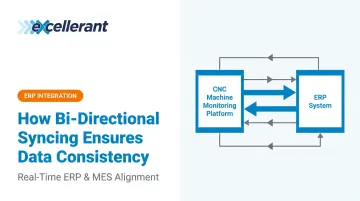
Bi-directional syncing is a data integration pattern where two connected systems continuously exchange updates in both directions. A change made in System A propagates to System B, and a change made in System B propagates back to System A — keeping both in a consistent state without human intervention.
It exists because enterprise systems weren't built to talk to each other. ERP platforms, MES software, machine monitoring tools, and quality databases each evolved independently, with proprietary data structures and no native data-sharing capability.
Standards like MESA's B2MML (an XML implementation of ISA-95) and the OPC Foundation's OPC UA protocol were developed to create interoperability between enterprise and control-system layers. Even so, the integration layer that keeps data synchronized must still be deliberately built and configured.
What Bi-Directional Syncing Is Not
Bi-directional sync is often confused with related-but-different approaches:
- Data replication/backup — copies data to a secondary location but doesn't maintain mutual consistency between two active systems
- One-time data migration — moves data from one system to another at a point in time, then stops
- One-way ETL pipelines — push data from a source to a destination on a schedule, with no return flow; updates made at the destination never flow back to the source
The Three Sync Patterns
| Pattern | Direction | Use Case |
|---|---|---|
| One-way (unidirectional) | Source → Target only | Reporting, data warehousing |
| Two-way (bi-directional) | Both directions | Active systems that both write data |
| Multi-master | Multiple sources, all directions | Complex distributed architectures |
Complexity increases substantially with bi-directional and multi-master patterns because the system must actively monitor and reconcile data flowing from multiple sources simultaneously.
How Does Bi-Directional Syncing Work?
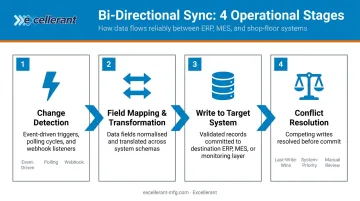
Bi-directional syncing operates through four stages: detection, mapping, transmission, and reconciliation. Each stage contributes to maintaining a consistent shared state.
Initiation: Detecting the Change
The sync begins when a change event occurs in one of the connected systems. In a manufacturing environment, that could be:
- A CNC machine logging a completed cycle
- An ERP work order being released or updated
- An operator confirming part completion at a shop floor terminal
- A machine alarm triggering a status change
How the sync engine detects that change depends on the trigger method:
- Event-driven — fires instantly when a change occurs; lowest latency
- Polling-based — the sync engine checks for changes at a set interval
- Webhook-driven — the source system pushes a notification the moment a change happens
The trigger method directly determines how "real-time" the sync actually is. OPC UA's Publish-Subscribe model, for example, supports event-driven pub/sub communication so publishers don't need to know specific subscribers — updates propagate as changes occur rather than on a fixed schedule.
Core Operation: Mapping and Writing
Once a change is detected, the integration layer:
- Reads the changed data from the source system
- Applies field mapping and any required data transformation (converting machine timestamp formats to ERP formats, for example)
- Writes the update to the target system
- Simultaneously listens for changes flowing back from that target
The field mapping step is where most data consistency errors originate. Mismatched field types, unit differences, or missing required values cause the receiving system to reject or silently corrupt incoming data. Accurate mapping configuration is the foundation the entire sync depends on.
Conflict Resolution
Conflicts happen when two systems update the same record nearly simultaneously. A common manufacturing example: the ERP marks a job complete while the machine monitoring system logs additional parts being produced in the same moment.
Standard resolution strategies include:
- Last-write-wins — the most recent timestamp takes precedence
- System-priority rules — one system is designated authoritative for specific fields (machine data typically owns cycle counts; ERP typically owns order quantities)
- Manual review flagging — the system cannot resolve the conflict automatically and routes it for human review
Output and Result
When the sync completes, both connected systems reflect an identical, current state of the shared data — no manual re-entry, no file exports, no human reconciliation. The ERP and shop floor monitoring system agree on job status, part counts, and machine availability in real time, giving operations and front-office teams a single source of truth to act on.
Why Data Consistency Matters in Manufacturing
In manufacturing, data inconsistency isn't an administrative inconvenience — it directly causes operational failures. NIST estimates that inadequate manufacturing data interoperability costs U.S. manufacturers between $20.9B and $42.9B annually. And when systems go out of sync, the failure modes are specific and predictable.
How Systems Fall Out of Sync
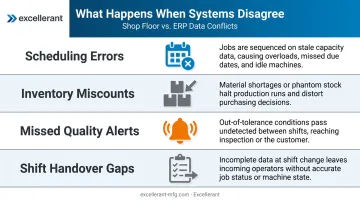
When shop floor data and ERP data diverge, here's what actually happens on the production floor:
- Scheduling errors — planners assign jobs to machines already running a different program, because the ERP shows availability that doesn't match reality
- Inventory miscounts — purchasing orders material already in stock because part completions from the shop floor never updated inventory records
- Missed quality alerts — machine alarm data never reaches the quality management system, so non-conformances go undetected until downstream
- Shift handover gaps — incoming shift personnel make decisions based on whatever was manually recorded at the end of the last shift, not current machine state
Bi-directional syncing removes the window of time during which any of these errors can occur. As soon as data changes in one system, the update propagates automatically — no delay, no manual step, no gap.
The Link to Production Forecasting
When ERP and machine data agree in real time, production managers can:
- Forecast accurately without guessing at actual machine availability
- Respond to unplanned downtime without data lag distorting the picture
- Allocate resources based on what's actually happening, not what was recorded hours ago
C&M Machine Products, an Excellerant customer, put it directly: "The accuracy of information that's coming into our ERP system is exponentially better than what it was before. We have been able to improve the accuracy of our costs and increase our value to our customers." Rory Miller at McMellon Bros. added: "ERP has become a more powerful tool. I can pull it up at any time and find out what's happening with a customer's parts. If we're not on pace, we can fix it."
This is the practical outcome of bi-directional sync done correctly — real-time data you can act on before a scheduling gap becomes a missed delivery or a quality escape reaches the customer.
That urgency compounds for aerospace, defense, and medical device manufacturers. In those environments, compliance frameworks — FDA 21 CFR Part 11, NIST SP 800-171, and CMMC 2.0 — all require that electronic records be accurate, auditable, and tamper-evident. Data consistency isn't optional; it's a condition of operating.
Excellerant's IIoT platform connects shop floor machines directly to ERP systems, replacing manual data entry with automated real-time capture so your records reflect current machine state — not last shift's notes.
Where Bi-Directional Syncing Is Used in Manufacturing Operations
Bi-directional sync doesn't operate at a single touchpoint — in a connected manufacturing stack, it runs simultaneously across multiple system pairs.
Primary Workflow Touchpoints
DNC ↔ CNC (program distribution and confirmation) NC programs distribute from DNC software to CNC machines. Job start and completion data flows back through the DNC system to the ERP, closing the loop between what was programmed and what was actually produced.
ERP ↔ machine monitoring (job tracking) ERP work orders sync with machine monitoring systems to reflect real-time production status. Operators signal part completion through a shop floor interface; actual hours, good parts, and scrap quantities push directly to the ERP, replacing manual labor tickets.
Shop floor ↔ ERP (inventory updates) Completed part counts update ERP inventory records automatically as production closes out — no end-of-shift data entry, no reconciliation lag.
Where It Performs Best
Bi-directional syncing delivers the most value in environments where:
- Legacy and modern machines run side by side — an IIoT layer translates RS-232 serial, BTR, and older control data into formats the ERP can consume
- Multiple shifts are running — continuous automated sync ensures incoming operators see current machine state and job status without a manual handoff
- Auditable records are a compliance requirement — aerospace, defense, and medical device shops need real-time, traceable data to satisfy quality and regulatory standards
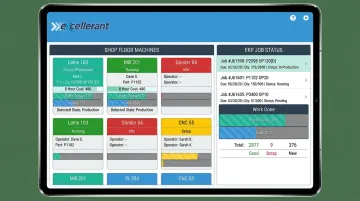
Excellerant's platform is built for exactly this kind of multi-layer environment. A hardware-enabled IIoT gateway supports MTConnect, OPC UA, Fanuc FOCAS, HAAS MNET, and Mazak Mazatrol, connecting machines of any age or protocol to a unified cloud platform. Pre-built integrations cover ERP systems including Epicor, JobBoss, Global Shop Solutions, SAP, and Oracle, and the platform's Open API enables two-way sync across the full manufacturing software stack simultaneously — not just between a single system pair.
Conclusion
Bi-directional syncing works because it removes the assumption that humans will keep multiple systems aligned. Data changes propagate automatically, in both directions, so every connected system reflects the same operational reality at the same time.
For manufacturing operations leaders, understanding how bi-directional sync works at a mechanical level — detection, mapping, transmission, conflict resolution — matters beyond theory. That understanding drives better decisions: which integrations to prioritize, how to configure triggers, and how to design a shop floor data architecture that keeps information consistent where decisions actually get made.
The shop floor and the front office don't have to run on different data. Closing that gap comes down to deliberate configuration — knowing which systems need to talk to each other, how conflicts get resolved, and where in the workflow sync needs to happen in real time versus on a schedule.
Frequently Asked Questions
What is bidirectional syncing?
Bidirectional syncing is a data integration method where two connected systems automatically exchange updates in both directions. A change in either system is reflected in the other in near real time, keeping both in a consistent and current state without manual re-entry or file exports.
How do you ensure data integrity when syncing data across different systems?
Data integrity across synced systems depends on four key controls:
- Field mapping: Accurate alignment between corresponding fields in each system
- Conflict resolution rules: Pre-defined logic for which system takes precedence on simultaneous updates
- Error logging: Capture of failed sync events for review and correction
- Periodic audits: Spot-checks confirming both systems reflect identical values
What is the difference between one-way and two-way data sync?
One-way sync moves data from a source to a target — the target never updates the source. Two-way sync allows changes in either system to propagate to the other. Two-way sync is the correct choice when both systems are actively used and need to stay in agreement.
What happens when two systems update the same data at the same time?
This is called a sync conflict. Bi-directional sync solutions resolve it using pre-configured rules: prioritizing the most recent timestamp, designating one system as authoritative for specific fields, or flagging the conflict for manual review when the correct state can't be determined automatically.
What types of manufacturing data benefit most from bi-directional syncing?
Production job status, part completion counts, machine availability and alarm states, NC program version tracking, and inventory levels deliver the most direct operational value when synced bi-directionally between shop floor systems and ERP or MES platforms.