JobBOSS is a capable shop management system. But its data collection module depends on people entering data accurately and consistently — and that dependency creates a gap between what the ERP shows and what's actually happening on equipment. That gap is where inaccurate job costing, missed delivery commitments, and reactive scheduling live.
This post covers what JobBOSS data collection actually captures, where the module consistently falls short in real-world deployments, and what shops are doing to close the gap between ERP records and live shop floor reality.
Key Takeaways
- JobBOSS collects labor time, job status, and cost data primarily through manual operator input — not automated machine signals.
- The module is powerful on paper but frequently criticized for navigation friction, reporting gaps, and no machine-level visibility.
- That gap — between what JobBOSS records and what machines are actually doing — is where hidden downtime and costing errors accumulate.
- Pairing JobBOSS with a dedicated machine monitoring solution adds the automated, real-time data layer the ERP alone cannot provide.
What JobBOSS Data Collection Does on the Shop Floor
JobBOSS's data collection module is designed to capture labor time, job progress, and production quantities as operators clock in and out of jobs. That data forms the backbone of job costing and scheduling accuracy across the system.
Time and Attendance Tracking
Operators log hours against specific job operations using time tickets. JobBOSS² also supports mobile time tracking and uses barcodes and QR codes on job travelers to reduce manual entry on both individual and batch jobs. This is the most actively used data collection feature — most shops treat it as the primary input mechanism for labor cost data.
The mobile Employee Data Collection App extends this further. According to ECI's feature documentation, operators can:
- Track production data from a phone or tablet
- Post materials directly to jobs in real time
- Record good and scrap piece counts
- Validate entries before they hit the job record
Job Status and Work-in-Progress Visibility
Supervisors can view job queue status, routing step completions, and estimated versus actual hours without walking the floor. JobBOSS² includes KnowledgeSync alerts for events like routing steps completed today, jobs where routing missed a start date, and employees not clocked in — giving front-office teams a structured signal system for production progress.
Job Costing and Cost Reporting
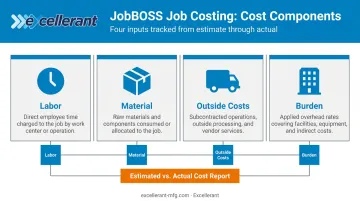
Collected time and material data feeds directly into job cost reports that break down estimated versus actual costs per job by:
- Labor
- Material
- Outside costs
- Burden
The Owner's KPI Dashboard and margin analysis reports give managers financial visibility from quote to close. JobBOSS also tracks material usage and purchased parts consumption, which keeps inventory accurate and BOM data clean. For make-to-order shops, this closes the loop between what a job was quoted at and what it actually cost — making the next estimate sharper.
The Limitations of JobBOSS Shop Floor Data Collection
User reviews and real-world deployments consistently surface the same complaint: JobBOSS's data collection is only as good as the discipline of the people entering data. That's a significant constraint in a busy shop environment.
No Direct Machine-Level Data
JobBOSS has no native ability to pull data directly from CNC machines or other shop equipment. Every piece of machine status information must be entered manually by an operator — including:
- Spindle uptime and cycle counts
- Feed rates and cutting parameters
- Alarm states and fault codes
That gap is architectural, not configurable. JobBOSS was designed around job transactions, not machine telemetry.
Data Buried Behind Too Many Clicks
User feedback across Capterra and G2 describes the same friction: critical shop floor data is hard to surface quickly. One reviewer noted it takes four steps to produce a single packing list. Others describe needing to write information down, back out of screens, and re-enter it elsewhere because the architecture doesn't allow direct navigation between related records.
For supervisors who need fast answers during a shift, that navigation overhead is more than inconvenient — it slows down decisions that depend on current data.
Reporting and Data Consistency Issues
Users have reported math inconsistencies in raw material calculations and profit-and-loss figures that don't reconcile as expected. Exporting reports to Excel is described as cumbersome, requiring hours of post-processing to reformat data into usable structures.
They reflect a broader pattern: when data entry is manual and reporting requires significant cleanup, shops revert to Excel to manage actual floor activity outside the ERP. That workaround directly undermines the system's purpose.
The Manual Entry Trap
For shops running custom one-off work or variable cycle times, the problem compounds. A few minutes rounded on a clock-out here, a missed entry during a shift change there — these errors accumulate across a full shift and across multiple machines. NIST has reported that inadequate manufacturing data quality costs U.S. manufacturers between $8.6 billion and $19.6 billion per year, with data interoperability issues adding an estimated $20.9 billion to $42.9 billion on top of that. Manual data entry is a significant contributor to that problem at the shop level.
Manual vs. Automated Shop Floor Data Collection: Why the Difference Matters
The fundamental distinction is straightforward. Manual data collection requires an operator to stop, interact with a terminal or device, and record what happened. Automated data collection captures machine signals — cycle start/stop, spindle on/off, program numbers, alarms — in real time, without any human input.
What Automated Collection Reveals That JobBOSS Cannot
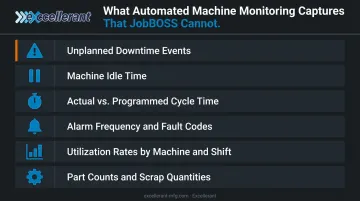
According to SME, shop floor monitoring systems let shops see what machine tools are doing at any time and gather data for OEE, helping identify bottlenecks and whether machines are running production. Specific data categories that automated monitoring captures — which JobBOSS generates no record of on its own — include:
- Unplanned downtime events with timestamps and duration
- Machine idle time between jobs (not captured in any labor ticket)
- Actual cycle time vs. programmed cycle time per part
- Alarm frequency and fault codes by machine
- Utilization rates by machine and by shift
- Part counts and scrap quantities tied directly to machine output
None of these exist in a JobBOSS deployment without additional integration. An operator may log eight hours on a job, but if the machine sat idle for two of those hours due to a tooling problem, the ERP has no record of it.
The Feedback Loop That Changes Job Costing
When real machine data flows back into the ERP, the impact on job costing is immediate and measurable. Standard hours in JobBOSS are typically estimates — educated guesses based on historical jobs or engineering calculations. When actual machine cycle times replace those estimates, cost reports shift from "approximately what we expected" to "what truly happened."
Quoting accuracy, customer billing, and margin visibility all depend on that gap being closed. Without it, the job cost module produces numbers that look precise but carry the full error load of manual entry.
How to Augment JobBOSS with Real-Time Machine Monitoring
The most practical approach for JobBOSS shops isn't to replace the ERP — it's to add a machine monitoring layer that captures what happens on equipment automatically, then feeds that data back into JobBOSS for costing and scheduling.
The two systems serve different functions and complement each other:
| Layer | System | What It Does |
|---|---|---|
| Business system | JobBOSS | Jobs, quotes, scheduling, costing, inventory |
| Machine data layer | Machine monitoring platform | Real-time cycle data, downtime, utilization, alarms |
What to Look for in a Machine Monitoring Solution
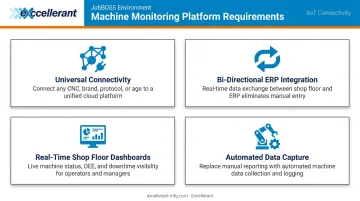
For a JobBOSS environment specifically, the monitoring platform needs to handle the machine mix most job shops actually have — not just new CNCs, but older machines too. Key requirements:
- Universal connectivity — support for modern protocols (MTConnect, OPC-UA, Fanuc FOCAS, HAAS MNET, Mazak Mazatrol) and legacy RS-232 serial machines
- Bi-directional ERP integration — the ability to pull job data from JobBOSS and push actual cycle times, part counts, and downtime back to the ERP
- Real-time shop floor dashboards — visible to both operators at machines and supervisors in the office
- Automated data capture — no ongoing manual input required for machine-level data
Excellerant's machine monitoring platform draws on more than 30 years of machine tool networking experience — tracing back to Macdac Engineering in 1991 — to connect any mix of machines to a single unified view. Modern CNCs connect via ethernet or WiFi; legacy equipment connects through serial communications or PLC intermediary devices.
The platform includes pre-built, bi-directional integration with JobBOSS. It replaces manual labor tickets with automated actual-hours capture, so the ERP displays real-time actual-versus-planned data without manual entry. The practical result: actual machine cycle times replace estimated standard hours in JobBOSS job costing.
Best Practices for Maximizing JobBOSS Data Collection
Even with a machine monitoring layer in place, JobBOSS data quality depends on how consistently operators and managers use the ERP's own features. These three practices have the biggest impact:
1. Build a clock-in/clock-out SOP operators will actually follow. Operator discipline around time ticket entry is where data quality is won or lost. Define a clear procedure for clocking into and out of job operations, then reduce friction wherever possible. Mobile barcode and QR scanning features help — fewer steps at the point of entry means fewer skipped entries.
2. Run actual vs. estimated hour reports on a weekly schedule. Job cost variance reports catch data entry gaps before they become billing or forecasting problems. Running these daily or weekly gives supervisors early warning when labor hours drift from estimates, and helps distinguish costing errors from real production inefficiencies.
3. Audit routing steps and standard times before variance reports lose meaning. Inaccurate standard hours in JobBOSS produce misleading comparisons no matter how disciplined the data collection is. Validate routing time standards against observed cycle times at least once a year. Do it sooner if quoting win rates or margin reports start showing unexplained variance.
Frequently Asked Questions
What is JobBOSS software used for?
JobBOSS (now JobBOSS²) is a shop management ERP designed for job shops and make-to-order manufacturers. It covers quoting, scheduling, job costing, inventory, purchasing, and shop floor data collection from quote to invoice.
Is JobBOSS an ERP or MRP?
JobBOSS is primarily a shop management ERP with MRP capabilities. It handles material requirements planning alongside broader business operations including accounting, scheduling, and shop floor data collection.
What is the difference between JobBOSS and JobBOSS²?
JobBOSS² is the cloud-native successor created by ECI Software Solutions after merging the original JobBOSS with E2 Shop System. It offers a modern browser-based interface, mobile apps, and cloud access compared to the legacy on-premises version.
How much does JobBOSS² cost per month?
ECI does not publish JobBOSS² pricing publicly. It is subscription-based with Silver, Gold, and Platinum tiers. Contact ECI directly for a quote based on user count and required modules.
Does JobBOSS have machine monitoring capabilities?
JobBOSS does not natively monitor CNC machines in real time. It collects labor and job data through manual operator input. Machine-level monitoring requires integration with a third-party platform such as a dedicated IIoT machine monitoring solution.
Can JobBOSS integrate with third-party machine monitoring software?
Yes. JobBOSS² supports integrations via API and flat file, and ECI has listed machine monitoring integrations including Alora. Platforms like Excellerant connect to JobBOSS² to feed actual cycle times and downtime data back into the ERP, improving job costing and scheduling accuracy.