That gap between shop floor reality and ERP records is where missed deadlines, idle machines, and bad shipping commitments are born. It's not a scheduling problem. It's a data problem.
Real-time ERP sync closes it by pushing production data into the ERP the moment events happen — no manual entry, no batch upload, no end-of-shift catch-up. Front-office teams get an accurate, live picture of operations as the day unfolds.
This article covers what real-time ERP sync means for manufacturers, why shops struggle without it, what data should flow, how the technology actually works, and how to get started.
Key Takeaways
- Real-time ERP sync automatically transfers machine and job data into the ERP as events occur — no keyboard entry required
- Without it, schedulers work from stale data — driving delivery failures and inventory inaccuracies
- Key data to sync: machine state, job completions, cycle times, material consumption, scrap, and NC program revisions
- Integration uses machine protocols (MTConnect, OPC-UA, FANUC FOCAS) paired with API connections or pre-built ERP connectors
- Legacy CNCs without network ports connect via hardware adapters and serial communication bridges
What Is Real-Time ERP Sync in Manufacturing?
Real-time ERP sync is the automatic, continuous transfer of operational data between shop floor systems and the ERP — happening within seconds of an event. That means machine monitoring platforms, DNC software, and MES layers all push data immediately, rather than waiting on manual input or scheduled batch uploads.
The difference between real-time and batch sync has a direct impact on every scheduling and planning decision your team makes:
Real-Time vs. Batch Sync
| Sync Type | When ERP Updates | Practical Impact |
|---|---|---|
| Batch | End of shift, nightly, or hourly | ERP always reflects yesterday's reality |
| Real-time | Within seconds of each event | ERP reflects what is happening right now |
A batch sync running every eight hours means your production planner at 2 PM is making decisions based on 6 AM data. That gap is a direct, repeatable source of scheduling errors — not an edge case.
What "Bidirectional" Means Here
Real-time ERP sync isn't one-directional. A properly configured integration flows both ways:
- Shop floor → ERP: Machine status, job completions, cycle times, scrap quantities, material consumption
- ERP → Shop floor: Work orders, schedules, NC program releases, priority changes
That closed loop means planners act on live data, and machines receive updated instructions without manual handoffs — keeping production and scheduling aligned throughout the shift.
Why Manufacturing Shops Struggle Without Real-Time ERP Sync
The Manual Data Problem Is Bigger Than It Looks
According to the Manufacturing Leadership Council's 2024 Data Mastery survey, 70% of manufacturers still collect data manually — and 44% report their data volume at least doubled over the prior two years. More data, collected manually, means the problem compounds every year shops wait to address it.
In practice, manual collection looks like this: a machinist finishes a job, a paper traveler gets stamped, and someone keys that information into the ERP at shift end. By then, the planner has already made four decisions based on incorrect WIP status.
Siloed Systems Make It Worse
When machine monitoring software, the DNC system, and the ERP each hold separate records of the same job, teams spend their day reconciling conflicting data instead of acting on it. Quality Magazine reports that manual data entry carries an average error rate of approximately 1% — and in a paper-to-computer calibration workflow, that figure can reach 40% of records containing faulty data.
Those errors don't stay isolated. They flow through to invoicing, purchasing, and shipping.
The Downstream Scheduling Failure
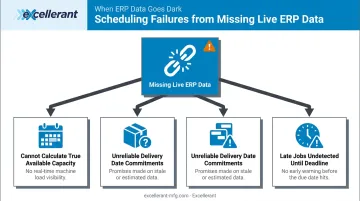
Without live job completion data feeding the ERP, production schedulers can't accurately:
- Calculate true available capacity
- Load new work without double-booking machines
- Commit to delivery dates with confidence
- Identify jobs running late before they miss due dates
Shops end up overpromising, expediting at a premium, and reacting to problems that live data would have flagged days earlier.
Inventory and Compliance Gaps
When material consumption is recorded only at job close rather than throughout production, on-hand inventory figures are wrong all day. Purchasing teams over-order, get caught short, or both — tying up cash in unnecessary stock.
For regulated manufacturers, the consequences go beyond cash flow. Manual processes introduce record gaps that fail audits in two critical frameworks:
- CMMC Level 2 / NIST SP 800-171: Requires auditable records tracing every action to an individual user — a standard manual entry cannot reliably meet
- FDA 21 CFR Part 820: Governs record-control obligations for medical device quality systems, where incomplete logs trigger costly corrective action
What Shop Floor Data Should Sync With Your ERP in Real Time
Not every machine signal needs to reach the ERP. These five data types do:
Machine Status and Availability
Real-time machine state data (running, idle, faulted, in setup) lets planners see actual capacity versus scheduled capacity without calling the floor. This single data stream changes how work gets loaded and sequenced. When a machine goes down at 9 AM, the ERP knows at 9 AM — not at 5 PM when someone enters the downtime log.
Job and Operation Completions
Each completed operation should immediately trigger an ERP update: advance the routing step, update WIP status, notify downstream operations. The entire production chain reacts without manual intervention from anyone.
Cycle Time: Actual vs. Planned
When the ERP receives live cycle time data per operation, it can flag jobs running long before they become delivery risks. Modern Machine Shop documented a 38 percentage-point increase in vertical CNC utilization at LeClaire Manufacturing after implementing machine monitoring — visibility into actual versus planned performance is foundational to that kind of improvement.
Material Consumption and Scrap
Syncing material draw-down and scrap quantities at the point of production, rather than at job close, keeps inventory records accurate throughout the day. More accurate inventory drives better purchasing signals and reduces emergency procurement costs.
NC Program Revision Data
In precision manufacturing, the ERP should know which exact program revision ran on which machine for which job. Excellerant's integrated DNC software captures NC file revision history and supports one-click revision compare between versions. When this data syncs two-way with the ERP, it creates an automatic audit trail — eliminating paper records while meeting traceability requirements for aerospace, defense, and medical work.
How Real-Time ERP Sync Works on the Shop Floor
Layer 1: Machine Data Collection
Before data can reach the ERP, it must come off the machine. Machine monitoring platforms read signals directly from CNC controllers using industrial protocols:
- MTConnect — open standard semantic vocabulary for manufacturing equipment data, with ERP integration listed as a primary use case
- OPC-UA — provides machine-to-machine and machine-to-enterprise interoperability across industrial systems
- FANUC FOCAS, HAAS MNET, Mazak Mazatrol — proprietary controller protocols for direct data access from major machine brands

NIST has validated the MTConnect-OPC UA companion specification as a standard bridge between these two protocol families, which matters for shops running mixed fleets.
Layer 2: Legacy Machine Connectivity
Many shops run equipment that's 20, 30, or even 40 years old with no native network port. CESMII estimates legacy CNC connectivity can cost $10,000 to $15,000 per machine without the right approach — before accounting for installation time.
Excellerant addresses this with wireless DNC adapters and RS-232 serial-to-network bridges that connect legacy machines without modifying or replacing them. Older machines connect via serial communications or PLC intermediary devices; modern CNCs plug in via ethernet or WiFi. Both run on the same unified platform — built by the team that pioneered the world's first wireless DNC connection to a machine tool in 2001.
Layer 3: Middleware and ERP Integration
The machine monitoring platform acts as a translator. It applies business logic to raw signals — for example, flagging a machine idle beyond a defined threshold as a downtime event — and enriches those signals with job number, operator, part number, and machine ID from the shop floor interface.
Structured records then push to the ERP via API or pre-built connectors. Excellerant supports bidirectional integrations for:
- Epicor
- JobBOSS
- Global Shop Solutions
- SAP
- Oracle
An Open API covers custom connections for any ERP not on this list.
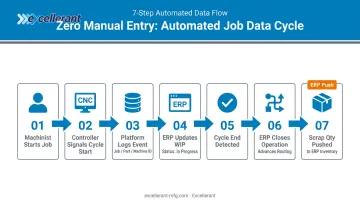
The Data Flow in Practice
Here's a complete cycle without a single keyboard entry:
- Machinist starts a job at the machine
- Controller signals cycle start
- Monitoring platform logs the event with job number, part number, and machine ID
- ERP updates WIP to "in progress"
- Cycle end is detected
- ERP closes the operation and advances the routing automatically
- Scrap quantity entered at the shop floor interface pushes to ERP inventory in real time
Rory Miller at McMellon Bros. described the practical result: "ERP has become a more powerful tool. I can pull it up at any time and find out what's happening with a customer's parts. If we're not on pace, we can fix it."
Dan Villemaire at C&M Machine Products put it more directly: "The accuracy of information that's coming into our ERP system is exponentially better than what it was before."
That accuracy gap — between what the ERP shows and what's actually happening on the floor — is exactly what real-time sync is designed to close.
How to Get Started with Real-Time ERP Sync
Step 1 — Establish Machine Connectivity
Audit each machine's controller type and determine the right connectivity approach:
- Modern CNCs with ethernet ports: Plug-and-play connection, minimal setup
- WiFi-preferred environments: Wireless DNC adapters eliminate cabling
- Legacy machines with RS-232: Serial-to-network bridges or PLC intermediary devices
Excellerant's platform supports any brand, any protocol, and any machine age on a single unified system. There's no need for separate platforms to manage old and new equipment side by side.
Step 2 — Map Your Data Flows and ERP Fields
Before connecting anything to the ERP, define:
- Which shop floor events (job start, cycle end, scrap, downtime) trigger ERP updates
- Which ERP fields or transaction types those events should populate
- Which ERP work orders and schedules should push back down to the floor
Getting this mapping right upfront ensures bidirectional sync works as intended from day one — not as an afterthought requiring costly rework later.
Step 3 — Configure, Pilot, and Roll Out
- Connect the machine monitoring layer to the ERP via API or pre-built connector
- Run a pilot with a subset of machines to validate data accuracy before shop-wide deployment
- Set up a monitoring dashboard — Excellerant's Shop Summary Dashboard shows real-time operational status for all connected equipment, accessible from any device or mounted plant floor display
- Roll out shop-wide with continuous improvement cycles as the team builds confidence in the data
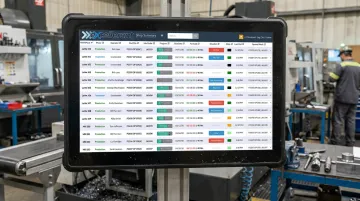
The platform requires only a single server install with browser-based access from any device. With no per-seat licensing fees, scaling from pilot to full shop adds zero infrastructure complexity.
Frequently Asked Questions
What is real-time syncing in ERP systems?
Real-time ERP sync is the automatic, continuous transfer of operational data into and out of the ERP as events occur, unlike batch sync, which updates on a schedule. In manufacturing, this means the ERP reflects actual shop floor status at any given moment rather than what the floor looked like at shift end.
What are real-time applications of ERP systems in manufacturing?
Common applications include live job status tracking, dynamic production scheduling, real-time inventory deduction, machine downtime alerts, and traceability record creation. Each becomes possible when machine data syncs continuously rather than through manual entry or periodic uploads.
What types of shop floor data can sync with an ERP in real time?
Key data types include machine state (running/idle/faulted), job and operation completions, cycle times, material consumption, scrap quantities, and NC program revision records. All are captured automatically through machine monitoring, with no manual entry required.
Can legacy CNC machines be connected for real-time ERP sync?
Yes. Machines without native network ports connect using hardware adapters and serial communication bridges. The right connectivity platform supports a mixed fleet of new and legacy equipment (including machines 30 to 40 years old) without requiring replacement or machine modification.
How does real-time ERP sync improve production scheduling?
When the ERP receives live job completion and machine status data, schedulers see true available capacity and spot jobs running behind before due dates slip. New work gets loaded based on actual floor conditions, not estimates made hours earlier.
What is the difference between real-time and batch ERP data sync?
Batch sync updates the ERP on a schedule (end of shift or nightly), so the data is always hours behind reality. Real-time sync pushes updates within seconds of each event. That gap determines whether a scheduler can redirect resources mid-shift or only review what went wrong the next morning.