Introduction
Production forecasting estimates future demand and the resources needed to meet it. Production scheduling translates that estimate into a specific, time-bound plan — which machine, which operator, which job, and when. Together, they determine whether a manufacturing operation runs with intention or improvisation.
This guide covers both disciplines in depth — what breaks them, how they interact, and what a reliable planning system actually requires in a real shop environment.
Key Takeaways
- Production forecasting answers "how much demand, and when?" — scheduling answers "which machine, which operator, in what order, by what date?"
- Without scheduling, a forecast has no execution path — and without forecasting, a schedule is built on guesswork
- The most common accuracy failures trace back to incomplete machine data, siloed teams, and treating a forecast as a fixed commitment
- Real-time machine availability data connects the demand signal to a schedule the shop floor can actually execute
- Both processes require regular updates — not a once-a-quarter review
What Are Production Forecasting and Scheduling?
Production forecasting and scheduling are often used interchangeably — but they describe fundamentally different activities.
Production forecasting uses historical order data, sales trends, customer commitments, and market signals to estimate future production demand — and the labor, materials, and machine capacity required to fulfill it. It answers the question: how much will we need to produce, and over what time horizon?
Production scheduling takes that demand estimate and converts it into actionable shop floor instructions: which jobs run on which machines, in what sequence, worked by which operators, completed by which dates.
The distinction matters operationally:
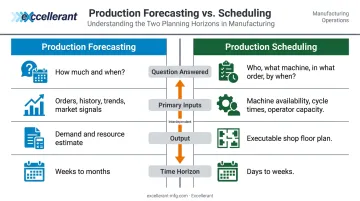
| Forecasting | Scheduling | |
|---|---|---|
| Question answered | How much, and when? | Who, what machine, in what order, by when? |
| Primary inputs | Orders, history, trends, market signals | Machine availability, cycle times, operator capacity, job priorities |
| Output | Demand and resource estimate | Executable shop floor plan |
| Time horizon | Weeks to months | Days to weeks |
Both are often grouped under umbrella terms like "production planning" or "capacity planning." They share inputs and inform each other, but they require different data, different decision-making, and different owners. Conflating the two typically produces schedules built on demand assumptions no one has validated — and floor teams that stop trusting the plan within a week.
How Production Forecasting and Scheduling Work Together
The relationship is a loop, not a handoff. A forecast creates a demand signal; scheduling stress-tests that signal against real constraints; the result is an executable plan. When shop floor conditions change, the loop restarts.
Step 1: Build the Forecast
A production forecast draws on several input types:
- Confirmed customer orders — the most reliable demand signal available
- Historical order data — seasonal patterns, repeat customer behavior, product-family trends
- Sales pipeline inputs — quotes, opportunities, and customer conversations about upcoming volume
- Market signals — industry conditions, lead-time trends, customer capacity plans
The forecasting method depends on what data is available:
- Qualitative methods (expert judgment, Delphi) — appropriate when historical data is limited or a new product is launching
- Time series analysis — appropriate when past demand patterns are stable and well-documented
- Causal modeling — appropriate when demand links to a measurable external variable (e.g., a customer's build schedule)
- Trend projection — appropriate for identifying directional demand shifts over longer horizons
No method is universally best. Most job shops and machine shops blend confirmed orders with historical run rates rather than relying on a single technique.
Step 2: Validate Against Real Capacity
A forecast becomes dangerous the moment it's treated as an executable plan without capacity validation. This step asks: can we actually build this, with the machines and people we have available?
That requires knowing:
- Which machines are currently available and for how long
- Actual cycle times per operation (not estimated or assumed)
- Current utilization rates and any scheduled maintenance windows
- Where operator coverage exists by shift
This is where most operations stumble — they validate against assumed capacity rather than actual capacity. A machine listed as available in the ERP may be mid-repair on the shop floor. A cycle time entered months ago may no longer reflect current tooling or material conditions.
Excellerant's CNC machine monitoring software closes this gap by delivering live visibility into machine status, utilization, cycle times, and downtime events — automatically, without manual data entry. The Shop Summary Dashboard gives planners a real-time view of the entire floor, including alerts about threats to planned production levels and schedule forecasting based on current machine performance.
Live floor data turns capacity validation from a paperwork assumption into a genuine check against what's actually running.
Step 3: Build, Sequence, and Release the Schedule
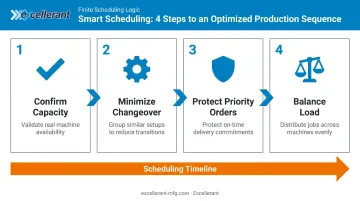
Once capacity is confirmed against real floor conditions, planners can sequence jobs to:
- Minimize changeover time between similar setups
- Protect on-time delivery for priority or contractual orders
- Balance load across machines to avoid bottlenecks
- Account for operator skill, shift coverage, and material availability
The schedule should be treated as a living document. Constraints surface constantly — a machine goes down, a rush order arrives, a supplier is late. A good scheduling process handles these as sequencing decisions, not crises requiring a rebuild from scratch.
Key Factors That Affect Forecast and Schedule Accuracy
Data Quality and Timeliness
A forecast is only as good as the data feeding it. The Manufacturing Leadership Council found in 2024 that **70% of manufacturers still collect data manually**, with 44% reporting that their data volume had at least doubled over the prior two years. Manual entry introduces transcription errors that compound through every downstream planning decision.
Stale ERP records, paper job travelers, and after-the-fact log entries mean the production picture planners are working from is always behind reality. Automated, real-time machine data collection — where machines report their own status, cycle times, and downtime events — eliminates this lag at the source.
Demand Variability and Order Behavior
Fluctuating order volumes, last-minute customer changes, and seasonal spikes destabilize even well-constructed schedules. A 2024 Scientific Reports study on dynamic flexible job-shop scheduling identifies new job insertions, machine breakdowns, delivery time changes, and processing time changes as the primary disruption categories.
The response to variability shouldn't be a full schedule rebuild — it should be a re-sequencing capability. Planners need to move jobs quickly without losing the priority logic already embedded in the schedule.
Machine and Resource Constraints
Unplanned downtime, tool wear, and operator gaps are the most common reasons a valid schedule breaks down in practice. Constraint visibility is just as critical as constraint management — knowing a machine just went down — the moment it happens, not at the end of the shift — lets planners re-sequence before the downstream impact compounds.
Excellerant's platform captures this through automated downtime recording, machine alarm-state tracking, and instant mobile notifications when a stoppage occurs. Operators categorize downtime reasons directly at the machine using a one-tap interface, feeding that data immediately into root-cause analysis and schedule updates.
Forecast Horizon and Update Frequency
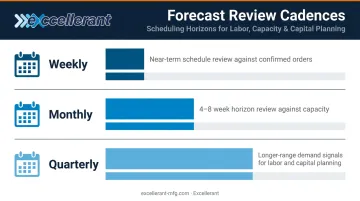
Short-horizon forecasts (days to two weeks) are reliably more accurate than month-long or quarterly projections. The practical implication: manufacturers benefit from a rolling forecast cadence rather than a fixed review cycle. In practice, this means:
- Weekly review of the near-term schedule against confirmed orders
- Monthly review of the 4-8 week horizon against capacity
- Quarterly review of longer-range demand signals for labor and capital planning
When the forecast is treated as a static document with a fixed review date, conditions change faster than the plan does. The result is reactive scheduling, not proactive planning.
Cross-Functional Alignment
Sales, production, and procurement each carry their own version of demand reality. When those versions don't match, schedules get built on conflicting assumptions. ASCM notes that without sales and marketing input, manufacturers may produce goods without correlation to actual demand — and that S&OP's core value is giving all departments a single set of numbers to work from.
Excellerant's bi-directional ERP integration addresses this directly. Real-time machine and operator data flows into ERP systems (Epicor, JobBoss, Global Shop Solutions, SAP, Oracle), while job and work-order data flows back to the shop floor.
The result is a shared, current picture across departments: sales can see live production status, procurement can monitor actual material consumption, and production isn't building schedules on stale assumptions. The platform's shop floor communication module connects operators with schedulers, programmers, and front-office staff — no separate tools required.
Common Mistakes That Undermine Production Forecasting and Scheduling
Treating the Forecast as a Commitment
Teams often lock in a forecast number, build a schedule around it, and then defend that schedule even as conditions change. The forecast is a planning signal — it should trigger preparation, not replace judgment. When a machine goes down or a customer pushes out an order, the right response is to update the schedule, not protect the forecast.
Scheduling to Theoretical Capacity
Loading machines to 100% utilization on paper is one of the fastest ways to generate a schedule that falls apart by Tuesday. Factory Physics and queueing theory are clear on this: as utilization approaches 100%, waiting time and lead time grow sharply — especially when arrival and processing times vary, which they always do in a real job shop.
Excellerant's OEE monitoring breaks capacity into its actual components:
- Availability — accounts for downtime and maintenance windows
- Performance — actual output vs. expected output
- Quality — accounts for scrap and rework losses
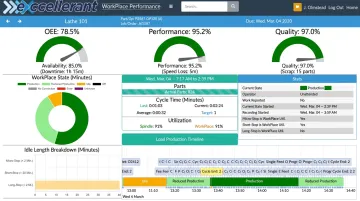
This gives planners a realistic capacity ceiling to schedule against, not the theoretical nameplate number that ignores everything that actually happens on the floor.
Relying on Disconnected or Outdated Tools
Spreadsheet-based scheduling creates version control problems, introduces transcription errors, and produces a picture of the shop floor that is always hours behind reality. When planners lose confidence in their own schedule, they default to reactive decision-making — managing by phone call and tribal knowledge rather than data.
McMellon Bros. described the shift after implementing Excellerant's platform: "ERP has become a more powerful tool. I can pull it up at any time and find out what's happening with a customer's parts. If we're not on pace, we can fix it." Real-time visibility like that is the difference between a schedule that drives decisions and one that planners route around.
Conclusion
Forecasting and scheduling are not independent activities. Forecasting creates the demand signal; scheduling converts it into an executable plan — but only when that plan is grounded in accurate, current data about what the shop floor can actually do.
A responsive planning system — one built on real-time shop-floor data — is the actual target. That means:
- Updating plans as conditions change, not after the damage is done
- Catching capacity constraints before they become missed deliveries
- Giving operations teams the confidence to commit to dates and hit them
When forecasting and scheduling share the same live data, planners stop reacting and start leading.
Frequently Asked Questions
What is production forecasting?
Production forecasting is the process of estimating future product demand and the resources — labor, materials, and machine capacity — needed to meet it. It gives manufacturers a basis for proactive planning rather than reacting to demand after it arrives.
What is the difference between forecasting and scheduling?
Forecasting estimates how much demand will arrive and over what timeframe. Scheduling takes that estimate and assigns specific jobs to specific machines, operators, and time slots. The two are sequential: forecasting sets the target, scheduling maps the path to hit it.
What are the four methods of forecasting?
The four primary methods are qualitative (expert judgment/Delphi), time series analysis, causal modeling, and trend projection. Method selection comes down to data availability: qualitative approaches work when historical data is limited; quantitative methods when patterns are established.
What are the most common challenges in production forecasting?
The most common challenges are demand volatility, inaccurate or outdated historical data, supply chain disruptions, and misalignment between sales, production, and procurement teams. When each department works from different numbers, the forecast reflects internal politics as much as actual demand.
How does real-time machine data improve production scheduling?
Live visibility into machine availability, utilization, cycle times, and downtime lets planners schedule against actual capacity rather than assumed capacity. This closes the gap between the planned schedule and what the shop floor can realistically execute — and allows schedules to update dynamically when conditions change.