Introduction
Picture a machine operator in a job shop around 2005: clipboard in hand, walking the floor every hour to check which machines are running, scribbling down cycle counts, and manually logging any faults before heading back to the office to enter that data into a spreadsheet. Today, that same operator pulls up a browser tab and sees every machine's live status, cycle time, and production progress — without leaving their desk.
That shift is largely what HMI technology made possible.
A Human Machine Interface (HMI) is the hardware and software system that connects operators to industrial machines, giving them real-time visibility and control without requiring physical interaction with each piece of equipment. As Rockwell Automation defines it, an HMI solution is a mix of software, hardware, and data that provides a visual interface between a human and a process or machine.
This guide breaks down how HMIs work, what they're made of, how they've evolved across four generations, and where they fit alongside PLCs and SCADA systems.
Key Takeaways
- HMI = a display and control system connecting operators to machines in real time — ranging from simple pushbutton panels to full touchscreen dashboards
- HMIs collect data from PLCs and sensors, visualize it, and let operators respond to alerts or adjust parameters on the fly
- HMIs, PLCs, and SCADA are distinct but complementary — PLCs run machine logic, HMIs surface that data to operators, and SCADA pulls it all together across the facility
- According to the Manufacturing Leadership Council, 70% of manufacturers still collect data manually — HMI-connected platforms are the direct solution to that gap
What Is an HMI and How Does It Work?
An HMI is the operator-facing system — hardware, software, and connectivity combined — that lets a person see what a machine is doing and interact with it without physically being at the machine.
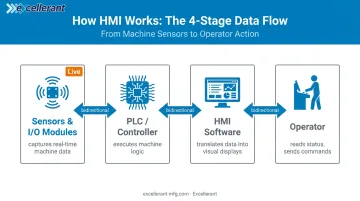
At the functional level, the process works like this:
- Sensors and I/O modules capture real-time data from the machine (temperature, cycle count, speed, fault states)
- A PLC or controller processes that data and executes machine logic
- The HMI software reads values from the PLC, translates them into visual displays, and presents them to the operator
- The operator reads status, adjusts parameters, or responds to alerts — then sends commands back through the HMI to the PLC
A car dashboard is the closest everyday analogy. You don't open the hood to check engine temperature or fuel levels — the dashboard surfaces that information so you can act on it while driving. An HMI does the same job on the shop floor: it shows spindle speed, cycle count, temperature, and fault codes so the operator understands machine state without standing next to it.
HMI vs. GUI — An Important Distinction
A GUI (graphical user interface) is just the visual layer: the icons, buttons, and color-coded displays. An HMI is the full system — hardware, software, and two-way communication infrastructure — that makes that visual layer functional in an industrial context.
Where HMIs Are Used
HMIs are used across virtually every sector involving industrial equipment:
- Manufacturing (CNC machine shops, assembly lines, fabrication)
- Oil and gas
- Food and beverage processing
- Water and wastewater treatment
- Pharmaceutical production
- Energy generation and distribution
In each of these environments, the HMI serves the same core function: giving operators real-time visibility and control without requiring direct physical access to the equipment.
Key Components of an HMI System
Every functional HMI system has four core elements working together:
| Component | Role |
|---|---|
| Display/Interface Device | The physical screen — touchscreen panel, mounted monitor, or tablet — where operators see machine data |
| PLC (Programmable Logic Controller) | The machine's control brain; reads sensor inputs and executes programmed logic to drive outputs |
| I/O Modules | Handle data exchange between field devices (sensors, actuators) and the control system |
| HMI Software | Translates raw machine data into readable visuals — dashboards, trend charts, alarm logs, KPI widgets |
The PLC continuously monitors machine conditions through sensors; the HMI software reads those values and presents them visually; the operator then sends commands (start, stop, speed adjustment) back through the HMI to the PLC.
Communication Protocols
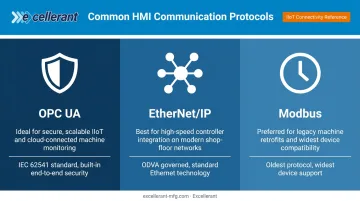
These components communicate through standardized industrial protocols. Three of the most common:
- OPC UA — maintained by the OPC Foundation (IEC 62541), described as a framework for standardized data exchange with built-in end-to-end security
- EtherNet/IP — governed by ODVA, deploys standard Ethernet technology for industrial automation networks
- Modbus — specifications maintained by the Modbus Organization; one of the oldest and most widely supported industrial protocols
Protocol compatibility is the deciding factor in mixed-brand CNC environments. Platforms like Excellerant's machine monitoring system support MTConnect, OPC UA, Fanuc FOCAS, HAAS MNET, Mazak Mazatrol, and Heidenhain TNCremo — acting as a protocol translator that connects machines of different brands and ages into one unified data stream.
Modern CNCs connect via ethernet or WiFi; legacy RS-232 machines connect through serial adaptors or PLC intermediary devices.
Types of HMI
By Hardware Form Factor
Fixed/panel-mount HMIs are built into control cabinets or mounted at workstations — the most common form on individual CNC machines. Siemens' SIMATIC HMI Panels, for example, range from 4-inch Basic Panels to 22-inch Unified Panels for more complex machine-level visualization.
Mobile/handheld HMIs — tablets, pendants, or ruggedized handhelds — let operators carry the interface across the floor. These are practical in large facilities where moving between machines is part of the job.
Web-based/software HMIs run in a browser and work on any internet-connected device. This includes remote monitoring from an office, a different building, or off-site entirely. Excellerant's platform uses this architecture — a single server install accessible from any device (Windows, Mac, iOS, Android), so the same system serves both the production floor and the front office.
Managers can monitor live machine status from their desks while operators use a tablet-optimized Shop Floor Interface at each machine simultaneously.
By Interface Style
- Graphical HMIs — use color-coded process diagrams, trend charts, and icons to represent machine states; the dominant form in modern manufacturing
- Touchscreen HMIs — replace physical buttons with direct tap/swipe interaction on the display
- Alphanumeric OITs (Operator Interface Terminals) — simpler text/number displays for local, single-machine control; all OITs are HMIs, but not all HMIs are OITs
Emerging Types
- High-performance HMIs — minimal, clutter-free designs that display only critical information quickly
- Cloud-connected HMIs — push machine data to remote dashboards and analytics platforms for facility-wide visibility
- Multi-touch panels — enable complex data manipulation for high-density process environments
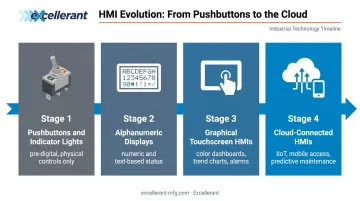
The Four Stages of HMI Evolution
Stage 1 — Pushbuttons and Indicator Lights
The original "HMI" was purely physical: toggle switches, relay panels, and pilot lights on a control cabinet. Operators knew a machine was running because a light was on. Troubleshooting meant walking the floor and inspecting the machine directly. As Schneider Electric documents, these early systems had no graphical representation of any kind — the hardware itself was the interface.
Stage 2 — Character-Based Alphanumeric Displays
Early digital HMIs moved to small screens showing text and numbers: spindle speed, part count, a basic status code. Useful, but with no graphical context. Control Engineering traces this shift from text-based to graphical visualization as a defining transition in HMI history.
Stage 3 — Graphical Touchscreen HMIs
The dominant form today. Full-color touchscreens display process diagrams, trend charts, alarm histories, and real-time KPIs. Operators navigate menus, adjust parameters, and respond to faults without consulting a manual. The shift from CRT to LCD displays accelerated adoption through the 2000s and 2010s.
Stage 4 — Connected, Mobile, and Cloud-Enabled HMIs
The current frontier. Modern HMIs feed data into IIoT platforms, SCADA systems, and cloud dashboards. Schneider Electric describes today's HMIs as functioning as edge computers that support mobile access and predictive maintenance.
Rockwell positions its modern HMI/SCADA solutions at the convergence of edge computing and cloud connectivity. That's a significant distance from a fixed pilot light on a cabinet door — and the pace of change shows no sign of slowing.
HMI in Manufacturing: Core Functions and Real-World Benefits
Real-Time Machine Monitoring
HMIs give operators a live view of machine status (running, idle, faulted), output rates, cycle times, and error conditions — without walking the floor. According to the Manufacturing Leadership Council, 70% of manufacturers still collect data manually, which means most shops are still operating on delayed, error-prone information.
Excellerant's platform closes that gap. The Shop Summary Dashboard shows the real-time operational status of every connected machine at a glance. The Shop Floor Interface (SFI) gives individual operators tablet-optimized views of job progress, machine status timelines, part counts, and cycle times at their workstation.
When a machine fault occurs, the mobile app sends instant notifications — no floor walk required.
McMellon Bros., a CNC shop running Excellerant's platform, reports: "ERP has become a more powerful tool. I can pull it up at any time and find out what's happening with a customer's parts. If we're not on pace, we can fix it."
Alarm and Fault Management
HMIs surface threshold violations, process anomalies, and fault codes as visual and audible alerts — letting operators intervene before a minor issue escalates. Crucially, HMIs log alarm histories, which supports root cause analysis over time.
Excellerant's system includes automatic machine-alarm-state tracking that logs fault codes and error conditions, generates downtime diagrams and statistics graphics, and provides root-cause analysis tools for identifying production bottlenecks. Operators can also raise warnings proactively — flagging a concern before the machine actually goes down.
Process Control, Program Status, and Data Integration
Beyond alarms, HMIs in CNC environments go further than displaying machine metrics. They surface program status, tool information, and NC file data alongside production figures.
Excellerant's platform extends this with centralized NC file management, including:
- In-browser NC editor with one-click G-code compare
- Guaranteed access to the latest approved program revision at the machine
- Integrated chat connecting operators with programmers and front-office staff
- Tooling information and job notes embedded directly in the operator view
For data accuracy, the platform integrates bi-directionally with ERP systems including SAP, Oracle, Epicor, JobBoss, and Global Shop Solutions. It replaces manual labor tickets with automated actual-hours capture, pushing real-time machine data upstream while pulling job and work-order data back to the floor.
C&M Machine Products documented the result: "The accuracy of information that's coming into our ERP system is exponentially better than what it was before."
Reduced Downtime and Proactive Maintenance
Siemens' 2024 True Cost of Downtime report puts unplanned downtime costs for the world's 500 largest companies at $1.4 trillion annually — 11% of revenues. In automotive manufacturing alone, a single hour of downtime costs $2.3 million.
HMI-enabled visibility shifts maintenance from reactive to predictive. Excellerant's platform includes a rule engine that monitors machine control and sensor data around the clock, tracking changes in frequency, amplitude, force intensity, and bearing wear. It alerts the right personnel via mobile app before a minor anomaly becomes a production stoppage.
HMI vs. PLC vs. SCADA: What's the Difference?
These three technologies are frequently confused because they work together — but they serve distinct roles at different levels of the automation stack.
HMI vs. PLC
The PLC (Programmable Logic Controller) is the machine's control brain. As Inductive Automation defines it, a PLC is an industrial computer with inputs and outputs used to control and monitor industrial equipment. It reads sensor signals and executes programmed logic to drive machine outputs.
The HMI is the operator-facing layer on top of that. It shows what the PLC is doing and lets humans send commands to it. The PLC runs the machine; the HMI is how a person sees and talks to it. Each handles a distinct job — one executes logic, the other surfaces it.
HMI vs. SCADA
SCADA (Supervisory Control and Data Acquisition) operates at a higher level. It aggregates data from multiple HMIs and PLCs across an entire facility or multiple sites, stores historical data in a database, and provides facility-wide supervisory oversight. An HMI typically operates at the machine or process level; SCADA provides the bird's-eye view.
HMI is often a component within a SCADA system, not a replacement for it.
The Automation Stack
Here's how the layers fit together:
| Layer | Technology | Function |
|---|---|---|
| Field Level | Sensors, actuators | Physical machine inputs/outputs |
| Control Level | PLCs | Execute machine logic |
| Operator Interface | HMIs | Visualize and control at machine level |
| Supervisory Level | SCADA | Facility-wide oversight and data aggregation |
| Enterprise Level | MES / ERP | Production planning and business integration |
This model — based on the ISA-95 standard (also known as the Purdue Model) — is how most industrial automation environments are structured.
When Each Is Sufficient
- Single CNC machine: HMI + PLC is typically sufficient
- Facility with 20+ machines: SCADA-level aggregation adds real value
- Multi-site enterprise: MES/ERP integration becomes essential
Platforms like Excellerant's span multiple layers at once: operator interface, machine-level data collection, and bi-directional synchronization with SCADA and MES/ERP systems above it.
Frequently Asked Questions
What are the 4 stages of HMI?
The four stages move from physical to digital: (1) pushbutton panels and indicator lights, (2) character-based alphanumeric displays, (3) graphical touchscreen HMIs with color dashboards and trend charts, and (4) cloud-connected HMIs with mobile access and predictive analytics. Each stage gave operators more context and faster response capability.
What is the difference between an HMI and a PLC?
A PLC is the control brain — it reads machine inputs and executes programmed logic to drive outputs. An HMI is the operator-facing display that shows what the PLC is doing and allows humans to issue commands back to it. The PLC runs the machine; the HMI is how operators see and interact with it.
Is HMI the same as SCADA?
No. HMIs provide machine-level visualization and control for a single process or machine. SCADA systems aggregate data from multiple HMIs and PLCs across an entire facility, store historical records, and provide supervisory control at a higher level. HMI is often a component within a SCADA system rather than a replacement for it.
What is a machine operator interface?
A machine operator interface — also called an OIT (Operator Interface Terminal) — is a type of HMI designed for local, single-machine control. All OITs are HMIs, but not all HMIs are OITs; HMIs also cover remote monitoring, web-based dashboards, and facility-wide supervision.
What are the key components of an HMI system?
An HMI system has four core components:
- Display device — touchscreen, monitor, or tablet
- PLC — executes machine logic and feeds data to the HMI
- I/O modules — connect field sensors and actuators to the control system
- HMI software — translates machine data into visual dashboards and alerts
Where is HMI used in manufacturing?
HMIs are used across virtually all manufacturing environments — CNC machine shops, assembly lines, food and beverage plants, pharmaceutical facilities, and more. Anywhere operators need real-time visibility into machine status and production output, an HMI belongs on the floor.