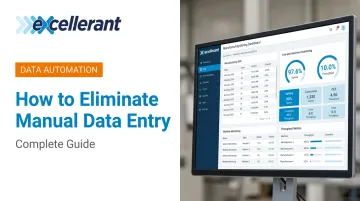
Eliminating manual data entry in manufacturing isn't just a matter of buying new software. It requires understanding exactly where manual entry happens, which systems need to talk to each other, and what infrastructure changes are needed before automation can hold. Skip those steps, and you'll automate the wrong things — or only automate part of the flow, which can corrupt an otherwise clean data stream.
This guide walks through the full process: why manual data entry is a genuine operational problem, how to eliminate it step by step, what you need in place before you start, and the mistakes that derail most implementations.
Key Takeaways
- Manual shop floor data entry creates compounding errors, production blind spots, and ERP records that lag reality by hours or days
- Elimination requires a structured sequence: audit data flows → identify integration gaps → connect machines → integrate with ERP/MES → validate and train
- Legacy CNC equipment is the most common blocker — any platform that can't connect older machines will leave gaps that operators fill manually
- Partial automation is not a stable end state; incomplete data flows corrupt the clean ones
- Bidirectional ERP integration, not just a monitoring dashboard, is what actually removes manual re-entry from schedulers and accountants
Why Manual Data Entry Is a Critical Problem in Manufacturing
Manual data entry on the shop floor does more than slow things down. It actively degrades the accuracy of every downstream system that depends on production data.
Deloitte's 2025 smart manufacturing survey of 600 executives found manufacturers realizing up to 20% improvement in production output and 20% in employee productivity after moving to connected, automated data environments — numbers that reflect how much capacity manual processes leave stranded.
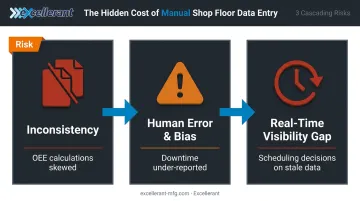
Inconsistency and Unstructured Data
The same data point — a downtime event, a part count, a cycle time — gets recorded in dozens of different formats depending on which operator is working which shift. Some write in minutes, others in decimal hours. Some log downtime codes immediately, others fill in the sheet at the end of the shift from memory.
That inconsistency makes it impossible to aggregate or analyze data reliably. The root cause is a data architecture problem — and it corrupts everything downstream:
- OEE calculations skewed by inconsistent time formats and incomplete logs
- ERP records that reflect what operators remembered, not what actually happened
- Job cost actuals built on rounded numbers and missing events
Human Error and Operator Bias
Errors don't only come from typos. After-the-fact logging — where an operator fills in a log from memory rather than at the point of capture — introduces systematic inaccuracy. Under work pressure, cycle times get rounded. Downtime gets under-reported. Short stoppages disappear entirely.
These are predictable outcomes of asking humans to do something machines should be capturing automatically.
Real-Time Visibility Gaps
Manual entry introduces lag. By the time a shift summary reaches a production supervisor or gets keyed into ERP, the shop floor has moved on. Scheduling decisions get made on stale data. Delivery commitments get made against a production picture that's already out of date.
That gap between shop floor reality and ERP records is precisely why reactive scheduling becomes the default. Shops can't plan confidently against data they can't trust.
How to Eliminate Manual Data Entry: Step by Step
This process requires preparation and phased execution. Rushing any step, especially the audit, leads to integration failures or partial solutions that still require significant manual input.
Step 1: Audit All Current Manual Data Entry Points
Before touching any software, map every location where a human is manually recording or transferring production data:
- Paper production logs and shift reports
- Operator-entered downtime codes filled in after the fact
- CNC program transfers via USB drives or paper travelers
- Manual ERP updates keyed in from clipboard summaries
- Part counts and cycle times written on whiteboards or log sheets
Once mapped, categorize each entry point by frequency, data criticality, and error exposure. That prioritization determines where you automate first and where ROI is highest.
Step 2: Identify System Integration Gaps
Determine which machines, sensors, and software systems are not currently sharing data with each other. Pay particular attention to legacy CNC equipment without native network connectivity, which are typically the biggest sources of manual data bridging.
Map the current data flow (or failure to flow) between:
- Shop floor equipment and machine monitoring platforms
- Machine monitoring and production scheduling
- Shop floor actuals and ERP job records
- Quality inspection results and ERP quality fields
The gaps you find here become the prioritized list for your integration roadmap — address highest-frequency, highest-error-exposure gaps first.
Step 3: Connect Machines to Automated Data Collection
This is the foundational step: replacing manual observation and logging with direct machine-to-system data capture.
Modern IIoT platforms can connect CNC machines of any brand, age, or protocol to a centralized monitoring platform. For modern CNCs, connectivity is often as straightforward as an Ethernet cable or WiFi connection.
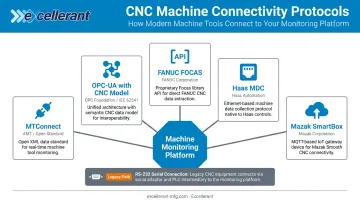
For legacy equipment (RS-232 serial-controlled CNCs, older tape-reader machines, controls from the 1980s and 1990s), the solution is a hardware gateway layer that translates serial or proprietary communications into the platform's data environment.
The most common connectivity protocols in CNC environments include:
- MTConnect — open, royalty-free standard developed by AMT for interoperability between controls, devices, and software
- OPC-UA — industrial interoperability standard with a dedicated CNC information model (OPC 40502) published by the OPC Foundation
- FANUC FOCAS — FANUC's native API for CNC communications and data collection
- Haas MDC — Haas Next Generation Control data collection via MTConnect and Ethernet
- Mazak SmartBox — Mazak's connectivity layer supporting MQTT and OPC protocols
Excellerant's platform natively supports all of these, plus Mazak MAZATROL and Heidenhain TNCremo, and connects legacy machines via RS-232 serial communications or PLC intermediary devices. A platform that can only connect newer machines leaves gaps that operators fill manually, which is exactly what you're trying to eliminate.
Once connected, data (cycle times, part counts, machine status, alarm states, run/idle time by job) flows automatically to the platform without operator input.
Step 4: Integrate Shop Floor Data with ERP and Scheduling Systems
Collecting machine data is only half the job. That data must flow automatically into ERP, MES, or scheduling systems to eliminate front-office manual entry.
A bidirectional integration looks like this:
- Downstream (ERP → shop floor): Job orders, work instructions, and production targets are pushed to operator interfaces at each machine
- Upstream (shop floor → ERP): Part completions, actual hours, scrap quantities, and machine status flow back automatically — no manual labor ticket required
Specific integration checkpoints to verify:
- Does job status update automatically when a machine starts a program?
- Does scrap get logged without requiring a separate operator entry?
- Does downtime trigger an alert in real time rather than a retroactive paper entry?
- Do ERP job cost actuals reflect machine data, not estimates?
Excellerant's platform connects directly with SAP, Oracle, Epicor, JobBoss, and Global Shop Solutions via an Open API, pushing real-time actuals and pulling work-order data back to the floor. As C&M Machine Products reported after implementation: "The accuracy of information that's coming into our ERP system is exponentially better than what it was before."
Step 5: Validate, Train, and Monitor
After automation is in place, run a parallel validation period: track automated data alongside the manual records you're retiring before fully switching off the manual process. Discrepancies during this phase reveal misconfigured integrations or missing data fields before they become permanent inaccuracies.
Operator training at this stage should focus on two things:
- How to use monitoring dashboards — reading real-time data, flagging anomalies, understanding what the system is and isn't capturing
- Context input, not data recording — operators still play a role, but it shifts from logging raw data to providing context (categorizing a downtime reason with a one-tap picker, confirming a scrap quantity) rather than entering everything from scratch
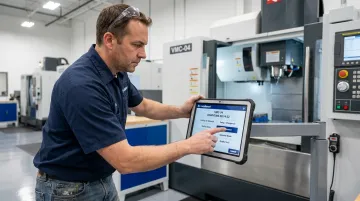
The framing matters. Platforms built around visibility and operator empowerment — rather than surveillance — get adopted. Excellerant's shop floor interface is designed around this premise: operators signal completions, categorize downtime, and communicate machine needs through a tablet-optimized interface, making them active participants in the data environment rather than subjects of it.
What You Need Before Getting Started
Most manufacturing automation projects stall at the pilot stage for the same reason: teams buy software before assessing their environment. Preparation is what separates a successful rollout from a costly false start.
Equipment and Connectivity Requirements
The minimum requirements for machine connectivity:
- Modern CNCs: Native Ethernet or WiFi port, or support for a standard protocol (MTConnect, OPC-UA, FOCAS, HAAS MNET, Mazak MAZATROL)
- Legacy CNCs: RS-232 serial port, or the ability to add a PLC intermediary device — no native network port required
- Non-CNC equipment: PLC-controlled machines, presses, and stamping machines can be connected via PLC adaptor or direct sensor integration
Machines that lack any of the above cannot be connected with software alone. A hardware gateway layer — with serial adaptors and wireless bridging options — is what makes legacy equipment viable without full replacement. Excellerant's single hardware set covers this layer for mixed-machine environments.
System and Software Readiness
On the software side, confirm:
- Your ERP or MES can receive automated inputs via API or data import
- Data field mapping is defined (so automated outputs land in the right records)
- IT and OT teams have agreed on data ownership, security protocols, and access permissions
- Cloud vs. on-premise deployment requirements are established (particularly relevant for defense contractors under CMMC or NIST 800-171)
Operator and Process Readiness
The human side of the transition must be settled before go-live:
- Operators need to understand why manual entry is being replaced — not that they're being watched
- Supervisors need to be comfortable reading dashboards instead of interpreting clipboard summaries
- The language around implementation matters: this is about data accuracy and giving the floor more visibility, not about performance surveillance
Common Mistakes When Eliminating Manual Data Entry
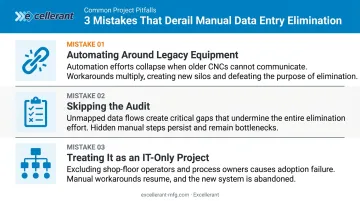
Three mistakes derail most automation projects before they deliver results.
Automating around legacy equipment instead of through it. Choosing a monitoring platform that only works with newer machines, then building manual workarounds for older equipment, creates a two-tier data system. The older machines — often running the highest-volume jobs — become the blind spots. Confirm universal legacy connectivity before committing to any vendor.
Skipping the audit and going straight to software. Teams that buy automation software before mapping their manual entry points automate the wrong things. They miss critical data flows, end up with a partial solution, and still require significant manual input to fill the gaps.
Treating this as an IT project. When automation is driven exclusively by IT — without direct input from production supervisors and machine operators — deployed systems rarely reflect actual workflow needs. Operators build workarounds. Manual entry comes back.
McKinsey reports that only 30% of Industry 4.0 pilots reach organization-wide scale, and the IT/OT alignment gap is a primary reason. Change management matters as much as the technology itself.
Frequently Asked Questions
How do you reduce manual data entry in manufacturing?
Audit every manual entry point on the shop floor, connect machines and sensors to an automated data collection platform, and integrate shop floor outputs directly into your ERP or MES. Eliminating manual data entry means removing the human handoff at every system boundary downstream, not just at the source.
What is the main cause of manual data entry errors?
The biggest driver is post-hoc recording: entering data from memory rather than at the point of capture. Shift transitions, work pressure, and inconsistent formats across operators compound the problem, producing records that look complete but can't be reliably aggregated.
What counts as manual data entry in a manufacturing context?
Any process where a human operator physically records, transfers, or keys in production data — cycle times, machine status, part counts, program numbers, downtime codes — rather than having that data captured and transmitted automatically by connected systems.
What's the difference between automated and integrated data collection?
Automated collection means machines or sensors capture data without human input. Integrated collection means that data flows automatically across connected systems (ERP, MES, scheduling) without re-entry at any handoff point. You need both: automation at the source and integration at every downstream boundary.
How does manual data entry affect ERP accuracy and production scheduling?
Manually entered shop floor data always lags real-time conditions. ERP job status, actual hours, and inventory records reflect what was true hours ago — not what's happening now. Scheduling decisions made against that data are reactive by definition, leading to poor forecasting and missed delivery commitments.