Introduction
Most production schedules live in two places: a planner's head and a spreadsheet no one on the shop floor has seen. When a machine goes down, priorities shift, or a rush order lands, the schedule doesn't update — people start guessing. Operators wait for direction. Jobs pile up in front of bottlenecks while downstream cells sit idle. Lean manufacturing can't function on guesswork.
Visual production scheduling fixes this by putting the plan where work actually happens — on or near the shop floor, in a format anyone can read in seconds. When every team member can see what's running, what's next, and what's behind, the gap between plan and reality closes in minutes, not shifts.
This guide covers:
- What visual production scheduling means in a lean context
- How it targets specific wastes on the shop floor
- What features separate a real planning tool from a "show board"
- A practical path to building a system that sticks
Key Takeaways
- Visual scheduling makes the production plan transparent and actionable to everyone on the shop floor — not just planners.
- It directly attacks waiting, overproduction, and communication breakdowns — three wastes that compound quickly in job shops.
- Effective boards share four features: capacity visibility, color-coded job status, interactive sequencing, and a clear way to surface problems.
- Physical boards suit simpler, lower-mix shops; digital tools are necessary when schedule accuracy requires real-time machine status.
- The board only delivers value when paired with a daily review habit. Without that routine, even a well-designed board goes ignored.
What Is Visual Production Scheduling in Lean Manufacturing?
Visual production scheduling is the practice of displaying the production plan — jobs, sequences, resources, timelines, and status — in a format that can be read and acted on at a glance, directly on the shop floor.
The concept fits within lean's broader principle of visual management. The Lean Enterprise Institute frames it plainly: visual management supports adherence to standards and rapid identification of abnormalities. If a problem isn't visible, it can't be solved — and a production schedule buried in a spreadsheet or a planner's inbox is invisible by definition.
Art of Lean reinforces this: standardized work defines what "normal" looks like. Without a visible standard, there are no abnormalities — only random variation. The schedule is the standard for production. Making it visual makes deviations catchable before they become delays.
Planning Boards vs. Production Dashboards
These two tools are often confused, but they serve different audiences and answer different questions:
| Tool | Primary User | What It Shows | Key Question Answered |
|---|---|---|---|
| Visual Planning Board | Planners, supervisors, operators | Job sequences, deadlines, capacity loading, operator assignments | What should we be running, and are we on track? |
| Production Dashboard | Managers, front office | Aggregated KPIs — OEE, on-time delivery rate, WIP counts | How is the shop performing overall? |
Both are useful. Many shops run both in parallel. They're not interchangeable, though. A dashboard showing aggregate OEE doesn't tell an operator what to run next. And a job-level scheduling board doesn't replace the performance visibility managers need for strategic decisions.
How Visual Scheduling Eliminates Waste in a Lean Shop
The absence of a shared, visible schedule generates waste across multiple lean categories at once — and most of it goes unnoticed until it compounds.
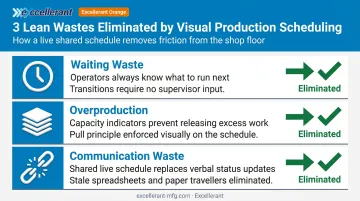
Waiting Waste
When operators don't have clear visibility into what's next, they wait. They ask supervisors. Supervisors interrupt planners. The right job starts late, or the wrong job starts first. Every minute of that confusion is waiting waste — time consumed by the process rather than by value-adding work.
A visual board eliminates this by making job priority, sequence, and status visible at each work cell. Transitions between tasks become faster because no one has to ask.
Overproduction
Toyota considered overproduction the worst of the seven wastes because it hides every other problem. Without capacity visibility, planners release work into the shop without knowing whether downstream cells can absorb it. Jobs pile up as WIP, obscuring real throughput problems.
When a visual schedule includes capacity indicators — showing how loaded each work cell is for each time period — planners can see overloading before it happens and hold work back. That's the pull principle applied directly to scheduling.
Communication Waste
Manual status updates between the shop floor and the front office are a significant source of error. A supervisor calls a planner who checks a spreadsheet last updated two hours ago. A customer gets a delivery estimate based on stale data.
A shared, current visual schedule makes these verbal status checks unnecessary. When the plan is visible and updated in near-real time, the front office and shop floor are looking at the same picture. As The Fabricator notes, unclear scheduling communication can lead workers to act on incorrect information — a risk that grows with schedule complexity and change frequency.
Flow and Bottleneck Visibility
Visual schedules that display job sequences and dependencies also make bottlenecks visible before they cause downstream stoppages. When a planner can see that a particular work cell is overloaded three days out, there's still time to act. Caught at shift start, the options narrow to expediting, overtime, or a missed delivery.
Early visibility creates room for practical responses:
- Rebalance jobs across work cells before the backlog locks in
- Shift labor to the constrained operation before a stoppage ripples downstream
- Communicate accurate revised timelines to customers while there's still buffer
Essential Features of an Effective Visual Production Scheduling Board
Not every visual board functions as a lean management tool. Here's what separates a working planning system from a display that looks good but doesn't drive behavior.
Timescale and Period View
Effective boards divide the schedule into time periods — typically days or weeks — so planners can see workload distribution at a glance. A flat list of jobs in order tells you sequence. A period-based view tells you whether Tuesday is overloaded and Thursday is empty, which is the question that actually drives rebalancing decisions.
Capacity Indicators
A capacity bar or histogram shows how much of a work cell's available time is consumed in each period. When a period is overloaded, this should trigger an immediate visual alert — a color change, a warning symbol, something that doesn't require calculation to notice.
This is the feature that turns a scheduling board into a pull-system tool. Planners don't need to mentally calculate capacity; the board tells them where the limit is.
Color Coding and Job Status
Color is fast. A well-designed visual board should communicate schedule health without requiring anyone to read text or numbers in detail. Common uses of color include:
- Job type or product family — helps planners identify setup opportunities and sequence similar jobs
- Priority level — distinguishes urgent orders from standard releases
- Status — on track, in progress, overdue, complete
A well-designed board tells you in roughly one second whether things are normal — and within a few more seconds, what the problem is and what action is needed. That speed only works when color conventions are consistent and applied without exception.
Interactive Sequencing
A schedule that cannot be adjusted in real time isn't a planning tool — it's a snapshot. The ability to move jobs between periods or within a period, with downstream dependencies adjusting automatically, is what allows planners to respond to actual disruptions: a machine alarm, late material, a customer pulling in a delivery date.
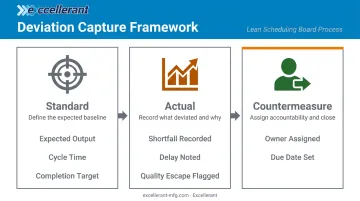
Standards, Problems, and Actions
Display-only boards get consulted. Boards that surface deviations from the plan and assign countermeasure ownership drive daily behavior. That's the line between a show board and a management tool.
For deviations to be actionable, the board needs to capture:
- What the standard was (expected output, cycle time, completion target)
- What actually happened (shortfall, delay, quality escape)
- Who owns the corrective action and by when
The Lean Enterprise Institute's daily management framework makes this explicit: daily management exposes and resolves deviations by engaging all employees every day. The board is the mechanism for making deviations visible and accountable.
Manual Boards vs. Digital Visual Scheduling Tools
When Manual Boards Work
Physical Kanban boards, magnetic scheduling boards, and whiteboard-based Gantt charts all share common strengths:
- Low cost to implement
- Easy for teams to own and update directly
- Promote floor-level engagement with the schedule
- Work well for repetitive, lower-mix production with stable routings
Their core limitation is staleness. Manual boards require human updates. In shops where schedules change multiple times per day, someone must maintain the board continuously — and even then, The Fabricator notes, there's no guarantee operators are seeing current guidance.
When Digital Tools Become Necessary
Digital visual scheduling software — interactive Gantt tools, Kanban-style boards within ERP or MES systems, standalone scheduling applications — addresses what manual boards cannot:
- Real-time updates without manual intervention
- Automatic rescheduling when jobs are moved
- Visibility across shifts and locations without someone physically updating a board
- Integration with machine-level status data
The Critical Upgrade Trigger
The clearest signal that a shop has outgrown a manual board: schedule accuracy requires knowing real-time machine status.
NIST's 2018 advanced maintenance report estimated that maintenance-related downtime consumed 13.3% of planned production time on average. No manual board can account for that kind of disruption in real time.
Bridging that gap requires a scheduler that reads actual machine state, not a static plan. Excellerant's Finite Dynamic Scheduler connects directly to its CNC machine monitoring layer. When a machine enters a downtime or alarm state, the scheduler automatically reschedules against current shop floor conditions. The Shop Summary Dashboard provides real-time operational status across all connected equipment, with intelligent forecasting that predicts job completion from live performance data.
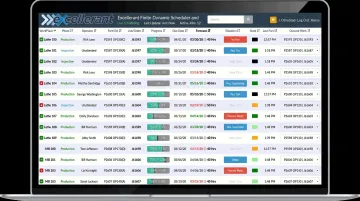
For a CNC job shop where spindle availability drives every scheduling decision, that feedback loop keeps the schedule synchronized with what's actually happening on the floor — not what was planned hours earlier.
How to Build a Visual Production Scheduling System
Step 1: Define Your Scheduling Unit and KPIs
Before designing anything, the team must agree on three things:
- What are you scheduling? Jobs, operations, work cells, or all three?
- What time horizon matters? Daily view, weekly view, or both?
- Which 3–4 KPIs must the board make visible?
Starting KPIs for lean shops typically include:
- On-time delivery rate (the lagging measure of schedule health)
- Work-in-progress count (a leading indicator of flow)
- Resource utilization by work cell
- Actual vs. planned throughput
The Lean Enterprise Institute distinguishes leading from lagging indicators for good reason — leading measures let supervisors act before the lagging measure gets worse. Build both into your board design.
Step 2: Match the Format to Your Shop's Complexity
| Production Type | Recommended Format |
|---|---|
| Repetitive, low-mix flow | Physical Kanban or magnetic board |
| High-mix, variable routing job shop | Digital Gantt-style board |
| Multi-cell with real-time machine data needs | Digital platform with machine monitoring integration |
Don't over-engineer the first version. Start with the minimum that makes the schedule visible and actionable. Add complexity only after the team builds a daily habit around the board.
Step 3: Put the Board Where Work Happens
A visual schedule in a conference room or on a manager's laptop only works when the people doing the work can see it. The board must be physically or digitally accessible on or near the shop floor — somewhere the team can gather quickly for a brief review.
For shops moving to digital scheduling, this means deploying displays directly on the floor. Excellerant's platform supports mounted industrial displays that push schedule visibility plant-wide without requiring workers to leave their cells.
Step 4: Build the Daily Review Habit
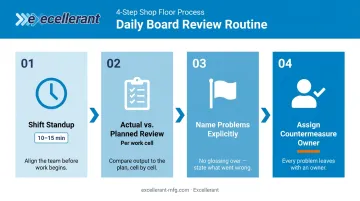
The board only works if it drives a structured daily conversation. That means:
- A short standup (10–15 minutes) at shift start or end
- Actual vs. planned reviewed for each work cell
- Problems named explicitly, not glossed over
- One person owns each countermeasure before the meeting ends
This structured daily engagement — comparing actual performance to goals and reacting quickly to deviations — is what converts a board from decoration into a management system, a point LEI's daily management framework makes explicit.
Assign a team lead who owns board updates. When that ownership sits with management instead of the floor, the board stops reflecting ground truth.
Frequently Asked Questions
What is visual production scheduling in lean manufacturing?
It's the practice of displaying the production plan — jobs, sequences, resources, and status — in a format all shop floor team members can read and act on at a glance. It supports lean's core principle that problems must be made visible before they can be solved.
What is the difference between a visual planning board and a production dashboard?
A planning board shows job-level detail — sequences, deadlines, operator assignments — for interactive scheduling decisions. A dashboard shows aggregated KPIs like on-time delivery rate and OEE for management-level monitoring. They answer different questions for different audiences.
What are the must-have features of a lean visual scheduling board?
Capacity indicators, color-coded job status, interactive sequencing, period-level time views, and a structure for surfacing deviations and assigning countermeasures. Without these, a board can display status but cannot support active planning decisions.
How does visual scheduling support lean waste reduction?
It targets three common lean wastes directly. Operators always know what to run next, eliminating waiting. Visible capacity limits prevent work from being released before the floor can absorb it. A shared, current schedule replaces verbal status updates and error-prone handoffs, cutting communication waste at the source.
When should a manufacturer upgrade from a manual board to digital scheduling software?
When schedule accuracy requires real-time machine status, when production mix or volume makes manual updates unsustainable, or when planners are regularly making decisions based on information that's hours out of date.
Can visual production scheduling work for small machine shops?
Yes. Smaller shops often start with a physical Kanban or whiteboard system — the core principle scales regardless of shop size. Migration to digital tools makes sense as production complexity grows or when real-time machine data becomes necessary for accurate scheduling.