Introduction
If you're running Haas CNC machines and trying to understand what's actually happening on your shop floor, you've probably heard the term "machine data collection" thrown around. The problem isn't awareness — it's knowing where to start, or recovering after a first attempt that didn't stick.
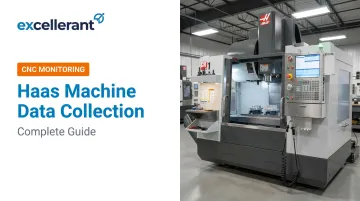
Haas Machine Data Collection (MDC) is the process of extracting real-time operational data from Haas CNC controls — including spindle status, cycle times, part counts, and alarms — over a network connection to support monitoring, analysis, and production decisions. Haas NGC machines have this capability built in, with no extra hardware required on most machines.
This guide is written for CNC operators, shop managers, and manufacturing engineers running Haas NGC controls who want to stop guessing about machine utilization.
Here's what you'll find inside:
- What Haas MDC is and how it works
- The three available methods: MTConnect, Ethernet Q commands, and 8M status relays
- Setup guidance for each method
- Where shops commonly go wrong
Key Takeaways
- Haas NGC machines offer three native MDC methods: MTConnect (port 8082), Ethernet Q commands (port 5051), and 8M PCB hardware relays
- MTConnect outputs structured XML for monitoring platforms; Q commands query specific variables like cycle time, part count, and active tool
- Setting 143 must be explicitly configured to port 5051 — the most commonly missed step
- Native MDC works for single-brand shops; mixed fleets or OEE/dashboard needs require a dedicated monitoring platform
What Is Haas Machine Data Collection?
Haas Machine Data Collection refers to the built-in capability of Haas Next Generation Control (NGC) machines to broadcast or respond to data requests over an Ethernet network. No additional hardware is required on most machines. The data available covers machine state, production metrics, timing data, and variable values.
The goal is straightforward: give shop managers and production planners accurate, real-time visibility into what each machine is doing. How long are jobs actually taking? When did that alarm fire? MDC answers these questions without relying on manual logs or operator memory.
MDC vs. Diagnostic Data Collection
Diagnostic data collection is a completely separate process — and it's easy to conflate the two.
Haas also documents a diagnostic data collection method that uses USB-loaded XML files to capture technical data on trigger events, saving an .OSC_DATA file for Haas Service technicians. This is a troubleshooting tool — not a production monitoring method. If you've encountered this process and assumed it's how all machine data collection works, that's a common misconception this guide addresses.
The Three Methods of Haas Machine Data Collection
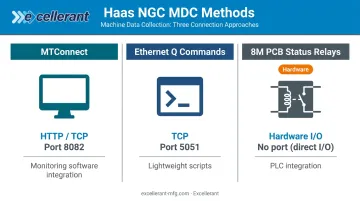
Haas NGC machines support three native MDC methods. The right choice depends on how you plan to consume the data — monitoring software, custom scripts, or hardware signal integration.
| Method | Connection Type | Port | Best For |
|---|---|---|---|
| MTConnect | HTTP (TCP) | 8082 | Monitoring software integration |
| Ethernet Q Commands | TCP | 5051 (Setting 143) | Direct queries, lightweight scripts |
| 8M PCB Status Relays | Hardware I/O | N/A | Signal-level external integration |
MTConnect
MTConnect is an open, royalty-free manufacturing industry standard built into Haas NGC machines. The Haas control acts as an MTConnect Agent on TCP port 8082, responding to three types of HTTP requests:
- Probe — returns machine metadata (model, capabilities)
- Current — returns live data values at the moment of request
- Sample — returns historical buffered data
The URL format is http://[machine IP]:8082/[model]/[request type]. For example: http://172.21.16.31:8082/UMC/current.
Two things to verify before attempting MTConnect integration:
- Software version
100.20.000.1200or higher is recommended for optimal functionality - Machines with a
/in their name require version100.24.000.1200or higher
Ethernet Q Commands
Q commands use a TCP connection to port 5051 (configured via Setting 143) and let a remote terminal or application query specific machine variables. Responses are comma-separated values (CSV), starting with > — parseable by any script or monitoring tool.
Key queryable data points:
| Command | Returns |
|---|---|
?Q100 |
Machine serial number |
?Q102 |
Machine model number |
?Q104 |
Current mode |
?Q300 |
Power-on time |
?Q301 |
Motion time |
?Q303 |
Last cycle time |
?Q402 / ?Q403 |
M30 parts counters |
?Q500 |
Combined program/status/parts |
?Q600 |
Any macro or system variable |
Commands must be entered in uppercase. Lowercase returns an unrecognized command error.
E commands are the write counterpart — format ?Exxxx yyyyyy.yyyyyy — which write values to writable macro variables remotely. Use with caution: Haas explicitly warns that incorrect values written to system variables can damage the machine.
8M PCB Status Relays
The 8M option takes a hardware-based approach. Outputs 90–97 change relay states depending on machine condition, enabling signal-level integration with external systems.
Output mapping:
- Output 90 — Control is In-Cycle, Running
- Output 91 — MEM/MDI Mode, No Alarms
- Output 93 — Feed Hold or M00/M01 Stop
- Output 94 — M02 or M30 Stop
- Output 95 — Feed-rate override not at 100%
- Output 97 — Edit Mode
This method requires the 8M PCB option and a service key. Factory Setting 315.26 must be set to TRUE in service mode to enable status relays.
Each method has a distinct integration footprint — MTConnect suits platform-level monitoring, Q Commands fit lightweight custom polling, and 8M relays work best when you need hardware-level signal outputs into PLCs or external controllers.
How to Set Up Haas Machine Data Collection
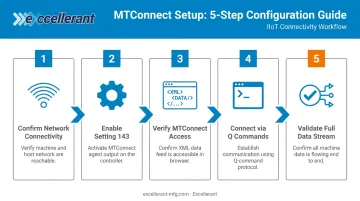
Follow these five steps to establish a live MDC connection from your Haas control. Each step builds on the last, so resolve any failures before moving forward.
Step 1 — Confirm Network Connectivity
Navigate to Settings > Network tab on the control. Verify:
- Status shows "UP"
- Machine has a valid IP address, subnet mask, and gateway
If status shows "DOWN," resolve network connectivity before proceeding. Nothing else in this process will work without it.
Step 2 — Enable Setting 143
Navigate to the Settings menu and set Setting 143 (Machine Data Collect) to port 5051.
Two important restrictions:
- Ports
8082and9090–9999are reserved by the Haas control — do not use them - Check with your network administrator to confirm your chosen port is not already in use and is accessible through any network firewall
Step 3 — Verify MTConnect Access
Open a web browser on any PC on the same network and navigate to:
http://[machine IP]:8082/[model]/current
A successful connection returns XML data. If there's no response, check that port 8082 is accessible on the network and that the software version meets the minimum requirement.
MTConnect confirms the machine is broadcasting data. Q Commands go further — they let you query specific machine values in real time over a direct TCP connection.
Step 4 — Connect via Q Commands
Using PuTTY (or any TCP terminal):
- Enter the machine IP address and port
5051 - Set connection type to Telnet
- Enable TCP keepalives
- Open the connection
- Type
?Q100in uppercase
A response of SERIAL NUMBER, [number] confirms the MDC connection is live.
Step 5 — Validate the Full Data Stream
After confirming the Q100 connection, run additional queries to validate the full output:
?Q500— combined status (returns format:PROGRAM, Oxxxxx, STATUS, PARTS, xxxxx)?Q303— last cycle time
Responses follow comma-separated format beginning with >. At this point, your MDC connection is fully validated and ready to feed data into a monitoring application, custom script, or a platform like Excellerant's CNC machine monitoring software.
Common Misconceptions About Haas Machine Data Collection
"MDC is automatic once the machine is on the network"
It isn't. Setting 143 must be explicitly configured, the correct port must be open, and software must meet the minimum version. Network connectivity alone does nothing — the control won't respond to Q commands or accept MDC connections until that setting is configured.
"Diagnostic data collection is the same as production MDC"
Many operators encounter the diagnostic XML file process — where files are loaded via USB and an .OSC_DATA file is generated for service technicians — and assume this is how all machine data collection works. It's not. Diagnostic collection is a service tool for troubleshooting servo and spindle faults. Production MDC runs over Ethernet and has nothing to do with USB file loading.
"Q commands push data continuously"
Q commands are a pull system. The Haas control responds to requests; it does not broadcast a continuous data stream.
A monitoring system must actively poll the machine at regular intervals. Getting that interval wrong in either direction creates real problems:
- Too frequent: On older software versions, rapid queries can overlap with machine operations and cause control instability
- Too infrequent: Data gaps emerge that make cycle time and OEE calculations unreliable
Most shops find a polling interval between 5 and 15 seconds balances data resolution against control load. Dialing this in is one of the less-obvious configuration steps in a native MDC setup.
When Native Haas MDC Isn't Enough
Native Q commands and MTConnect provide raw data points. They don't include dashboards, alarm notifications, historical trending, OEE calculation, or ERP integration. Shops that start with PuTTY and manual queries usually reach the same conclusion: they're doing data collection without data intelligence.
The Mixed-Fleet Problem
Most machine shops run equipment from multiple CNC manufacturers. Native Haas MDC covers Haas controls only. A shop with Haas mills, Fanuc-controlled lathes, and older Mazak equipment has three separate data silos with no native way to share data between them.
A dedicated machine monitoring platform solves this directly. Excellerant's platform, built on over 30 years of machine tool networking experience dating back to Macdac Engineering in 1991, connects any mix of Haas and non-Haas machines into a single monitoring environment. It supports Fanuc FOCAS, HAAS MNET, Mazak Mazatrol, MTConnect, and OPC-UA — so Haas MDC data feeds into the same dashboard as every other machine on the floor.
Signals You've Outgrown Native MDC
The following conditions are clear indicators that raw data streams are no longer sufficient:
- Transferring machine data to spreadsheets manually
- Unable to answer questions about OEE or downtime without asking operators
- ERP system is working from estimated cycle times, not actual ones
- Running a mixed-brand floor with no unified view of utilization
C&M Machine Products found this firsthand. After implementing Excellerant, Dan Villemaire noted: "The accuracy of information that's coming into our ERP system is exponentially better than what it was before. We have been able to improve the accuracy of our costs and increase our value to our customers." McMellon Bros. saw the same shift in practice: Rory Miller reported the ERP became genuinely usable for real-time decisions, letting the team spot and fix pacing problems during active production runs — not after the shift ended.
Beyond monitoring, Excellerant adds:
- OEE calculation and downtime root-cause analysis
- Bi-directional ERP integration with SAP, Epicor, JobBoss, and Global Shop Solutions
- A finite dynamic scheduler that adjusts to live machine conditions
- CMMC 2.0 and NIST 800-171 compliance support for defense and aerospace shops
Frequently Asked Questions
How do you get data from a Haas CNC machine?
Haas NGC machines support data extraction via MTConnect (HTTP requests on port 8082) or Ethernet Q commands (TCP queries on port 5051, configured via Setting 143). Both methods require network connectivity and return machine status, cycle times, part counts, and detailed production metrics.
What is Setting 143 on a Haas control?
Setting 143 is the Machine Data Collect port setting on the Haas NGC control. It must be set to a TCP port number — typically 5051 — to enable Ethernet-based Q command data collection.
What is the difference between MTConnect and Q commands on a Haas machine?
MTConnect (port 8082) is an open industry standard returning structured XML data, best suited for integration with monitoring software. Q commands (port 5051) use a simple query-response format returning CSV-style text that is easier to parse manually or with lightweight scripts. Both use the Ethernet network but fit different integration needs.
Can you collect data from older Haas machines without NGC controls?
Older Haas Standard Generation Control (SGC) machines support Q command-based data collection, though variable addresses differ from NGC. MTConnect is generally limited to NGC machines on recent software, so legacy shops typically need a third-party adapter or machine monitoring solution for full connectivity.
What data points can you extract from a Haas CNC using MDC?
Standard queryable data points include:
- Machine serial number, model, and software version
- Current operating mode and tool number in use
- Total tool changes and power-on/motion time
- Last cycle time, previous cycle time, and M30 parts counters (two separate counters)
- Combined program/status/parts output via Q500
Any macro or system variable is also accessible using the Q600 command.